Building a Developer Portfolio That Gets Interviews
A practical guide to building a developer portfolio that stands out. Covers GitHub profile optimization, project selection, README quality, blogging strategy, and how to present technical depth — based on building 26 repos and 50 blog posts in a weekend.
Why Portfolios Beat Resumes
A resume tells a hiring manager what you claim you can do. A portfolio shows them. In a market where hundreds of developers apply to the same role, the difference between getting an interview and getting ghosted often comes down to evidence.
Consider what happens when a recruiter reviews your application:
| Candidate A | Candidate B |
|---|---|
| Resume says “Built microservices” | GitHub shows 5 repos with working microservices |
| Claims “Strong in Java” | Blog explains Java 21 features with production examples |
| Lists “System design” as a skill | Published post walks through a URL shortener design |
| No online presence | LinkedIn posts about recent learnings every week |
Candidate B gets the interview every time. Not because they’re necessarily better — but because the evidence reduces the interviewer’s risk.
The Three Pillars
A strong developer portfolio stands on three legs:
graph TD
    A[Developer Portfolio] --> B[GitHub]
    A --> C[Blog]
    A --> D[LinkedIn]
    B --> E[Working projects with great READMEs]
    C --> F[Technical depth + consistency]
    D --> G[Visibility + network]
    E --> H[Interview Invites]
    F --> H
    G --> H
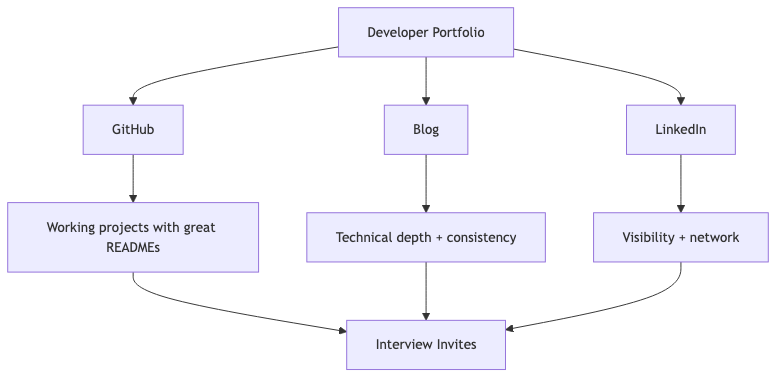
Each pillar serves a different purpose:
| Pillar | Purpose | Signal to Hiring Manager |
|---|---|---|
| GitHub | Proof of execution | “This person ships working code” |
| Blog | Proof of depth | “This person understands fundamentals” |
| Proof of consistency | “This person is actively growing” |
You don’t need to be world-class at all three. But you need presence in all three. A GitHub full of repos with no README is as bad as no GitHub at all.
GitHub: Quality Over Quantity
What Makes a Good Repository
Most GitHub profiles are graveyards of half-finished projects with no documentation. To stand out, every repo you pin should have:
| Element | Why It Matters |
|---|---|
| Clear README with setup instructions | Shows you think about other developers |
| Working code that actually runs | Proves it’s not copy-pasted from a tutorial |
| Consistent code style | Shows professional habits |
| Meaningful commit history | Demonstrates your process |
| Tests (even minimal) | Shows quality awareness |
| Proper .gitignore | Shows attention to detail |
Repository Red Flags
| Red Flag | What It Signals |
|---|---|
| No README | “I don’t communicate” |
| Single “initial commit” | “I dumped code, didn’t iterate” |
| node_modules or target/ committed | “I don’t understand tooling” |
| Hardcoded secrets | “I’m a security risk” |
| Only tutorial clones | “I follow along but can’t build independently” |
| 200 repos, all empty | “Quantity over quality” |
How Many Repos to Pin
Pin 6 repositories on your GitHub profile. These should represent:
- One system design project — URL shortener, rate limiter, notification service
- One full-stack application — Even a simple CRUD app, done well
- One tool/library — Something others could use
- One learning repo — Exploring a new technology (well-documented)
- One contribution — Open source PR or fork with improvements
- One creative/fun project — Shows personality beyond work
Project Selection Strategy
Not all projects signal the same things to hiring managers. Choose projects that demonstrate specific competencies:
| Project Type | What It Demonstrates | Interview Value |
|---|---|---|
| URL Shortener | System design, encoding, databases | High — classic interview question |
| Notification Service | Event-driven architecture, patterns | High — production relevance |
| REST API with auth | Security, CRUD, validation | Medium — expected baseline |
| CLI tool | Problem-solving, UX thinking | Medium — shows versatility |
| Rate Limiter | Algorithms, concurrency | High — demonstrates depth |
| Chat Application | WebSockets, real-time | Medium — shows modern skills |
| E-commerce API | Domain modeling, transactions | High — enterprise relevance |
| Infrastructure as Code | DevOps awareness, cloud skills | Medium-High — full-stack signal |
The Key Insight
Build projects that solve interview questions. System design interviews ask about URL shorteners, rate limiters, notification services, and caches. If you’ve already built them, you can walk through your actual implementation during the interview.
README as Your Sales Page
Your README is the first thing anyone sees. Treat it like a landing page.
Template
1
2
3
4
5
6
7
8
9
10
11
12
13
14
15
16
17
18
19
20
21
22
23
24
25
26
27
28
29
30
31
32
33
34
35
36
37
38
39
40
# Project Name

One-line description of what this project does.

## Features

- Feature 1 — brief explanation
- Feature 2 — brief explanation
- Feature 3 — brief explanation

## Tech Stack

| Layer | Technology |
|-------|-----------|
| Backend | Spring Boot 3.5 |
| Database | PostgreSQL 16 |
| Messaging | Apache Kafka |

## Architecture

[Mermaid diagram or architecture image]

## Running Locally

\```bash
docker compose up -d
./mvnw spring-boot:run
\```

## API Usage

\```bash
curl -X POST http://localhost:8080/api/resource \
  -H "Content-Type: application/json" \
  -d '{"key": "value"}'
\```

## Blog Post

Detailed walkthrough: [Link to your blog post]
Key principles:
- Start with value — what does this do and why should I care?
- Show, don’t tell — include a working curl command, not just API docs
- Make it runnable —
docker compose up+ one command should work - Link to depth — point to the blog post for the full explanation
Blogging for Engineers
Why Blog?
Blogging does three things simultaneously:
- Forces understanding — You can’t explain what you don’t truly understand
- Creates searchable artifacts — Google indexes your expertise
- Compounds over time — 50 posts create more value than 5 × 10 posts ever could
Consistency Over Perfection
| Approach | Posts/Month | Outcome After 6 Months |
|---|---|---|
| Perfectionist | 0-1 | 3 amazing posts nobody finds |
| Consistent | 4-8 | 30 solid posts with compound traffic |
| Burnout sprint | 20 (month 1) then 0 | Abandoned blog |
The sweet spot: 2 posts per week. Not every post needs to be a 3,000-word deep dive. Alternate between:
- Long-form system design posts (like this one)
- Short comparison posts (“Kafka vs RabbitMQ”)
- TIL (Today I Learned) posts
- “How I solved X” debugging stories
SEO Basics for Technical Blogs
| Element | Practice |
|---|---|
| Title | Include the technology name + what it does |
| Description | 150-160 chars, includes primary keyword |
| Headers | H2 for sections, H3 for subsections |
| Code blocks | Language-tagged for syntax highlighting |
| Internal links | Link between your own related posts |
| Tags | 5-7 specific tags per post |
Technical Depth Spectrum
graph LR
    A[Surface Level] --> B[Tutorial]
    B --> C[Explanation]
    C --> D[Deep Dive]
    D --> E[Original Research]

    style A fill:#fee2e2
    style B fill:#fef3c7
    style C fill:#dcfce7
    style D fill:#dbeafe
    style E fill:#ede9fe

Aim for the “Explanation” to “Deep Dive” range. Tutorials are commoditized — everyone writes “How to set up Spring Boot.” Fewer people write “How Base62 encoding works in URL shorteners and why we chose it over random hashes.”
LinkedIn Presence
Posting About What You Build
Every project you build and every post you write should generate a LinkedIn post. The formula:
1
2
3
4
1. Hook (1 line): What did you build/learn?
2. Context (2-3 lines): Why does this matter?
3. Key insight (2-3 lines): What's the interesting technical detail?
4. Call to action: Link to repo/blog
Example:
Built a notification service with Spring Boot + Kafka this weekend.
The interesting part: using the Strategy pattern to route notifications to Email, SMS, or Push channels without a single if-else chain. Adding a new channel = implementing one interface.
Full writeup + code: [link]
Posting Cadence
| Frequency | Effect |
|---|---|
| 1/week | Minimum for visibility |
| 3/week | Strong presence, algorithm rewards you |
| Daily | Maximum growth, time-intensive |
The Compound Effect
Here’s what happens when you consistently build, write, and share:
graph TD
    A[Build a Project] --> B[Write Blog Post]
    B --> C[Share on LinkedIn]
    C --> D[Someone Shares It]
    D --> E[Traffic to Blog]
    E --> F[Reader Visits GitHub]
    F --> G[Interviewer Finds You]
    G --> H[Interview Invite]
    B --> I[Google Indexes It]
    I --> E
    C --> J[Recruiter Sees Post]
    J --> H
    A --> K[Interview: Walk Through Your Code]
    K --> L[Job Offer]
    H --> L
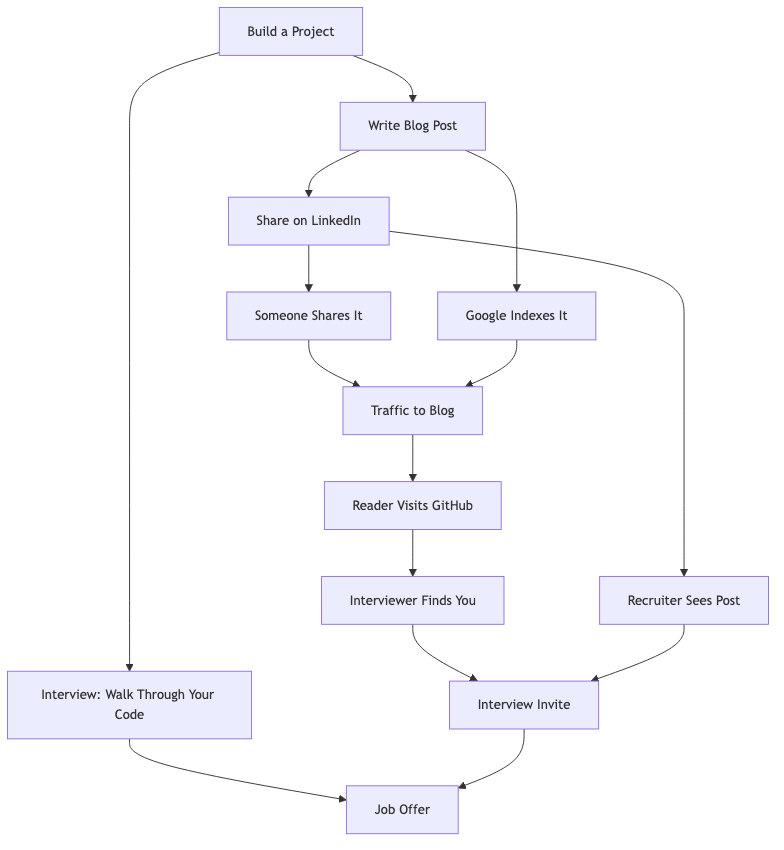
This flywheel takes 3-6 months to build momentum. The first month feels like shouting into the void. By month 6, you’re getting inbound messages from recruiters who found your blog.
Common Mistakes
| Mistake | Why It Hurts | Fix |
|---|---|---|
| Only tutorial follow-alongs | Shows you can copy, not create | Build original projects that solve problems |
| No README on repos | Repos are invisible to humans | Every pinned repo needs a quality README |
| Inconsistent posting | Algorithm forgets you, momentum dies | Schedule posts — treat it like a standup |
| Too broad (React + DevOps + ML + Blockchain) | Confuses your brand | Pick 2-3 focus areas and go deep |
| Never sharing your work | Nobody discovers it organically | Post on LinkedIn, Twitter, Reddit, HN |
| Waiting until it’s perfect | Nothing ships, nothing compounds | Ship at 80%. Iterate publicly. |
| Ignoring SEO | Great content nobody finds | Use descriptive titles with technology names |
| Copying others’ content | Destroys credibility if caught | Always create original work, cite sources |
What Hiring Managers Actually Look At
I’ve asked engineering managers and tech leads what they look for. The consensus:
- Can this person ship? — Do their repos actually work? Is there a README with instructions?
- Do they think about quality? — Tests, error handling, proper architecture.
- Can they communicate? — Blog posts, README quality, commit messages.
- Are they curious? — Do they explore new things? Is there growth visible over time?
- Would I want to work with them? — Tone of writing, collaboration evidence (PRs, reviews).
What they don’t care about:
- Star count on repos
- Number of followers
- Contribution graph being all green
- Using the trendiest framework
Action Plan
Week 1: Foundation
- Optimize GitHub profile (bio, pinned repos, profile README)
- Choose your blog platform (GitHub Pages, Hashnode, or Dev.to)
- Pick 3 focus technologies (e.g., Java + Spring Boot + System Design)
- Draft your first blog post outline
Week 2: First Project + Post
- Build your first system design project (URL shortener recommended)
- Write a README that follows the template above
- Write the companion blog post
- Share on LinkedIn with the formula above
Week 3: Second Project + Post
- Build your second project (different category)
- Write README + blog post
- Start writing a “lessons learned” or comparison post
Week 4: Consistency Engine
- Set up a posting schedule (2 blog posts + 3 LinkedIn posts per week)
- Build a content backlog (list of 20 future post ideas)
- Join 2-3 tech communities where you can share (Reddit, Discord, Twitter)
- Review and iterate on your first posts based on what got engagement
Month 2-3: Compound
- Continue shipping: 2 posts/week, 1 new repo/month
- Start cross-linking between posts
- Engage with others’ content (genuine comments, not spam)
- Track which topics get the most traffic and double down
The Math
Let’s be concrete about what consistent effort produces:
| Timeframe | Posts Written | Repos Built | Likely Outcome |
|---|---|---|---|
| 1 month | 8 | 2 | Foundation exists |
| 3 months | 24 | 5 | Starting to rank in Google |
| 6 months | 50 | 8 | Inbound recruiter messages |
| 12 months | 100 | 12 | Industry recognition in niche |
This isn’t overnight. But neither was learning to code. The difference: most developers never do this, so even modest effort puts you in the top 10% of visible candidates.