Building a RAG Application with Spring AI and PGVector
A hands-on guide to building a Retrieval Augmented Generation application using Spring AI, OpenAI, and PGVector. Covers document ingestion, vector similarity search, the QuestionAnswerAdvisor, and a production-style REST API — with complete working code.
The Problem
You have internal documents — product specs, policies, engineering runbooks, research papers — and you want your team to ask questions about them in natural language and get accurate, grounded answers.
Off-the-shelf ChatGPT doesn’t know about your documents. Fine-tuning is expensive and overkill for most cases. You need a way to give the LLM access to your data at query time without retraining it.
That’s exactly what RAG (Retrieval Augmented Generation) does.
What We Are Building
A Spring Boot application that:
- Ingests PDF documents — reads, chunks, embeds, and stores them in a vector database
- Answers questions — retrieves relevant document chunks and uses them as context for the LLM
- Shows sources — returns which documents were used to generate the answer
flowchart LR
    A[User Question] --> B[Spring AI ChatClient]
    B --> C[QuestionAnswerAdvisor]
    C --> D[PGVector: Similarity Search]
    D --> E[Top-K Relevant Chunks]
    E --> F[Augmented Prompt]
    F --> G[OpenAI GPT-4o-mini]
    G --> H[Grounded Answer]

    style C fill:#feca57,color:#333
    style D fill:#48dbfb,color:#333
    style G fill:#2ed573,color:#fff

The key insight: the LLM never sees your entire document corpus. It only sees the 3-5 most relevant chunks for each specific question. This keeps token costs low and answers focused.
Why Spring AI?
If you’re a Java/Spring developer, you could use LangChain4j or call the OpenAI SDK directly. Here’s why Spring AI is a better fit for Spring shops:
- Familiar patterns —
ChatClientworks likeRestClient/WebClient. Constructor injection, auto-configuration, profiles — everything you already know. - Portable — swap OpenAI for Ollama or Anthropic by changing a dependency and a config property. Your application code doesn’t change.
- Advisor API — RAG, memory, logging, guardrails are composable interceptors. You don’t embed them into your business logic.
- Auto-configuration — add a starter dependency, set an API key, and the vector store + embedding model + chat model are wired automatically.
Prerequisites
| Component | Version |
|---|---|
| Java | 21+ |
| Spring Boot | 3.4.1 |
| Spring AI | 1.0.0 |
| Docker | Latest (for PostgreSQL + PGVector) |
| OpenAI API key | platform.openai.com |
| Maven | 3.9+ |
Project Setup
Dependencies (pom.xml)
1
2
3
4
5
6
7
8
9
10
11
12
13
14
15
16
17
18
19
20
21
22
23
24
25
26
27
28
29
30
31
32
33
34
35
36
37
38
39
40
41
42
43
44
45
46
47
48
49
50
51
52
53
54
55
<properties>
    <java.version>21</java.version>
    <spring-ai.version>1.0.0</spring-ai.version>
</properties>

<dependencyManagement>
    <dependencies>
        <dependency>
            <groupId>org.springframework.ai</groupId>
            <artifactId>spring-ai-bom</artifactId>
            <version>${spring-ai.version}</version>
            <type>pom</type>
            <scope>import</scope>
        </dependency>
    </dependencies>
</dependencyManagement>

<dependencies>
    <!-- Spring Boot -->
    <dependency>
        <groupId>org.springframework.boot</groupId>
        <artifactId>spring-boot-starter-web</artifactId>
    </dependency>

    <!-- Spring AI - OpenAI model -->
    <dependency>
        <groupId>org.springframework.ai</groupId>
        <artifactId>spring-ai-starter-model-openai</artifactId>
    </dependency>

    <!-- Spring AI - PGVector store -->
    <dependency>
        <groupId>org.springframework.ai</groupId>
        <artifactId>spring-ai-starter-vector-store-pgvector</artifactId>
    </dependency>

    <!-- Spring AI - RAG advisor -->
    <dependency>
        <groupId>org.springframework.ai</groupId>
        <artifactId>spring-ai-advisors-vector-store</artifactId>
    </dependency>

    <!-- Spring AI - PDF reader -->
    <dependency>
        <groupId>org.springframework.ai</groupId>
        <artifactId>spring-ai-pdf-document-reader</artifactId>
    </dependency>

    <!-- PostgreSQL -->
    <dependency>
        <groupId>org.postgresql</groupId>
        <artifactId>postgresql</artifactId>
        <scope>runtime</scope>
    </dependency>
</dependencies>
Each dependency has a specific role:
| Dependency | Purpose |
|---|---|
spring-ai-starter-model-openai | Auto-configures ChatModel + EmbeddingModel for OpenAI |
spring-ai-starter-vector-store-pgvector | Auto-configures VectorStore backed by PostgreSQL + PGVector |
spring-ai-advisors-vector-store | Provides QuestionAnswerAdvisor for RAG |
spring-ai-pdf-document-reader | Reads PDF files into Spring AI Document objects |
Configuration
docker-compose.yml — PostgreSQL with PGVector
1
2
3
4
5
6
7
8
9
10
services:
  postgres:
    image: pgvector/pgvector:pg16
    container_name: spring-ai-pgvector
    environment:
      POSTGRES_DB: springai
      POSTGRES_USER: postgres
      POSTGRES_PASSWORD: postgres
    ports:
      - "5432:5432"
1
docker compose up -d
application.yml
1
2
3
4
5
6
7
8
9
10
11
12
13
14
15
16
17
18
19
20
21
22
spring:
  ai:
    openai:
      api-key: ${OPENAI_API_KEY}
      chat:
        options:
          model: gpt-4o-mini
          temperature: 0.7
      embedding:
        options:
          model: text-embedding-3-small
    vectorstore:
      pgvector:
        initialize-schema: true
        index-type: HNSW
        distance-type: COSINE_DISTANCE
        dimensions: 1536

  datasource:
    url: jdbc:postgresql://localhost:5432/springai
    username: postgres
    password: postgres
Key settings:
initialize-schema: true— Spring AI creates the vector table and index on startupindex-type: HNSW— Hierarchical Navigable Small World index for fast approximate nearest neighbor searchdimensions: 1536— matches the output dimension oftext-embedding-3-smallCOSINE_DISTANCE— standard similarity metric for text embeddings
Implementation
Step 1: Configure the ChatClient
1
2
3
4
5
6
7
8
9
10
11
12
13
14
15
@Configuration
public class AiConfig {

    @Bean
    public ChatClient chatClient(ChatModel chatModel) {
        return ChatClient.builder(chatModel)
                .defaultSystem("""
                        You are a helpful assistant that answers questions based on
                        the provided context. If you don't know the answer or the
                        context doesn't contain relevant information, say so honestly.
                        Do not make up information.
                        """)
                .build();
    }
}
ChatClient is the main entry point for interacting with AI models in Spring AI. The builder pattern lets you set defaults (system prompt, model options, advisors) that apply to every request.
Step 2: Document Ingestion Service
Before you can ask questions, documents need to be:
- Read — extract text from PDFs
- Split — chunk into smaller pieces (LLMs have token limits, and smaller chunks mean more precise retrieval)
- Embedded — convert text chunks into vector representations
- Stored — persist vectors in PGVector for similarity search
1
2
3
4
5
6
7
8
9
10
11
12
13
14
15
16
17
18
19
20
21
22
23
24
25
26
27
28
29
30
31
32
33
34
35
36
37
38
@Service
public class DocumentIngestionService {

    private final VectorStore vectorStore;

    public DocumentIngestionService(VectorStore vectorStore) {
        this.vectorStore = vectorStore;
    }

    public IngestionResponse ingestDocuments() throws IOException {
        PathMatchingResourcePatternResolver resolver = new PathMatchingResourcePatternResolver();
        Resource[] resources = resolver.getResources("classpath:documents/*.pdf");

        List<Document> allDocuments = new ArrayList<>();

        for (Resource resource : resources) {
            List<Document> documents = readAndSplitDocument(resource);
            allDocuments.addAll(documents);
        }

        vectorStore.add(allDocuments);  // Embeds + stores in one call

        return new IngestionResponse(
                "Successfully ingested " + resources.length + " document(s)",
                allDocuments.size()
        );
    }

    private List<Document> readAndSplitDocument(Resource resource) {
        // Read PDF page by page
        PagePdfDocumentReader reader = new PagePdfDocumentReader(resource);
        List<Document> rawDocuments = reader.read();

        // Split into chunks of ~800 tokens with 350 token overlap
        TokenTextSplitter splitter = new TokenTextSplitter(800, 350, 5, 10000, true);
        return splitter.apply(rawDocuments);
    }
}
The ingestion pipeline visualized:
flowchart TD
    A[PDF Document] --> B[PagePdfDocumentReader]
    B --> C["Raw Pages (1 Document per page)"]
    C --> D[TokenTextSplitter]
    D --> E["Chunks (800 tokens, 350 overlap)"]
    E --> F[EmbeddingModel]
    F --> G["Vectors (1536 dimensions each)"]
    G --> H[(PGVector Database)]

    style F fill:#feca57,color:#333
    style H fill:#48dbfb,color:#333
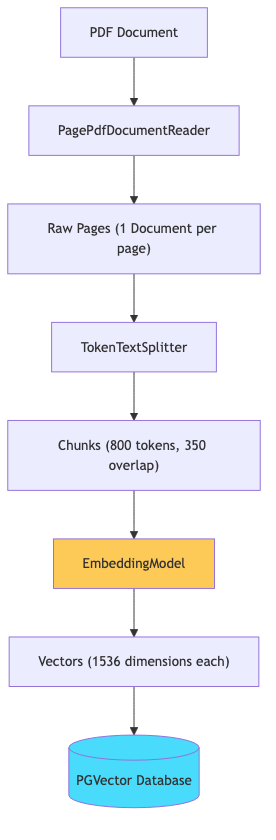
Why chunking matters: If you embed an entire 50-page document as one vector, the embedding becomes a vague average of all topics in the document. By splitting into small, focused chunks, each vector represents a specific piece of information — making retrieval precise.
Why overlap: A 350-token overlap ensures that context isn’t lost at chunk boundaries. If an important sentence spans two chunks, both chunks capture it.
Step 3: The RAG Service
This is where the core RAG logic lives:
1
2
3
4
5
6
7
8
9
10
11
12
13
14
15
16
17
18
19
20
21
22
23
24
25
26
27
28
29
30
31
32
33
@Service
public class RagService {

    private final ChatClient chatClient;
    private final VectorStore vectorStore;

    public RagService(ChatClient chatClient, VectorStore vectorStore) {
        this.chatClient = chatClient;
        this.vectorStore = vectorStore;
    }

    public ChatResponse ask(String question) {
        // Build the QuestionAnswerAdvisor
        QuestionAnswerAdvisor qaAdvisor = QuestionAnswerAdvisor.builder(vectorStore)
                .searchRequest(SearchRequest.builder()
                        .similarityThreshold(0.7)
                        .topK(5)
                        .build())
                .build();

        // Call the model with RAG
        org.springframework.ai.chat.model.ChatResponse aiResponse = chatClient.prompt()
                .advisors(qaAdvisor)
                .user(question)
                .call()
                .chatResponse();

        String answer = aiResponse.getResult().getOutput().getText();
        List<DocumentReference> sources = retrieveSourceReferences(question);

        return ChatResponse.of(answer, sources);
    }
}
The QuestionAnswerAdvisor does the heavy lifting:
sequenceDiagram
    participant User
    participant ChatClient
    participant QAAdvisor as QuestionAnswerAdvisor
    participant VS as PGVector
    participant LLM as OpenAI

    User->>ChatClient: "What is the refund policy?"
    ChatClient->>QAAdvisor: Intercept request

    QAAdvisor->>VS: Similarity search (top 5, threshold 0.7)
    VS-->>QAAdvisor: [chunk1, chunk2, chunk3]

    Note over QAAdvisor: Augments prompt:<br/>"Context: {chunks}<br/>Question: What is the refund policy?"

    QAAdvisor->>LLM: Augmented prompt
    LLM-->>QAAdvisor: "Our refund policy allows..."
    QAAdvisor-->>ChatClient: Response
    ChatClient-->>User: Answer + sources
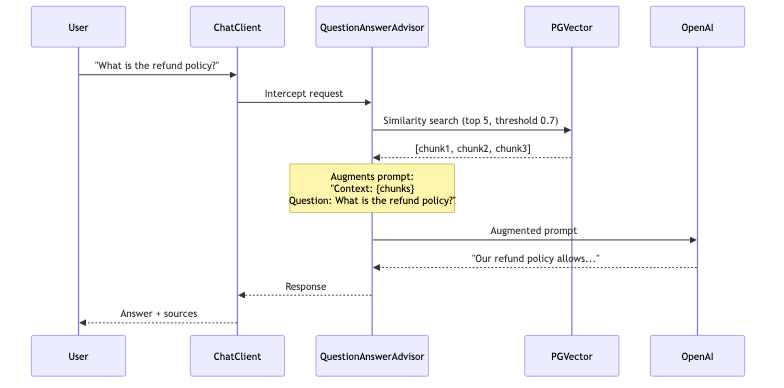
Key parameters:
similarityThreshold(0.7)— only include chunks with cosine similarity >= 0.7 (filters out irrelevant matches)topK(5)— return at most 5 chunks (keeps the context window manageable)
Step 4: REST Controller
1
2
3
4
5
6
7
8
9
10
11
12
13
14
15
16
17
18
19
20
21
22
23
24
25
26
27
28
29
30
31
32
@RestController
@RequestMapping("/api/v1")
public class RagController {

    private final RagService ragService;
    private final DocumentIngestionService ingestionService;

    public RagController(RagService ragService, DocumentIngestionService ingestionService) {
        this.ragService = ragService;
        this.ingestionService = ingestionService;
    }

    @PostMapping("/chat")
    public ResponseEntity<ChatResponse> chat(@Valid @RequestBody ChatRequest request) {
        ChatResponse response = ragService.ask(request.question());
        return ResponseEntity.ok(response);
    }

    @GetMapping("/search")
    public ResponseEntity<List<DocumentReference>> search(
            @RequestParam String query,
            @RequestParam(defaultValue = "5") int topK) {
        List<DocumentReference> results = ragService.searchSimilar(query, topK);
        return ResponseEntity.ok(results);
    }

    @PostMapping("/ingest")
    public ResponseEntity<IngestionResponse> ingestDocuments() throws IOException {
        IngestionResponse response = ingestionService.ingestDocuments();
        return ResponseEntity.status(HttpStatus.CREATED).body(response);
    }
}
How It Works — End to End
flowchart TD
    subgraph "Phase 1: Ingestion (one-time)"
        A[PDF Files] --> B[Read Pages]
        B --> C[Split into Chunks]
        C --> D[Generate Embeddings via OpenAI]
        D --> E[(Store in PGVector)]
    end

    subgraph "Phase 2: Query (every request)"
        F[User Question] --> G[Embed Question]
        G --> H[Similarity Search in PGVector]
        H --> I[Top-K Relevant Chunks]
        I --> J[Augment Prompt with Context]
        J --> K[Send to OpenAI]
        K --> L[Grounded Answer]
    end

    style E fill:#48dbfb,color:#333
    style K fill:#2ed573,color:#fff

Phase 1 happens once per document. Phase 2 happens on every user question. The embedding model (text-embedding-3-small) is used in both phases — this is critical. The same model must embed documents and queries for similarity search to work.
Testing the Application
1. Start the infrastructure
1
docker compose up -d
2. Run the application
1
2
export OPENAI_API_KEY=sk-your-key-here
./mvnw spring-boot:run
3. Ingest documents
Place any PDF in src/main/resources/documents/ and trigger ingestion:
1
curl -X POST http://localhost:8080/api/v1/ingest
Response:
1
2
3
4
{
  "message": "Successfully ingested 1 document(s)",
  "documentsIngested": 23
}
4. Ask a question
1
2
3
curl -X POST http://localhost:8080/api/v1/chat \
  -H "Content-Type: application/json" \
  -d '{"question": "What are the main components described in the document?"}'
Response:
1
2
3
4
5
6
7
8
9
10
{
  "answer": "The document describes three main components: the ingestion pipeline, the vector store, and the query engine...",
  "sources": [
    {
      "source": "architecture-guide.pdf",
      "snippet": "The system consists of three core components..."
    }
  ],
  "timestamp": "2026-08-12T14:30:00"
}
5. Search without generating (useful for debugging retrieval)
1
curl "http://localhost:8080/api/v1/search?query=authentication&topK=3"
Understanding the Spring AI Components
ChatClient
The primary interface for talking to AI models. It follows a builder/fluent pattern similar to WebClient:
1
2
3
4
5
6
chatClient.prompt()           // Start building a request
    .system("...")            // Set system instructions
    .user("...")              // Set user message
    .advisors(advisor)        // Add interceptors (RAG, memory, etc.)
    .call()                   // Execute (blocking)
    .chatResponse();          // Get the full response object
QuestionAnswerAdvisor
An Advisor in Spring AI is an interceptor that modifies the request or response in the AI call chain. QuestionAnswerAdvisor specifically:
- Takes the user’s question
- Searches the vector store for relevant documents
- Appends those documents to the prompt as context
- Passes the augmented prompt to the model
You don’t write RAG plumbing yourself — the advisor handles it.
VectorStore
Spring AI’s VectorStore interface abstracts over vector databases. The auto-configured PgVectorStore handles:
- Table creation (
vector_storetable with a vector column) - HNSW index creation for fast search
- Embedding generation (calls the
EmbeddingModelautomatically when youadd()documents) - Cosine similarity search
EmbeddingModel
Converts text into a fixed-dimensional vector (1536 floats for text-embedding-3-small). This happens transparently — when you call vectorStore.add(documents), Spring AI embeds each document’s text before storing. When you search, the query is embedded with the same model.
Common Problems
| Symptom | Cause | Fix |
|---|---|---|
Could not find bean ChatModel | Missing OpenAI starter | Add spring-ai-starter-model-openai dependency |
relation "vector_store" does not exist | PGVector extension not installed | Use pgvector/pgvector:pg16 Docker image |
| Answers say “I don’t know” for everything | Documents not ingested, or similarity threshold too high | Call /api/v1/ingest first, lower threshold to 0.6 |
InvalidApiKeyException | Wrong or missing API key | Verify OPENAI_API_KEY env var is set |
| Slow responses (10+ seconds) | Large chunks or too many topK results | Reduce chunk size or topK |
| Irrelevant context retrieved | Chunks too large, poor splitting | Reduce chunk size, increase overlap |
Production Considerations
This example is a teaching implementation. For production, consider:
Security
- Never expose the
/ingestendpoint publicly — gate it behind authentication - Validate uploaded documents (size, format, content)
- Rate-limit the
/chatendpoint to control costs
Observability
- Add Micrometer metrics for response times, token usage, and cache hit rates
- Log trace IDs for correlating requests across services
- Monitor embedding costs (each query = 1 embedding API call)
Cost Management
- Cache embeddings for repeated questions
- Use
gpt-4o-minifor most queries, escalate togpt-4oonly when the mini model indicates low confidence - Set
maxTokenslimits on responses
Retrieval Quality
- Experiment with chunk sizes (500-1000 tokens is typical)
- Add metadata filtering (by document type, date, department)
- Implement re-ranking: retrieve top 20, re-rank to top 5 using a cross-encoder
Scaling
- PGVector handles millions of vectors with HNSW indexing
- For larger scale, consider dedicated vector databases (Pinecone, Weaviate, Milvus)
- Spring AI supports all of them through the same
VectorStoreinterface
Conclusion
We built a complete RAG application using Spring AI that:
- Ingests PDF documents into a PGVector store
- Answers questions using OpenAI with retrieved context
- Returns source references for transparency
- Handles errors gracefully
The code is available at github.com/AnupamSinha/spring-boot-examples/tree/main/05-ai-function-calling.
Next steps to explore:
- Add conversation memory using
VectorStoreChatMemoryAdvisor - Implement tool calling to let the LLM query live databases or APIs
- Add structured output to return typed Java objects from the model
- Build a multi-document RAG with metadata filtering per document source