The Problem
In the function calling post, tools live inside the same application as the AI model. That works fine for a single app. But what happens when:
- Multiple AI apps need the same tools (payment lookup, user search, etc.)
- Different teams own the tools vs. the AI layer
- Non-Java clients (Claude Desktop, Python agents) need access to your Java tools
- You want to add tools dynamically without redeploying the AI application
You need a standard protocol for exposing and consuming tools over the network. That’s MCP — the Model Context Protocol.
What Is MCP?
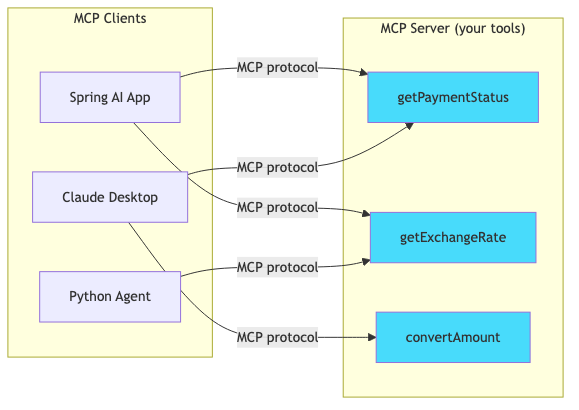
MCP is an open standard (created by Anthropic, adopted widely) that defines how AI applications discover and call tools from remote servers.
flowchart LR
    subgraph "MCP Server (your tools)"
        T1[getPaymentStatus]
        T2[getExchangeRate]
        T3[convertAmount]
    end

    subgraph "MCP Clients"
        C1[Spring AI App]
        C2[Claude Desktop]
        C3[Python Agent]
    end

    C1 -->|MCP protocol| T1
    C1 -->|MCP protocol| T2
    C2 -->|MCP protocol| T1
    C2 -->|MCP protocol| T3
    C3 -->|MCP protocol| T2

    style T1 fill:#48dbfb,color:#333
    style T2 fill:#48dbfb,color:#333
    style T3 fill:#48dbfb,color:#333
Think of it as REST for AI tools — a standard interface so any client can discover and invoke any server’s tools without custom integration.
What We Are Building
A multi-module Spring Boot project:
| Module | Role | Port |
|---|
mcp-server | Exposes payment tools via MCP (SSE transport) | 8081 |
mcp-client | AI assistant that discovers + uses remote tools | 8080 |
sequenceDiagram
    participant User
    participant Client as MCP Client (8080)
    participant Server as MCP Server (8081)
    participant LLM as OpenAI

    Note over Client,Server: Startup: tool discovery
    Client->>Server: GET /mcp (SSE connection)
    Server-->>Client: Tool list: [getPaymentStatus, getExchangeRate, ...]

    Note over User,LLM: Runtime: user query
    User->>Client: "Check payment TXN-9042"
    Client->>LLM: Message + discovered tool schemas
    LLM-->>Client: Tool call: getPaymentStatus("TXN-9042")
    Client->>Server: MCP tool call request
    Server-->>Client: {status: COMPLETED, amount: 250...}
    Client->>LLM: Tool result
    LLM-->>Client: "Payment TXN-9042 is completed..."
    Client-->>User: Final answer
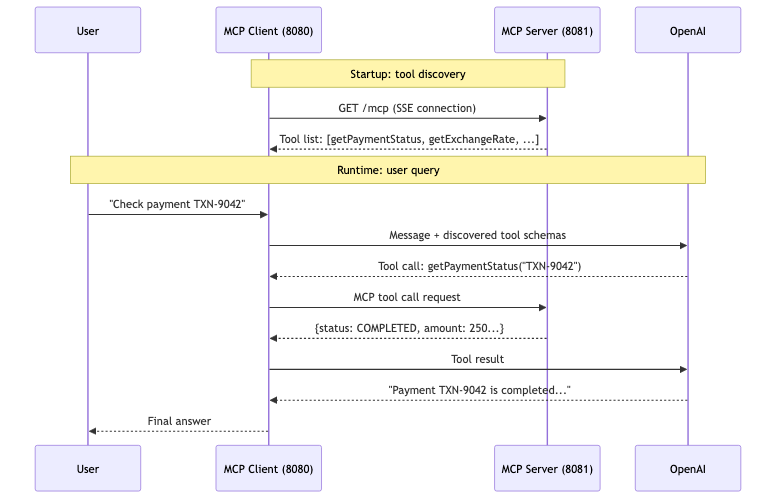
The client never defines tool schemas locally. It discovers them from the server at startup.
Prerequisites
Project Setup
Parent POM
1
2
3
4
5
6
7
8
9
10
11
12
13
14
15
16
17
18
19
20
21
22
23
24
25
| <groupId>com.anupam</groupId>
<artifactId>spring-ai-mcp</artifactId>
<packaging>pom</packaging>
<properties>
<java.version>21</java.version>
<spring-ai.version>2.0.0</spring-ai.version>
</properties>
<modules>
<module>mcp-server</module>
<module>mcp-client</module>
</modules>
<dependencyManagement>
<dependencies>
<dependency>
<groupId>org.springframework.ai</groupId>
<artifactId>spring-ai-bom</artifactId>
<version>${spring-ai.version}</version>
<type>pom</type>
<scope>import</scope>
</dependency>
</dependencies>
</dependencyManagement>
|
Part 1: Building the MCP Server
Server Dependencies
1
2
3
4
5
6
7
8
9
10
| <dependencies>
<dependency>
<groupId>org.springframework.boot</groupId>
<artifactId>spring-boot-starter-web</artifactId>
</dependency>
<dependency>
<groupId>org.springframework.ai</groupId>
<artifactId>spring-ai-starter-mcp-server-webmvc</artifactId>
</dependency>
</dependencies>
|
That’s it. One AI dependency. The spring-ai-starter-mcp-server-webmvc auto-configuration:
- Scans for
@Tool-annotated beans - Generates JSON schemas for parameters
- Registers tools with the MCP protocol handler
- Exposes an SSE endpoint for clients to connect
Server Configuration
1
2
3
4
5
6
7
8
9
10
| spring:
ai:
mcp:
server:
name: payment-tools-server
version: 1.0.0
description: "MCP server exposing payment lookup and exchange rate tools"
server:
port: 8081
|
1
2
3
4
5
6
7
8
9
10
11
12
13
14
15
16
17
18
19
20
21
22
23
24
25
26
27
28
29
30
31
32
33
34
35
36
| @Component
public class PaymentMcpTools {
@Tool(description = "Get the current status and details of a payment by its transaction ID")
public PaymentInfo getPaymentStatus(
@ToolParam(description = "Transaction ID, e.g. TXN-9042") String transactionId) {
PaymentInfo info = payments.get(transactionId);
if (info == null) {
throw new RuntimeException("Payment not found: " + transactionId);
}
return info;
}
@Tool(description = "Get the current exchange rate between two currencies. " +
"Supported: USD, EUR, GBP, JPY, INR, CAD, AUD")
public ExchangeRate getExchangeRate(
@ToolParam(description = "Source currency code, e.g. USD") String from,
@ToolParam(description = "Target currency code, e.g. EUR") String to) {
// ... conversion logic
return new ExchangeRate(from, to, rate, LocalDateTime.now());
}
@Tool(description = "Calculate the total amount in a target currency for a given payment")
public String convertPaymentAmount(
@ToolParam(description = "Transaction ID") String transactionId,
@ToolParam(description = "Target currency code") String targetCurrency) {
PaymentInfo payment = getPaymentStatus(transactionId);
ExchangeRate rate = getExchangeRate(payment.currency(), targetCurrency);
BigDecimal converted = payment.amount().multiply(rate.rate());
return String.format("%s %s = %s %s", payment.amount(), payment.currency(),
converted, targetCurrency);
}
}
|
Notice: the exact same @Tool annotation from the function calling post. The only difference is the dependency — spring-ai-starter-mcp-server-webmvc instead of spring-ai-starter-model-openai. Your tool code doesn’t change.
Start the Server
1
2
| cd mcp-server
./mvnw spring-boot:run
|
The server is now exposing tools at http://localhost:8081 via the MCP SSE transport. Any MCP client can connect and discover getPaymentStatus, getExchangeRate, and convertPaymentAmount.
Part 2: Building the MCP Client
Client Dependencies
1
2
3
4
5
6
7
8
9
10
11
12
13
14
| <dependencies>
<dependency>
<groupId>org.springframework.boot</groupId>
<artifactId>spring-boot-starter-web</artifactId>
</dependency>
<dependency>
<groupId>org.springframework.ai</groupId>
<artifactId>spring-ai-starter-model-openai</artifactId>
</dependency>
<dependency>
<groupId>org.springframework.ai</groupId>
<artifactId>spring-ai-starter-mcp-client</artifactId>
</dependency>
</dependencies>
|
Client Configuration
1
2
3
4
5
6
7
8
9
10
11
12
13
14
15
16
17
18
| spring:
ai:
openai:
api-key: ${OPENAI_API_KEY}
chat:
options:
model: gpt-4o
temperature: 0.3
mcp:
client:
sse:
connections:
payment-tools:
url: http://localhost:8081
server:
port: 8080
|
The mcp.client.sse.connections section tells Spring AI where to find MCP servers. You can list multiple servers — each gets a logical name (payment-tools here).
1
2
3
4
5
6
7
8
9
10
11
12
13
14
15
| @Configuration
public class AiConfig {
@Bean
public ChatClient chatClient(ChatModel chatModel, SyncMcpToolCallbackProvider mcpTools) {
return ChatClient.builder(chatModel)
.defaultSystem("""
You are a helpful payments assistant. You have access to tools
provided by an MCP server. Use them to look up payment status,
get exchange rates, and convert payment amounts.
""")
.defaultTools(mcpTools)
.build();
}
}
|
SyncMcpToolCallbackProvider is auto-configured by Spring AI. It connects to all configured MCP servers, discovers their tools, and wraps them as ToolCallback instances. You just inject it and pass it to .defaultTools().
1
2
3
4
5
6
7
8
9
10
11
12
13
14
15
16
17
18
19
20
| @RestController
@RequestMapping("/api/v1/assistant")
public class AssistantController {
private final ChatClient chatClient;
public AssistantController(ChatClient chatClient) {
this.chatClient = chatClient;
}
@PostMapping("/chat")
public ResponseEntity<ChatResponse> chat(@Valid @RequestBody ChatRequest request) {
String answer = chatClient.prompt()
.user(request.message())
.call()
.content();
return ResponseEntity.ok(ChatResponse.of(answer));
}
}
|
The controller has zero knowledge of what tools exist. It doesn’t import PaymentInfo or ExchangeRate. Those types live on the server side only. The client just passes the MCP-provided tool callbacks to the model and lets the loop run.
Testing
1. Start both applications
1
2
3
4
5
6
7
8
| # Terminal 1 — MCP Server
cd mcp-server
./mvnw spring-boot:run
# Terminal 2 — MCP Client
cd mcp-client
export OPENAI_API_KEY=sk-your-key-here
./mvnw spring-boot:run
|
2. Query via the client
1
2
3
| curl -X POST http://localhost:8080/api/v1/assistant/chat \
-H "Content-Type: application/json" \
-d '{"message": "What is the status of payment TXN-9042?"}'
|
1
2
3
4
| {
"answer": "Payment TXN-9042 has been completed. It was $250.00 USD sent from Alice Johnson to Bob Smith on August 20, 2026.",
"timestamp": "2026-08-22T11:00:00"
}
|
1
2
3
| curl -X POST http://localhost:8080/api/v1/assistant/chat \
-H "Content-Type: application/json" \
-d '{"message": "Convert TXN-9043 amount to EUR"}'
|
1
2
3
4
| {
"answer": "Payment TXN-9043 is $1,200.50 USD. At the current rate of 0.92, that equals approximately €1,104.46 EUR.",
"timestamp": "2026-08-22T11:00:05"
}
|
| Scenario | Use |
|---|
| Tools and AI in the same app | Local @Tool (simpler, no network hop) |
| Multiple AI apps share the same tools | MCP server (one source of truth) |
| Different teams own tools vs. AI layer | MCP (clean ownership boundary) |
| Non-Java clients need your Java tools | MCP (Claude Desktop, Python, etc.) |
| You want to add tools without redeploying the AI app | MCP (dynamic discovery) |
| Low-latency requirement | Local @Tool (no network round-trip) |
You can mix them freely:
1
2
3
4
5
| chatClient.prompt()
.user(question)
.tools(localTools, mcpTools) // Both in one call
.call()
.content();
|
The model doesn’t distinguish between local and remote tools — they all look like ToolCallback instances.
Transport Options
MCP supports two transports:
| Transport | Use Case | Config Key |
|---|
| SSE (Server-Sent Events) | Remote servers over HTTP | spring.ai.mcp.client.sse.connections |
| stdio | Local processes (CLI tools, scripts) | spring.ai.mcp.client.stdio.connections |
stdio example (connecting to an npm-based MCP server):
1
2
3
4
5
6
7
8
9
| spring:
ai:
mcp:
client:
stdio:
connections:
filesystem:
command: npx
args: ["-y", "@modelcontextprotocol/server-filesystem", "/tmp"]
|
Security Considerations
MCP expands the attack surface beyond a single JVM:
- Authenticate MCP connections — in production, add auth headers or mTLS between client and server
- Filter tools — use
McpToolFilter to restrict which discovered tools the client exposes to the model - Network boundary — keep MCP servers internal (VPC, service mesh). Don’t expose them publicly.
- Tool name conflicts — if two MCP servers expose a tool with the same name, use
DefaultMcpToolNamePrefixGenerator to prefix them
1
2
3
4
5
6
| // Only allow specific tools from the MCP server
@Bean
McpToolFilter mcpToolFilter() {
return (serverName, toolName) ->
Set.of("getPaymentStatus", "getExchangeRate").contains(toolName);
}
|
Common Problems
| Symptom | Cause | Fix |
|---|
Connection refused on startup | MCP server not running | Start the server first |
| No tools discovered | Wrong URL in client config | Check spring.ai.mcp.client.sse.connections.*.url |
| Tools work locally but not via MCP | Server not scanning @Tool beans | Ensure tool class has @Component |
| Slow first request | SSE connection + tool discovery on first call | This is normal; subsequent calls are fast |
ClassNotFoundException on client | Trying to import server-side model classes | Client doesn’t need server models — results are JSON strings |
Full Working Example
The complete code is available at github.com/AnupamSinha/spring-boot-examples/tree/main/06-ai-mcp.
1
2
3
4
5
6
7
8
| git clone https://github.com/AnupamSinha/spring-boot-examples/tree/main/06-ai-mcp
cd spring-ai-mcp
# Terminal 1 — Start server
cd mcp-server && ../mvnw spring-boot:run
# Terminal 2 — Start client
cd mcp-client && export OPENAI_API_KEY=sk-... && ../mvnw spring-boot:run
|
What’s Next
References