Spring AI Tool Calling + Conversation Memory — Stateful AI Assistants
Learn how to combine Spring AI tool calling with conversation memory so the model remembers previous tool results across turns. Build a stateful payment assistant that maintains context throughout a multi-turn conversation.
The Problem
In the previous post, we built an assistant that calls tools. But every request is isolated — ask “What’s the status of TXN-9042?” followed by “Who sent it?” and the model has no idea what “it” refers to.
Real conversations are multi-turn. Users say “check my last 3 payments” then follow up with “what’s the exchange rate for the largest one?” The model needs to remember both the question history and the tool results from earlier turns.
Spring AI solves this with MessageChatMemoryAdvisor — a composable advisor that stores and replays conversation history automatically.
What We Are Building
An extension of the payment assistant that:
- Remembers conversation history — previous questions and answers persist across turns
- Remembers tool results — the model can reference data from tools called in earlier turns
- Supports multiple conversations — each user/session gets isolated memory
sequenceDiagram
    participant User
    participant ChatClient
    participant Memory as ChatMemory
    participant LLM as OpenAI
    participant Tool as PaymentTools

    User->>ChatClient: "Check payment TXN-9042"
    ChatClient->>Memory: Load history (empty)
    ChatClient->>LLM: Message + tools
    LLM-->>ChatClient: Call getPaymentStatus("TXN-9042")
    ChatClient->>Tool: Execute
    Tool-->>ChatClient: {status: COMPLETED, sender: Alice...}
    ChatClient->>LLM: Tool result
    LLM-->>ChatClient: "TXN-9042 is completed, $250 from Alice to Bob"
    ChatClient->>Memory: Save turn (user + assistant + tool messages)

    User->>ChatClient: "Who sent it?"
    ChatClient->>Memory: Load history (has previous turn)
    ChatClient->>LLM: Full history + new question
    LLM-->>ChatClient: "Alice Johnson sent that payment"
    ChatClient->>Memory: Save turn
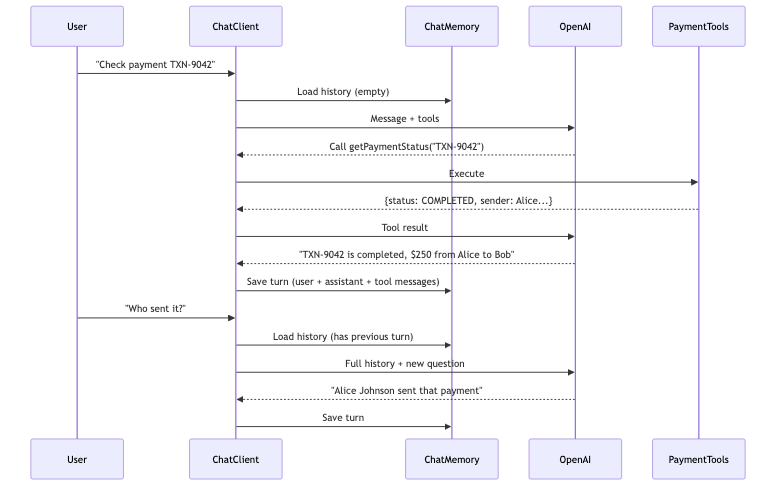
The model resolves “it” because it can see the full conversation history, including the tool result from turn 1.
Memory Placement: Outside vs Inside the Tool Loop
This is the key architectural decision. Where you place the memory advisor relative to ToolCallingAdvisor changes what gets stored:
Outside the Loop (Default — Recommended)
flowchart LR
    A[Request] --> B[MemoryAdvisor]
    B --> C[ToolCallingAdvisor]
    C --> D[Model]
    D -->|tool calls| C
    C -->|final answer| B
    B --> E[Response]

    style B fill:#feca57,color:#333
    style C fill:#48dbfb,color:#333
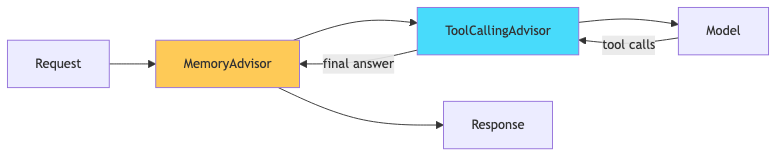
Memory stores: user message + final assistant answer only. Tool call/response messages are NOT persisted.
- Pros: Clean history, works with all memory backends, lower token usage on replay
- Cons: Model can’t see how it got a previous answer (just the answer itself)
- Best for: Most applications
Inside the Loop
flowchart LR
    A[Request] --> B[ToolCallingAdvisor]
    B --> C[MemoryAdvisor]
    C --> D[Model]
    D -->|tool calls| B
    B -->|final answer| A

    style B fill:#48dbfb,color:#333
    style C fill:#feca57,color:#333

Memory stores: everything — user message, tool call requests, tool responses, final answer.
- Pros: Full transparency, model can reason about previous tool calls
- Cons: Higher token usage, requires compatible memory backend (InMemory, Redis, or Neo4j)
- Best for: Complex agents that need to avoid repeating tool calls
For this post, we’ll use the default (outside the loop) — it covers 90% of use cases.
Implementation
Step 1: Add the Memory Configuration
1
2
3
4
5
6
7
8
9
10
11
12
13
14
15
16
17
18
19
20
21
22
23
24
25
26
27
28
29
30
31
import org.springframework.ai.chat.client.ChatClient;
import org.springframework.ai.chat.memory.ChatMemory;
import org.springframework.ai.chat.memory.InMemoryChatMemory;
import org.springframework.ai.chat.memory.MessageChatMemoryAdvisor;
import org.springframework.ai.chat.model.ChatModel;
import org.springframework.context.annotation.Bean;
import org.springframework.context.annotation.Configuration;

@Configuration
public class AiConfig {

    @Bean
    public ChatMemory chatMemory() {
        return new InMemoryChatMemory();
    }

    @Bean
    public ChatClient chatClient(ChatModel chatModel, ChatMemory chatMemory) {
        return ChatClient.builder(chatModel)
                .defaultSystem("""
                        You are a helpful payments assistant. You can look up payment
                        information, check transaction status, and provide exchange rates.
                        Use conversation context to resolve references like "it", "that payment",
                        or "the last one". If something is ambiguous, ask for clarification.
                        """)
                .defaultAdvisors(
                        MessageChatMemoryAdvisor.builder(chatMemory).build()
                )
                .build();
    }
}
InMemoryChatMemory stores history in a ConcurrentHashMap. For production, swap to Redis or a database-backed implementation.
Step 2: Update the Service to Handle Conversation IDs
1
2
3
4
5
6
7
8
9
10
11
12
13
14
15
16
17
18
19
20
21
22
23
24
import org.springframework.ai.chat.client.ChatClient;
import org.springframework.ai.chat.memory.ChatMemory;
import org.springframework.stereotype.Service;

@Service
public class AssistantService {

    private final ChatClient chatClient;
    private final PaymentTools paymentTools;

    public AssistantService(ChatClient chatClient, PaymentTools paymentTools) {
        this.chatClient = chatClient;
        this.paymentTools = paymentTools;
    }

    public String chat(String conversationId, String userMessage) {
        return chatClient.prompt()
                .user(userMessage)
                .tools(paymentTools)
                .advisors(a -> a.param(ChatMemory.CONVERSATION_ID, conversationId))
                .call()
                .content();
    }
}
The conversationId isolates different users’ conversations. Each ID gets its own history. In a real app, this could be a session ID, a user ID, or a UUID generated per chat window.
Step 3: Update the Controller
1
2
3
4
5
6
7
8
9
10
11
12
13
14
15
16
17
18
19
20
@RestController
@RequestMapping("/api/v1/assistant")
public class AssistantController {

    private final AssistantService assistantService;

    public AssistantController(AssistantService assistantService) {
        this.assistantService = assistantService;
    }

    @PostMapping("/chat")
    public ResponseEntity<ChatResponse> chat(@Valid @RequestBody ChatRequest request) {
        String conversationId = request.conversationId() != null
                ? request.conversationId()
                : UUID.randomUUID().toString();

        String answer = assistantService.chat(conversationId, request.message());
        return ResponseEntity.ok(new ChatResponse(answer, conversationId, LocalDateTime.now()));
    }
}
1
2
3
4
5
6
7
8
9
10
public record ChatRequest(
        @NotBlank String message,
        String conversationId  // optional — if null, starts a new conversation
) {}

public record ChatResponse(
        String answer,
        String conversationId,
        LocalDateTime timestamp
) {}
Testing Multi-Turn Conversations
Turn 1: Ask about a payment
1
2
3
curl -X POST http://localhost:8080/api/v1/assistant/chat \
  -H "Content-Type: application/json" \
  -d '{"message": "What is the status of TXN-9042?", "conversationId": "session-1"}'
1
2
3
4
5
{
  "answer": "Payment TXN-9042 is completed. It was $250.00 USD sent from Alice Johnson to Bob Smith on August 20, 2026.",
  "conversationId": "session-1",
  "timestamp": "2026-08-22T10:00:00"
}
Turn 2: Follow up with a pronoun reference
1
2
3
curl -X POST http://localhost:8080/api/v1/assistant/chat \
  -H "Content-Type: application/json" \
  -d '{"message": "Who sent it?", "conversationId": "session-1"}'
1
2
3
4
5
{
  "answer": "Alice Johnson sent that payment.",
  "conversationId": "session-1",
  "timestamp": "2026-08-22T10:00:05"
}
Without memory, the model would say “I don’t have enough context to determine what ‘it’ refers to.”
Turn 3: Ask a follow-up requiring a new tool call
1
2
3
curl -X POST http://localhost:8080/api/v1/assistant/chat \
  -H "Content-Type: application/json" \
  -d '{"message": "Convert that amount to EUR", "conversationId": "session-1"}'
1
2
3
4
5
{
  "answer": "At the current rate of 0.92, $250.00 USD is approximately €230.00 EUR.",
  "conversationId": "session-1",
  "timestamp": "2026-08-22T10:00:10"
}
The model remembered “$250.00 USD” from turn 1 and called getExchangeRate("USD", "EUR") to compute the conversion.
Memory Window: Limiting History Size
Conversations can grow long. Sending the full history every turn wastes tokens and eventually hits the context window limit. Control this with the maxMessages parameter:
1
2
3
MessageChatMemoryAdvisor.builder(chatMemory)
        .maxMessages(20)  // Keep last 20 messages (10 turns)
        .build()
| Setting | Behavior |
|---|---|
maxMessages(10) | Last 5 user/assistant pairs |
maxMessages(20) | Last 10 turns — good default |
maxMessages(0) or omit | Unlimited (careful with long conversations) |
Production Memory Backends
InMemoryChatMemory works for demos but doesn’t survive restarts. For production:
Redis (Recommended for most apps)
1
2
3
4
<dependency>
    <groupId>org.springframework.ai</groupId>
    <artifactId>spring-ai-redis-store</artifactId>
</dependency>
1
2
3
4
@Bean
public ChatMemory chatMemory(RedisTemplate<String, Object> redisTemplate) {
    return new RedisChatMemory(redisTemplate);
}
Benefits: Fast, supports TTL for automatic conversation expiry, horizontally scalable.
Neo4j (For complex conversation graphs)
1
2
3
4
@Bean
public ChatMemory chatMemory(Neo4jClient neo4jClient) {
    return new Neo4jChatMemory(neo4jClient);
}
Benefits: Query relationships between conversations, supports full tool message storage inside the loop.
Inside-the-Loop Memory (Advanced)
If you need the model to see previous tool calls — for example, to avoid calling the same tool twice with the same arguments:
1
2
3
4
5
6
7
8
9
10
11
12
@Bean
public ChatClient chatClient(ChatModel chatModel, ChatMemory chatMemory) {

    var memoryAdvisor = MessageChatMemoryAdvisor.builder(chatMemory)
            .order(BaseAdvisor.HIGHEST_PRECEDENCE + 400)  // Inside the tool loop
            .build();

    return ChatClient.builder(chatModel)
            .defaultSystem("...")
            .defaultAdvisors(memoryAdvisor)
            .build();
}
With order 400 (higher than ToolCallingAdvisor’s default of 300), memory sits inside the loop. Now the stored history includes:
1
2
3
4
[UserMessage] "Check TXN-9042"
[AssistantMessage] tool_call: getPaymentStatus("TXN-9042")
[ToolResponseMessage] {status: "COMPLETED", amount: 250.00, ...}
[AssistantMessage] "Payment TXN-9042 is completed..."
Warning: Only InMemory, Redis, and Neo4j backends support storing tool messages. JDBC-backed memory does NOT support this yet.
Common Problems
| Symptom | Cause | Fix |
|---|---|---|
| Model doesn’t remember previous turns | Missing conversationId or different ID per request | Ensure same ID across the conversation |
| “I don’t know what you’re referring to” | Memory advisor not registered | Check .defaultAdvisors() includes MessageChatMemoryAdvisor |
| Token limit exceeded on long conversations | No message window set | Add .maxMessages(20) |
| Tool results not visible in later turns | Memory is outside the loop (default) | Either move memory inside the loop or accept this trade-off |
| Memory lost on app restart | Using InMemoryChatMemory | Switch to Redis or a persistent backend |
Full Working Example
This builds on the spring-ai-function project. The memory branch adds conversation memory:
1
2
3
4
5
git clone https://github.com/AnupamSinha/spring-boot-examples/tree/main/05-ai-function-calling
cd spring-ai-function
git checkout memory
export OPENAI_API_KEY=sk-your-key-here
./mvnw spring-boot:run
What’s Next
- Spring AI + MCP — expose your tools as a standardized MCP server that any AI client can consume
- Spring AI Agentic Patterns — multi-step tool chains where the model plans workflows autonomously