Service Mesh vs Helm in OpenShift — What's the Difference and When to Use Which
Understand the difference between Service Mesh and Helm chart deployments in OpenShift. Simple analogies, real examples, and clear guidance on when to use each in your OCP environment.
The Confusion
If you work with OpenShift (OCP), you’ve likely heard both “Service Mesh” and “Helm Charts” mentioned in deployment conversations. They sound like they do similar things — but they don’t. They solve completely different problems.
Here’s the simplest way to think about it:
Helm = How you deploy your application
Service Mesh = How your applications talk to each other after deployment
They’re not competitors. They’re complementary. Let me explain.
The Analogy
Imagine you’re setting up a restaurant chain:
Helm is like the franchise kit — it contains everything needed to open a new location: the floor plan, the equipment list, the staff roles, and the menu. One kit, deploy anywhere.
Service Mesh is like the road system and traffic rules between your restaurants — it controls which trucks can deliver to which locations, encrypts the delivery manifests, monitors delivery times, and reroutes traffic if a road is blocked.
You need the franchise kit to open the restaurant. You need the road system to keep everything connected and secure. Different jobs.
What is Helm?
Helm is a package manager for Kubernetes/OpenShift. It bundles all the YAML files your application needs into a single, versioned, reusable package called a chart.
What a Helm Chart Contains
1
2
3
4
5
6
7
8
9
10
my-app/
├── Chart.yaml          # Chart metadata (name, version)
├── values.yaml         # Default configuration values
├── templates/
│   ├── deployment.yaml # Pod specification
│   ├── service.yaml    # Network service
│   ├── route.yaml      # OpenShift route (external URL)
│   ├── configmap.yaml  # Configuration
│   └── secret.yaml     # Credentials
└── charts/             # Dependencies (other charts)
What Helm Does
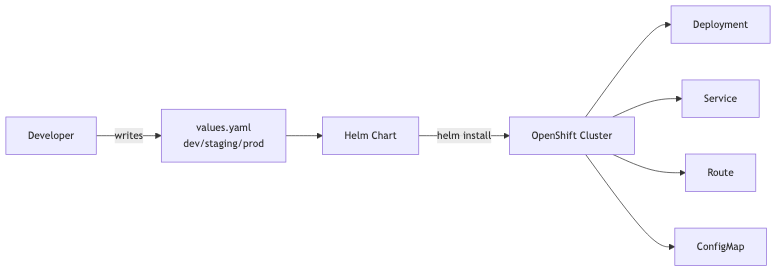
Helm takes your templates + values and produces the exact Kubernetes resources needed. Different values files produce different configurations — same chart, multiple environments.
| Capability | Description |
|---|---|
| Package | Bundle all Kubernetes resources into one unit |
| Template | Use variables (``) instead of hardcoded values |
| Version | Track releases, rollback to previous versions |
| Install | Deploy everything with one command |
| Upgrade | Update running apps with new config or images |
| Share | Push charts to a registry for others to reuse |
Deploying with Helm on OpenShift
1
2
3
4
5
6
7
8
9
10
11
12
13
14
# Add a chart repository
helm repo add bitnami https://charts.bitnami.com/bitnami

# Install an application
helm install my-app bitnami/nginx --namespace my-project

# Customize with your values
helm install my-app ./my-chart -f production-values.yaml

# Upgrade a running release
helm upgrade my-app ./my-chart -f new-values.yaml

# Rollback if something breaks
helm rollback my-app 1
Example: A Simple Helm values.yaml
1
2
3
4
5
6
7
8
9
10
11
12
13
14
15
16
17
18
19
20
21
22
23
24
25
26
27
28
# values.yaml
replicaCount: 3

image:
  repository: quay.io/my-org/order-service
  tag: "1.4.0"
  pullPolicy: IfNotPresent

service:
  type: ClusterIP
  port: 8080

route:
  enabled: true
  host: orders.apps.ocp.example.com
  tls:
    termination: edge

resources:
  limits:
    cpu: 500m
    memory: 512Mi
  requests:
    cpu: 250m
    memory: 256Mi

env:
  SPRING_PROFILES_ACTIVE: "prod"
What is Service Mesh?
Red Hat OpenShift Service Mesh (OSSM) — built on Istio, Envoy, and Kiali — is a dedicated infrastructure layer for managing service-to-service communication.
Instead of coding retries, circuit breaking, mTLS encryption, and distributed tracing into every microservice, Service Mesh handles it at the platform level via Envoy sidecar proxies.
1
2
3
4
5
6
7
8
[ Pod: order-service ]                [ Pod: payment-service ]
┌─────────────────────────┐          ┌─────────────────────────┐
│ App Container (Spring)  │          │ App Container (Spring)  │
│           │             │          │            ▲            │
│      (localhost)        │          │       (localhost)       │
│           ▼             │  mTLS    │            │            │
│   Envoy Sidecar Proxy   │ ════════>│   Envoy Sidecar Proxy   │
└─────────────────────────┘          └─────────────────────────┘
The 4 Pillars of Service Mesh
- Traffic Management — Canary deployments, A/B testing, weighted routing, traffic mirroring.
- Zero-Trust Security — Automatic mutual TLS (mTLS) between all pods, role-based authorization policies (
AuthorizationPolicy). - Observability — Out-of-the-box distributed tracing (Jaeger/Tempo), service topology visualizer (Kiali), metrics (Prometheus/Grafana) with zero code changes.
- Resilience — Dynamic timeouts, retries, rate limiting, and circuit breaking (
DestinationRule).
Example: Canary Deployment with Istio VirtualService
1
2
3
4
5
6
7
8
9
10
11
12
13
14
15
16
17
18
apiVersion: networking.istio.io/v1beta1
kind: VirtualService
metadata:
  name: order-service
  namespace: my-project
spec:
  hosts:
    - order-service
  http:
    - route:
        - destination:
            host: order-service
            subset: v1
          weight: 90
        - destination:
            host: order-service
            subset: v2
          weight: 10
Side-by-Side Comparison
| Feature | Helm | OpenShift Service Mesh |
|---|---|---|
| Lifecycle Focus | Deploy Time (packaging, rendering, installing) | Runtime (routing, securing, observing) |
| Primary Artifacts | Chart.yaml, values.yaml, templates | VirtualService, DestinationRule, PeerAuthentication |
| Problem Solved | Deploying manifests consistently across environments | Routing and securing network traffic across microservices |
| Application Impact | Creates Kubernetes objects | Injects Envoy sidecar proxies into pods |
The Winning Strategy: Using Them Together
In real-world OpenShift production environments, you use both:
- Write a Helm chart for your application.
- Inside
templates/, include both standard Kubernetes resources (deployment.yaml,service.yaml) and Service Mesh custom resources (virtualservice.yaml,destinationrule.yaml). - Deploy the entire application topology with a single
helm installorhelm upgrade.
1
2
3
4
5
6
7
8
my-microservice-chart/
├── Chart.yaml
├── values.yaml
└── templates/
    ├── deployment.yaml          # Deploys pods (auto-injected with Envoy)
    ├── service.yaml             # ClusterIP service
    ├── virtualservice.yaml      # Service Mesh routing rules
    └── destinationrule.yaml     # Service Mesh mTLS & circuit breaking
Decision Framework
Use Helm When:
- You need repeatable, versioned deployments across multiple environments (Dev, Staging, Prod).
- You want rollback capabilities with
helm rollback. - You want to parameterize resource limits, environment variables, and image tags.
Use Service Mesh When:
- You have microservices communicating over HTTP/gRPC that need end-to-end mTLS encryption.
- You want progressive delivery (Canary 90/10 traffic splitting, Blue/Green).
- You need deep observability and tracing across distributed service calls without instrumenting code manually.
Wrapping Up
Helm and Service Mesh are two complementary tools in modern cloud-native engineering:
- Helm packages and delivers your applications.
- Service Mesh connects, secures, and observes them once they are running.
When combined, they provide a rock-solid foundation for enterprise microservices on OpenShift.