You write the application code. But your application doesn’t run in a vacuum — it needs databases, load balancers, DNS records, queues, and container orchestration. If you’re still creating these resources by clicking through the AWS console, you have a problem:
- No reproducibility — Can you recreate your environment from scratch?
- No history — Who changed what, when?
- No review — Infrastructure changes bypass code review.
- No testing — You can’t test a click.
Terraform lets you define infrastructure in code, version it in Git, review it in PRs, and apply it reproducibly. As a Java developer, you already think in types, modules, and composition — Terraform maps cleanly to those mental models.
| Java Concept | Terraform Equivalent | Example |
|---|
| Class | Resource | resource "aws_s3_bucket" "data" |
| Interface | Module (input contract) | module "vpc" { source = "./modules/vpc" } |
| Constructor params | Variables | variable "instance_type" { default = "t3.micro" } |
| Getters / return values | Outputs | output "bucket_arn" { value = aws_s3_bucket.data.arn } |
| Package | Module directory | modules/database/ |
| Dependency injection | Resource references | subnet_id = aws_subnet.main.id |
new Object() | Resource block | Creates the real infrastructure |
.toString() | terraform output | Inspect created resources |
| Unit test | terraform plan | Preview what will change |
mvn deploy | terraform apply | Create/update real resources |
Setup
1
2
3
4
5
6
| # macOS
brew install terraform
# Verify
terraform --version
# Terraform v1.9.x
|
Project Structure
1
2
3
4
5
6
7
8
9
10
11
12
13
14
15
| infrastructure/
├── main.tf # Primary resources
├── variables.tf # Input variables
├── outputs.tf # Output values
├── providers.tf # Provider configuration
├── terraform.tfvars # Variable values (git-ignored for secrets)
└── modules/
├── database/
│ ├── main.tf
│ ├── variables.tf
│ └── outputs.tf
└── ecs/
├── main.tf
├── variables.tf
└── outputs.tf
|
Provider Configuration
1
2
3
4
5
6
7
8
9
10
11
12
13
14
15
16
17
18
19
20
21
22
23
24
25
26
27
28
29
| # providers.tf
terraform {
required_version = ">= 1.9.0"
required_providers {
aws = {
source = "hashicorp/aws"
version = "~> 5.60"
}
}
backend "s3" {
bucket = "my-terraform-state"
key = "prod/terraform.tfstate"
region = "us-east-1"
}
}
provider "aws" {
region = var.aws_region
default_tags {
tags = {
Environment = var.environment
ManagedBy = "terraform"
Project = var.project_name
}
}
}
|
First Resource — AWS S3 Bucket
Think of this as new S3Bucket(config):
1
2
3
4
5
6
7
8
9
10
11
12
13
14
15
16
17
18
19
20
21
22
23
24
25
26
27
28
29
| # main.tf
resource "aws_s3_bucket" "app_uploads" {
bucket = "${var.project_name}-uploads-${var.environment}"
}
resource "aws_s3_bucket_versioning" "app_uploads" {
bucket = aws_s3_bucket.app_uploads.id
versioning_configuration {
status = "Enabled"
}
}
resource "aws_s3_bucket_server_side_encryption_configuration" "app_uploads" {
bucket = aws_s3_bucket.app_uploads.id
rule {
apply_server_side_encryption_by_default {
sse_algorithm = "AES256"
}
}
}
resource "aws_s3_bucket_public_access_block" "app_uploads" {
bucket = aws_s3_bucket.app_uploads.id
block_public_acls = true
block_public_policy = true
ignore_public_acls = true
restrict_public_buckets = true
}
|
1
2
3
4
5
6
7
8
| # Initialize (downloads provider plugins — like mvn dependency:resolve)
terraform init
# Plan (dry-run — like mvn compile without deploy)
terraform plan
# Apply (create the resources)
terraform apply
|
Provisioning What Your Spring Boot App Needs
A typical Spring Boot application needs: a database, a security group, and a place to run. Let’s provision all three.
RDS PostgreSQL
1
2
3
4
5
6
7
8
9
10
11
12
13
14
15
16
17
18
19
20
21
22
23
24
25
26
| resource "aws_db_instance" "main" {
identifier = "${var.project_name}-db-${var.environment}"
engine = "postgres"
engine_version = "16.3"
instance_class = var.db_instance_class
allocated_storage = 20
max_allocated_storage = 100
storage_encrypted = true
db_name = var.db_name
username = var.db_username
password = var.db_password
vpc_security_group_ids = [aws_security_group.database.id]
db_subnet_group_name = aws_db_subnet_group.main.name
backup_retention_period = 7
multi_az = var.environment == "prod" ? true : false
skip_final_snapshot = var.environment != "prod"
tags = {
Name = "${var.project_name}-database"
}
}
|
Security Group
1
2
3
4
5
6
7
8
9
10
11
12
13
14
15
16
17
18
19
20
21
22
23
| resource "aws_security_group" "database" {
name_prefix = "${var.project_name}-db-"
vpc_id = var.vpc_id
ingress {
from_port = 5432
to_port = 5432
protocol = "tcp"
security_groups = [aws_security_group.application.id]
description = "PostgreSQL from application"
}
egress {
from_port = 0
to_port = 0
protocol = "-1"
cidr_blocks = ["0.0.0.0/0"]
}
lifecycle {
create_before_destroy = true
}
}
|
ECS Fargate Service
1
2
3
4
5
6
7
8
9
10
11
12
13
14
15
16
17
18
19
20
21
22
23
24
25
26
27
28
29
30
31
32
33
34
35
36
37
38
39
40
41
42
43
44
45
46
47
48
49
50
51
52
53
54
55
56
57
58
59
60
| resource "aws_ecs_task_definition" "app" {
family = "${var.project_name}-${var.environment}"
requires_compatibilities = ["FARGATE"]
network_mode = "awsvpc"
cpu = 512
memory = 1024
execution_role_arn = aws_iam_role.ecs_execution.arn
task_role_arn = aws_iam_role.ecs_task.arn
container_definitions = jsonencode([{
name = "app"
image = "${var.ecr_repository_url}:${var.app_version}"
portMappings = [{
containerPort = 8080
protocol = "tcp"
}]
environment = [
{ name = "SPRING_PROFILES_ACTIVE", value = var.environment },
{ name = "SERVER_PORT", value = "8080" }
]
secrets = [
{ name = "SPRING_DATASOURCE_URL", valueFrom = aws_ssm_parameter.db_url.arn },
{ name = "SPRING_DATASOURCE_PASSWORD", valueFrom = aws_ssm_parameter.db_password.arn }
]
logConfiguration = {
logDriver = "awslogs"
options = {
"awslogs-group" = aws_cloudwatch_log_group.app.name
"awslogs-region" = var.aws_region
"awslogs-stream-prefix" = "app"
}
}
healthCheck = {
command = ["CMD-SHELL", "curl -f http://localhost:8080/actuator/health || exit 1"]
interval = 30
timeout = 5
retries = 3
startPeriod = 60
}
}])
}
resource "aws_ecs_service" "app" {
name = "${var.project_name}-${var.environment}"
cluster = aws_ecs_cluster.main.id
task_definition = aws_ecs_task_definition.app.arn
desired_count = var.desired_count
launch_type = "FARGATE"
network_configuration {
subnets = var.private_subnet_ids
security_groups = [aws_security_group.application.id]
}
load_balancer {
target_group_arn = aws_lb_target_group.app.arn
container_name = "app"
container_port = 8080
}
}
|
State — Like a Database for Your Infra
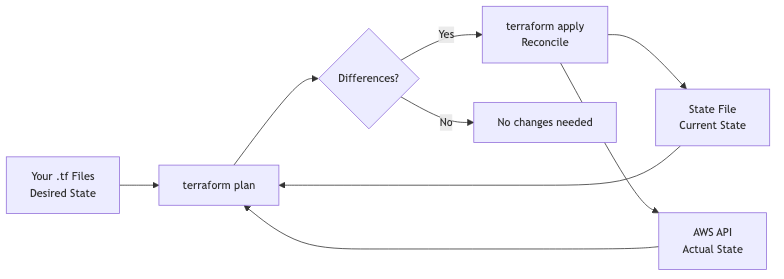
Terraform state tracks what resources exist and their current configuration. Think of it as a database that maps your HCL code to real AWS resources.
flowchart LR
    A[Your .tf Files<br>Desired State] --> B[terraform plan]
    C[State File<br>Current State] --> B
    D[AWS API<br>Actual State] --> B
    B --> E{Differences?}
    E -->|Yes| F[terraform apply<br>Reconcile]
    E -->|No| G[No changes needed]
    F --> C
    F --> D
Critical rules:
- Never edit state manually.
- Store state remotely (S3 + DynamoDB for locking).
- Enable versioning on the state bucket.
- One state file per environment.
1
2
3
4
5
6
7
8
9
10
| # Remote state configuration
terraform {
backend "s3" {
bucket = "mycompany-terraform-state"
key = "services/bookstore/prod/terraform.tfstate"
region = "us-east-1"
dynamodb_table = "terraform-locks"
encrypt = true
}
}
|
Modules = Reusable Libraries
Modules in Terraform are like Java libraries — encapsulated, parameterized, reusable.
Creating a Module
1
2
3
4
5
6
7
8
9
10
11
12
13
14
15
16
17
18
19
20
21
22
23
24
25
26
| # modules/database/variables.tf
variable "project_name" { type = string }
variable "environment" { type = string }
variable "instance_class" { type = string; default = "db.t3.micro" }
variable "vpc_id" { type = string }
variable "subnet_ids" { type = list(string) }
variable "app_security_group_id" { type = string }
# modules/database/main.tf
resource "aws_db_subnet_group" "this" {
name = "${var.project_name}-${var.environment}"
subnet_ids = var.subnet_ids
}
resource "aws_db_instance" "this" {
identifier = "${var.project_name}-${var.environment}"
engine = "postgres"
engine_version = "16.3"
instance_class = var.instance_class
# ... full configuration
}
# modules/database/outputs.tf
output "endpoint" { value = aws_db_instance.this.endpoint }
output "port" { value = aws_db_instance.this.port }
output "database_name" { value = aws_db_instance.this.db_name }
|
Using the Module
1
2
3
4
5
6
7
8
9
10
11
12
13
14
15
16
17
18
| # main.tf — like calling new Database(config)
module "database" {
source = "./modules/database"
project_name = var.project_name
environment = var.environment
instance_class = "db.t3.small"
vpc_id = module.networking.vpc_id
subnet_ids = module.networking.private_subnet_ids
app_security_group_id = module.ecs.security_group_id
}
# Reference outputs — like calling getters
resource "aws_ssm_parameter" "db_url" {
name = "/${var.project_name}/${var.environment}/db-url"
type = "SecureString"
value = "jdbc:postgresql://${module.database.endpoint}/${module.database.database_name}"
}
|
Variables and Outputs
Variables (constructor params)
1
2
3
4
5
6
7
8
9
10
11
12
13
14
15
16
17
18
19
20
21
22
23
24
25
26
| # variables.tf
variable "project_name" {
type = string
description = "Name of the project"
}
variable "environment" {
type = string
description = "Deployment environment"
validation {
condition = contains(["dev", "staging", "prod"], var.environment)
error_message = "Environment must be dev, staging, or prod."
}
}
variable "desired_count" {
type = number
description = "Number of ECS tasks"
default = 2
}
variable "enable_monitoring" {
type = bool
description = "Enable CloudWatch alarms"
default = true
}
|
Outputs (return values)
1
2
3
4
5
6
7
8
9
10
11
| # outputs.tf
output "api_url" {
value = "https://${aws_lb.main.dns_name}"
description = "URL of the load balancer"
}
output "database_endpoint" {
value = module.database.endpoint
description = "RDS endpoint"
sensitive = true
}
|
flowchart LR
    A[Write HCL] --> B[terraform init]
    B --> C[terraform plan]
    C --> D{Review Plan}
    D -->|Approve| E[terraform apply]
    D -->|Reject| A
    E --> F[Infrastructure Created]
    F --> G[terraform destroy<br>when done]
| Command | Java Equivalent | Purpose |
|---|
terraform init | mvn dependency:resolve | Download providers/modules |
terraform plan | mvn compile (dry-run) | Show what will change |
terraform apply | mvn deploy | Create/update resources |
terraform destroy | N/A | Delete all managed resources |
terraform fmt | Code formatter | Format HCL files |
terraform validate | Compiler check | Check syntax and types |
Integrating with GitHub Actions
1
2
3
4
5
6
7
8
9
10
11
12
13
14
15
16
17
18
19
20
21
22
23
24
25
26
27
28
29
30
31
32
33
34
35
36
37
38
39
40
41
| # .github/workflows/terraform.yml
name: Terraform
on:
push:
branches: [main]
paths: ['infrastructure/**']
pull_request:
paths: ['infrastructure/**']
jobs:
terraform:
runs-on: ubuntu-latest
defaults:
run:
working-directory: infrastructure
steps:
- uses: actions/checkout@v4
- uses: hashicorp/setup-terraform@v3
with:
terraform_version: 1.9.0
- name: Terraform Init
run: terraform init
- name: Terraform Format Check
run: terraform fmt -check
- name: Terraform Plan
run: terraform plan -out=tfplan
env:
AWS_ACCESS_KEY_ID: $
AWS_SECRET_ACCESS_KEY: $
- name: Terraform Apply
if: github.ref == 'refs/heads/main' && github.event_name == 'push'
run: terraform apply -auto-approve tfplan
env:
AWS_ACCESS_KEY_ID: $
AWS_SECRET_ACCESS_KEY: $
|
Common Problems
| Problem | Cause | Solution |
|---|
| “Resource already exists” | Resource created outside Terraform | terraform import aws_s3_bucket.x bucket-name |
| State lock stuck | Crashed apply, CI timeout | terraform force-unlock LOCK_ID |
| Cyclic dependency | Resources reference each other | Break cycle with depends_on or restructure |
| Drift detected | Manual console changes | Run terraform plan regularly, enforce no-console policy |
| Secrets in state | Passwords stored in plain text | Use sensitive = true, encrypt state backend |
| Slow plan | Too many resources in one state | Split into smaller states (per-service) |
| Provider version conflict | Multiple modules need different versions | Pin versions, use required_providers |
References