Spring Boot on AWS — Lambda, ECS, and RDS
Deploy Spring Boot to AWS three ways: as a serverless function on Lambda (with SnapStart), as containers on ECS Fargate, and with managed database on RDS. Covers cold start optimization, cost comparison, and when to use which approach.
The Problem — Which AWS Service?
You have a Spring Boot application ready for production. AWS offers dozens of compute options. The three most relevant for Spring Boot workloads are:
- AWS Lambda — serverless, pay per invocation
- ECS Fargate — containers without managing servers
- EC2 — full control, traditional deployment
Each has different cost profiles, operational complexity, and performance characteristics. Choosing wrong means either overpaying or under-delivering.
Three Deployment Models
graph TB
    subgraph "Option 1: Lambda"
        A[API Gateway] --> B[Lambda Function]
        B --> C[RDS Proxy]
        C --> D[RDS PostgreSQL]
    end

    subgraph "Option 2: ECS Fargate"
        E[ALB] --> F[ECS Service]
        F --> G[Task 1]
        F --> H[Task 2]
        G --> I[RDS PostgreSQL]
        H --> I
    end

    subgraph "Option 3: EC2"
        J[ALB] --> K[EC2 Instance 1]
        J --> L[EC2 Instance 2]
        K --> M[RDS PostgreSQL]
        L --> M
    end

Option 1: AWS Lambda + SnapStart
Spring Cloud Function
Convert your Spring Boot app to a Lambda function using Spring Cloud Function:
1
2
3
4
<dependency>
    <groupId>org.springframework.cloud</groupId>
    <artifactId>spring-cloud-function-adapter-aws</artifactId>
</dependency>
1
2
3
4
5
6
7
8
9
10
11
12
13
14
15
16
17
18
19
20
21
22
23
24
25
26
27
28
29
@SpringBootApplication
public class OrderApplication {

    public static void main(String[] args) {
        SpringApplication.run(OrderApplication.class, args);
    }

    @Bean
    public Function<APIGatewayProxyRequestEvent, APIGatewayProxyResponseEvent> handleRequest(
            OrderService orderService, ObjectMapper mapper) {

        return request -> {
            try {
                Order order = mapper.readValue(request.getBody(), Order.class);
                Order saved = orderService.createOrder(order);

                APIGatewayProxyResponseEvent response = new APIGatewayProxyResponseEvent();
                response.setStatusCode(201);
                response.setBody(mapper.writeValueAsString(saved));
                return response;
            } catch (Exception e) {
                APIGatewayProxyResponseEvent response = new APIGatewayProxyResponseEvent();
                response.setStatusCode(500);
                response.setBody("{\"error\": \"" + e.getMessage() + "\"}");
                return response;
            }
        };
    }
}
Cold Start Problem
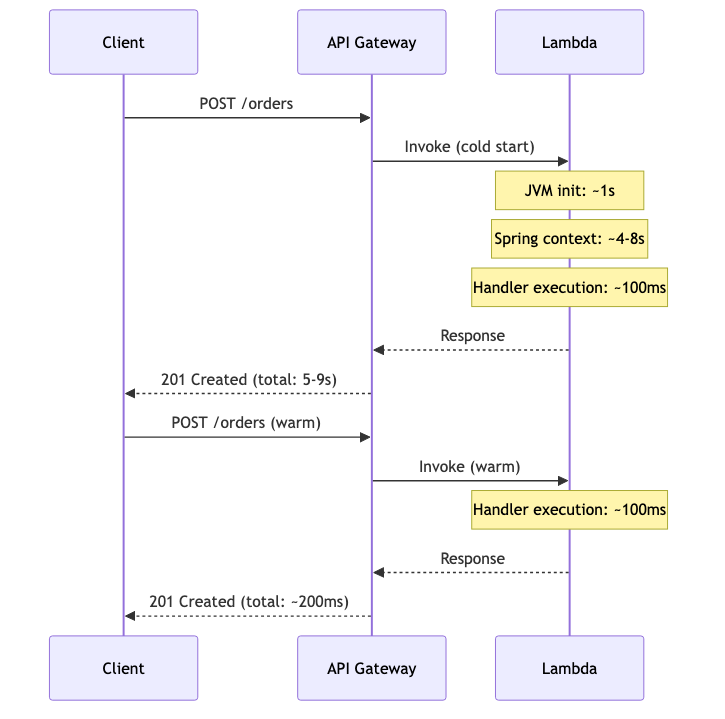
Spring Boot on Lambda has a notorious cold start problem. A fresh JVM + Spring context initialization can take 5-15 seconds.
sequenceDiagram
    participant Client
    participant API Gateway
    participant Lambda

    Client->>API Gateway: POST /orders
    API Gateway->>Lambda: Invoke (cold start)
    Note over Lambda: JVM init: ~1s
    Note over Lambda: Spring context: ~4-8s
    Note over Lambda: Handler execution: ~100ms
    Lambda-->>API Gateway: Response
    API Gateway-->>Client: 201 Created (total: 5-9s)

    Client->>API Gateway: POST /orders (warm)
    API Gateway->>Lambda: Invoke (warm)
    Note over Lambda: Handler execution: ~100ms
    Lambda-->>API Gateway: Response
    API Gateway-->>Client: 201 Created (total: ~200ms)
Cold Start Optimization
| Strategy | Cold Start Improvement | Tradeoff |
|---|---|---|
| SnapStart | ~80% reduction | Java 11+ only, snapshot restore time |
| GraalVM Native | ~95% reduction | Build time, reflection limitations |
| Provisioned Concurrency | Eliminates cold start | Costs money even with no traffic |
| Class Data Sharing | ~20% reduction | Minimal effort |
| Lazy initialization | ~30% reduction | First-request latency shifts |
SnapStart Configuration
1
2
3
4
5
6
7
8
9
10
11
12
13
14
# SAM template
Resources:
  OrderFunction:
    Type: AWS::Serverless::Function
    Properties:
      Handler: org.springframework.cloud.function.adapter.aws.FunctionInvoker::handleRequest
      Runtime: java21
      SnapStart:
        ApplyOn: PublishedVersions
      MemorySize: 1024
      Timeout: 30
      Environment:
        Variables:
          SPRING_DATASOURCE_URL: !Sub "jdbc:postgresql://${RDSProxy.Endpoint}:5432/orderdb"
SnapStart takes a snapshot of the initialized JVM after the first invocation. Subsequent cold starts restore from the snapshot instead of initializing from scratch.
Option 2: ECS Fargate
For always-on workloads with predictable traffic, ECS Fargate runs your Spring Boot app as a container without managing EC2 instances.
Dockerfile
1
2
3
4
5
FROM eclipse-temurin:21-jre-alpine
WORKDIR /app
COPY target/order-service-0.0.1-SNAPSHOT.jar app.jar
EXPOSE 8080
ENTRYPOINT ["java", "-jar", "app.jar"]
Task Definition
1
2
3
4
5
6
7
8
9
10
11
12
13
14
15
16
17
18
19
20
21
22
23
24
25
26
27
28
29
30
31
32
33
34
35
36
{
  "family": "order-service",
  "networkMode": "awsvpc",
  "requiresCompatibilities": ["FARGATE"],
  "cpu": "512",
  "memory": "1024",
  "containerDefinitions": [
    {
      "name": "order-service",
      "image": "123456789012.dkr.ecr.us-east-1.amazonaws.com/order-service:latest",
      "portMappings": [
        { "containerPort": 8080, "protocol": "tcp" }
      ],
      "environment": [
        { "name": "SPRING_DATASOURCE_URL", "value": "jdbc:postgresql://rds-endpoint:5432/orderdb" }
      ],
      "secrets": [
        { "name": "SPRING_DATASOURCE_PASSWORD", "valueFrom": "arn:aws:secretsmanager:..." }
      ],
      "logConfiguration": {
        "logDriver": "awslogs",
        "options": {
          "awslogs-group": "/ecs/order-service",
          "awslogs-region": "us-east-1",
          "awslogs-stream-prefix": "ecs"
        }
      },
      "healthCheck": {
        "command": ["CMD-SHELL", "curl -f http://localhost:8080/actuator/health || exit 1"],
        "interval": 30,
        "timeout": 5,
        "retries": 3
      }
    }
  ]
}
Auto-Scaling
1
2
3
4
5
6
7
8
9
10
11
12
13
14
15
16
17
18
19
{
  "ServiceScalingTarget": {
    "MinCapacity": 2,
    "MaxCapacity": 10,
    "ResourceId": "service/my-cluster/order-service",
    "ScalableDimension": "ecs:service:DesiredCount"
  },
  "ScalingPolicy": {
    "PolicyType": "TargetTrackingScaling",
    "TargetTrackingScalingPolicyConfiguration": {
      "TargetValue": 70.0,
      "PredefinedMetricSpecification": {
        "PredefinedMetricType": "ECSServiceAverageCPUUtilization"
      },
      "ScaleInCooldown": 300,
      "ScaleOutCooldown": 60
    }
  }
}
Option 3: Traditional EC2 + RDS
For workloads requiring full OS access, GPU instances, or custom networking:
graph LR
    A[Route 53] --> B[ALB]
    B --> C[Target Group]
    C --> D[EC2 - AZ1]
    C --> E[EC2 - AZ2]
    D --> F[RDS Primary]
    E --> F
    F --> G[RDS Read Replica]

This is the most familiar model but requires managing:
- AMIs and patching
- Auto Scaling Groups
- Instance types and sizing
- OS-level monitoring
Connecting to RDS
RDS Proxy (for Lambda)
Lambda creates many short-lived connections. Without RDS Proxy, you’ll exhaust the database connection pool:
1
2
3
4
5
6
7
spring:
  datasource:
    url: jdbc:postgresql://${RDS_PROXY_ENDPOINT}:5432/orderdb
    username: ${DB_USERNAME}
    password: ${DB_PASSWORD}
    hikari:
      maximum-pool-size: 2  # Lambda has limited connections
IAM Authentication
Instead of storing passwords, use IAM database authentication:
1
2
3
4
5
6
7
8
9
10
11
12
13
14
15
16
17
18
19
20
@Configuration
public class RdsIamConfig {

    @Bean
    public DataSource dataSource() {
        String token = RdsUtilities.builder()
                .region(Region.US_EAST_1)
                .build()
                .generateAuthenticationToken(builder -> builder
                        .hostname("my-db.cluster-xyz.us-east-1.rds.amazonaws.com")
                        .port(5432)
                        .username("app_user"));

        HikariConfig config = new HikariConfig();
        config.setJdbcUrl("jdbc:postgresql://my-db.cluster-xyz:5432/orderdb");
        config.setUsername("app_user");
        config.setPassword(token);
        return new HikariDataSource(config);
    }
}
Secrets Manager Rotation
For ECS/EC2 deployments, use Secrets Manager with automatic rotation:
1
2
3
4
5
6
7
8
9
10
11
12
13
14
15
16
17
18
19
20
21
@Configuration
public class SecretsConfig {

    @Value("${aws.secretsmanager.secret-id}")
    private String secretId;

    @Bean
    public DataSource dataSource(SecretsManagerClient smClient) {
        GetSecretValueResponse secret = smClient.getSecretValue(
                GetSecretValueRequest.builder().secretId(secretId).build());

        JsonNode credentials = new ObjectMapper().readTree(secret.secretString());

        HikariConfig config = new HikariConfig();
        config.setJdbcUrl("jdbc:postgresql://" + credentials.get("host").asText()
                + ":" + credentials.get("port").asText() + "/orderdb");
        config.setUsername(credentials.get("username").asText());
        config.setPassword(credentials.get("password").asText());
        return new HikariDataSource(config);
    }
}
Cost Comparison
Assuming: 1 million requests/month, average 200ms execution, 512MB memory.
| Cost Factor | Lambda | ECS Fargate (2 tasks) | EC2 (2x t3.small) |
|---|---|---|---|
| Compute | ~$4.17/month | ~$36/month | ~$30/month |
| Always-on cost | $0 (pay per use) | $36/month (24/7) | $30/month (24/7) |
| API Gateway | ~$3.50/month | $0 (ALB: ~$16) | $0 (ALB: ~$16) |
| RDS Proxy | ~$15/month (recommended) | Not needed | Not needed |
| Total (low traffic) | ~$22/month | ~$52/month | ~$46/month |
| At 100M req/month | ~$420/month | ~$72/month (auto-scale) | ~$60/month (auto-scale) |
Key insight: Lambda is cheapest at low traffic, most expensive at high traffic. ECS/EC2 cost stays relatively flat regardless of request count.
Decision Matrix
| Criteria | Lambda | ECS Fargate | EC2 |
|---|---|---|---|
| Traffic pattern | Spiky / low | Steady / growing | Steady / high |
| Cold start acceptable? | Yes (with SnapStart) | N/A (always running) | N/A (always running) |
| Operational overhead | Minimal | Low | High |
| Cost at low traffic | Lowest | Medium | Medium |
| Cost at high traffic | Highest | Low | Lowest |
| Startup time matters? | Yes (seconds) | Less (minutes OK) | Less (minutes OK) |
| Need persistent connections? | No (use RDS Proxy) | Yes | Yes |
| WebSocket / long-running needed? | No | Yes | Yes |
| Team familiarity | Functions | Containers | Traditional ops |
Infrastructure as Code — CDK Snippet
1
2
3
4
5
6
7
8
9
10
11
12
13
14
15
16
17
18
19
20
21
22
23
24
25
26
27
28
29
30
31
32
33
34
35
36
37
38
39
40
41
42
import * as cdk from 'aws-cdk-lib';
import * as ecs from 'aws-cdk-lib/aws-ecs';
import * as ecsPatterns from 'aws-cdk-lib/aws-ecs-patterns';
import * as rds from 'aws-cdk-lib/aws-rds';

export class OrderServiceStack extends cdk.Stack {
    constructor(scope: cdk.App, id: string) {
        super(scope, id);

        // RDS PostgreSQL
        const database = new rds.DatabaseInstance(this, 'OrderDB', {
            engine: rds.DatabaseInstanceEngine.postgres({
                version: rds.PostgresEngineVersion.VER_16,
            }),
            instanceType: ec2.InstanceType.of(ec2.InstanceClass.T4G, ec2.InstanceSize.MICRO),
            databaseName: 'orderdb',
            removalPolicy: cdk.RemovalPolicy.DESTROY,
        });

        // ECS Fargate Service with ALB
        const service = new ecsPatterns.ApplicationLoadBalancedFargateService(this, 'OrderService', {
            taskImageOptions: {
                image: ecs.ContainerImage.fromAsset('./'),
                containerPort: 8080,
                environment: {
                    SPRING_DATASOURCE_URL: `jdbc:postgresql://${database.dbInstanceEndpointAddress}:5432/orderdb`,
                },
                secrets: {
                    SPRING_DATASOURCE_PASSWORD: ecs.Secret.fromSecretsManager(database.secret!),
                },
            },
            cpu: 512,
            memoryLimitMiB: 1024,
            desiredCount: 2,
            publicLoadBalancer: true,
        });

        // Auto-scaling
        const scaling = service.service.autoScaleTaskCount({ maxCapacity: 10 });
        scaling.scaleOnCpuUtilization('CpuScaling', { targetUtilizationPercent: 70 });
    }
}
Common Problems
| Problem | Cause | Solution |
|---|---|---|
| Lambda cold start > 10s | Full Spring Boot initialization | Use SnapStart, GraalVM native, or provisioned concurrency |
| DB connection exhaustion (Lambda) | Each invocation opens a new connection | Use RDS Proxy to pool connections |
| ECS task fails health check | App not ready within grace period | Increase healthCheckGracePeriodSeconds |
| High Lambda cost at scale | Pay-per-invocation adds up | Migrate to ECS Fargate above breakeven point |
| RDS publicly accessible | Security group misconfiguration | Place RDS in private subnet, use VPC endpoints |
| Secret rotation breaks app | App caches old credentials | Use short-lived connections or Secrets Manager SDK |
| ALB 502 during deployments | Old tasks killed before new ones are healthy | Use rolling deployment with minimumHealthyPercent |
| Lambda timeout (default 3s) | First request initializes Spring context | Set timeout to 30s, use SnapStart |