Spring Boot Developer Productivity — DevTools, Docker Compose, and Local Dev Superpowers
Maximize your local development speed with Spring Boot. Covers DevTools live reload, Docker Compose integration (auto-start containers), Testcontainers at development time, application-local.yml profiles, and IDE shortcuts that save hours.
The Problem — Slow Feedback Loops
Every time you change a line of code, you wait. Wait for the build. Wait for the restart. Wait for the database to be ready. Wait for the test to run.
A typical inner development loop without optimization:
graph LR
    A[Edit Code] --> B[Full Restart: 8-15s]
    B --> C[Re-connect to DB]
    C --> D[Re-load test data]
    D --> E[Test manually]
    E --> A
    style B fill:#f96,stroke:#333

With proper tooling, it becomes:
graph LR
    A[Edit Code] --> B[Live Reload: <1s]
    B --> C[Already connected]
    C --> D[Test manually]
    D --> A
    style B fill:#c8e6c9,stroke:#333

The difference is minutes per hour — hours per day — days per month.
Spring Boot DevTools
Add one dependency and get instant productivity gains:
1
2
3
4
5
6
<dependency>
    <groupId>org.springframework.boot</groupId>
    <artifactId>spring-boot-devtools</artifactId>
    <scope>runtime</scope>
    <optional>true</optional>
</dependency>
What DevTools Gives You
| Feature | What it does | Default behavior |
|---|---|---|
| Automatic restart | Restarts app on classpath changes | Enabled |
| LiveReload | Refreshes browser on resource changes | Enabled (port 35729) |
| Property defaults | Disables template caching, enables SQL logging | Enabled in dev |
| Remote debugging | Hot-deploy to remote applications | Disabled (opt-in) |
| H2 console auto-enable | Enables H2 web console automatically | Enabled |
Restart vs Reload
DevTools uses two classloaders:
graph TB
    subgraph "Base ClassLoader (never restarts)"
        A[Spring Framework]
        B[Third-party libraries]
        C[JDK classes]
    end

    subgraph "Restart ClassLoader (restarts on change)"
        D[Your application classes]
        E[Your configuration]
    end

    F[File Change Detected] --> G[Discard Restart ClassLoader]
    G --> H[Create new Restart ClassLoader]
    H --> I[Load only YOUR classes]
    I --> J[App ready in ~1-2s]
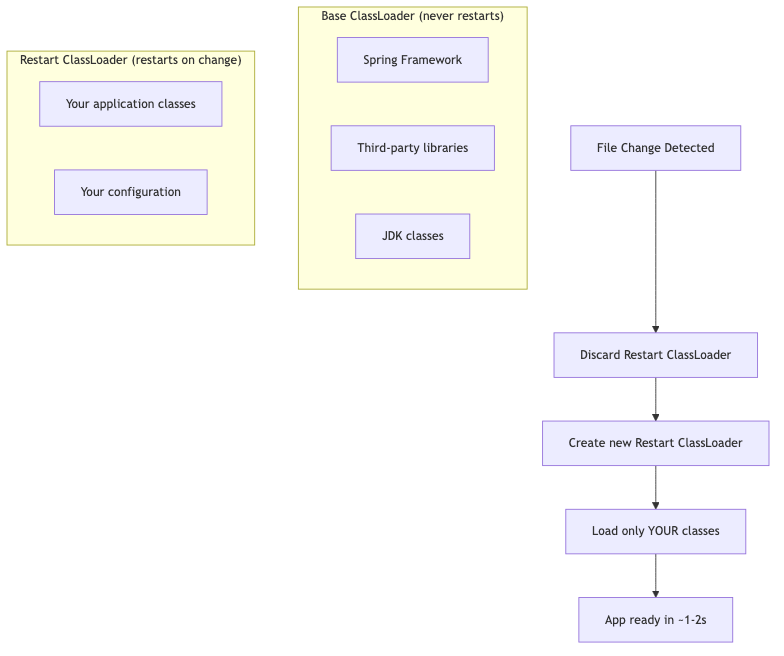
This is why DevTools restarts feel fast — it only reloads your code, not the entire framework.
Property Defaults in Development
DevTools automatically sets these properties (only in development):
1
2
3
4
5
6
7
8
9
10
11
12
13
# Template engines — no caching
spring.thymeleaf.cache=false
spring.freemarker.cache=false

# Show SQL
spring.jpa.show-sql=true

# Detailed error pages
server.error.include-stacktrace=always
server.error.include-message=always

# Disable HTTPS requirement for actuator
management.endpoints.web.exposure.include=*
Trigger File (Optional)
If restarts happen too often, configure a trigger file — restart only happens when you explicitly modify it:
1
2
3
4
spring:
  devtools:
    restart:
      trigger-file: .reloadtrigger
Then touch the file when you want a restart:
1
touch .reloadtrigger
Docker Compose Support
Spring Boot 3.1+ has built-in Docker Compose integration. It auto-starts your infrastructure containers when the application starts and stops them on shutdown.
1
2
3
4
5
6
<dependency>
    <groupId>org.springframework.boot</groupId>
    <artifactId>spring-boot-docker-compose</artifactId>
    <scope>runtime</scope>
    <optional>true</optional>
</dependency>
How It Works
- Spring Boot finds your
docker-compose.yml(orcompose.yml) in the project root - On app startup: runs
docker compose up - Waits for services to be healthy
- Auto-configures connection properties (database URL, port, credentials)
- On app shutdown: runs
docker compose down(configurable)
1
2
3
4
5
6
7
8
9
10
11
12
13
14
15
# docker-compose.yml — Spring Boot reads this automatically
services:
  postgres:
    image: postgres:16
    ports:
      - "5432:5432"
    environment:
      POSTGRES_DB: myapp
      POSTGRES_USER: dev
      POSTGRES_PASSWORD: dev

  redis:
    image: redis:7
    ports:
      - "6379:6379"
You don’t need to set spring.datasource.url — Spring Boot figures it out from the running container’s port mapping.
Configuration Options
1
2
3
4
5
6
7
8
9
10
spring:
  docker:
    compose:
      enabled: true
      lifecycle-management: start-and-stop  # or start-only, none
      file: docker-compose.yml
      skip:
        in-tests: true  # Don't start containers during tests
      stop:
        timeout: 30s
Supported Services (Auto-Configuration)
| Service | Auto-configured property |
|---|---|
| PostgreSQL | spring.datasource.url |
| MySQL | spring.datasource.url |
| MongoDB | spring.data.mongodb.uri |
| Redis | spring.data.redis.host/port |
| Kafka | spring.kafka.bootstrap-servers |
| RabbitMQ | spring.rabbitmq.host/port |
| Elasticsearch | spring.elasticsearch.uris |
Testcontainers at Development Time
Testcontainers isn’t just for tests. Since Spring Boot 3.1, you can use it to spin up infrastructure during local development with @ServiceConnection.
Dev-Time Configuration
Create a test configuration class that Spring Boot uses when running in development:
1
2
3
4
5
6
7
8
9
10
11
12
13
14
15
16
17
18
19
20
21
22
23
// src/test/java/com/example/TestOrderApplication.java
@TestConfiguration(proxyBeanMethods = false)
public class TestcontainersConfig {

    @Bean
    @ServiceConnection
    PostgreSQLContainer<?> postgresContainer() {
        return new PostgreSQLContainer<>("postgres:16");
    }

    @Bean
    @ServiceConnection
    KafkaContainer kafkaContainer() {
        return new KafkaContainer(DockerImageName.parse("confluentinc/cp-kafka:7.6.0"));
    }

    @Bean
    @ServiceConnection
    GenericContainer<?> redisContainer() {
        return new GenericContainer<>("redis:7")
                .withExposedPorts(6379);
    }
}
1
2
3
4
5
6
7
8
9
// Run this instead of the main application class during development
public class TestOrderApplication {

    public static void main(String[] args) {
        SpringApplication.from(OrderApplication::main)
                .with(TestcontainersConfig.class)
                .run(args);
    }
}
Run with:
1
./mvnw spring-boot:test-run
Docker Compose vs Testcontainers for Dev
| Aspect | Docker Compose Integration | Testcontainers at Dev Time |
|---|---|---|
| Configuration | docker-compose.yml | Java code (@ServiceConnection) |
| Port mapping | Fixed ports | Random ports (no conflicts) |
| Data persistence | Volumes persist data | Fresh container every time |
| Startup speed | Reuses running containers | Starts fresh each time |
| Shared with non-Java devs | Yes (standard Docker Compose) | No (requires Java/Maven) |
| CI/CD friendly | Yes | Yes |
| Multi-project conflicts | Possible port conflicts | Never (random ports) |
Profile Management
application-local.yml
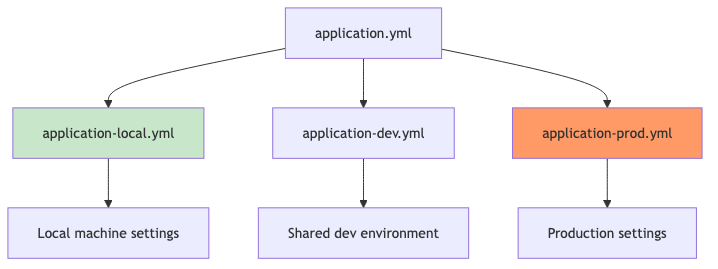
Keep local development settings separate from production:
1
2
3
4
5
6
7
8
9
10
11
# application.yml (shared defaults)
spring:
  application:
    name: order-service
  jpa:
    hibernate:
      ddl-auto: validate
    show-sql: false

server:
  port: 8080
1
2
3
4
5
6
7
8
9
10
11
12
13
14
15
16
# application-local.yml (local dev overrides)
spring:
  jpa:
    hibernate:
      ddl-auto: create-drop
    show-sql: true
  datasource:
    url: jdbc:postgresql://localhost:5432/orderdb
    username: dev
    password: dev

logging:
  level:
    org.hibernate.SQL: DEBUG
    org.hibernate.type.descriptor.sql.BasicBinder: TRACE
    com.example: DEBUG
Activate with:
1
2
3
4
# Environment variable
SPRING_PROFILES_ACTIVE=local ./mvnw spring-boot:run

# Or in IntelliJ: Run Configuration → Active profiles: local
Profile Hierarchy
graph TB
    A[application.yml] --> B[application-local.yml]
    A --> C[application-dev.yml]
    A --> D[application-prod.yml]
    B --> E[Local machine settings]
    C --> F[Shared dev environment]
    D --> G[Production settings]

    style B fill:#c8e6c9
    style D fill:#f96
Fast Startup Tips
| Technique | Startup Improvement | How to Enable |
|---|---|---|
| Lazy initialization | ~30-50% | spring.main.lazy-initialization=true |
| Class Data Sharing (CDS) | ~10-20% | -XX:SharedArchiveFile=app.jsa |
| Virtual threads | Fewer threads needed | spring.threads.virtual.enabled=true |
| AOT processing | ~40-60% | ./mvnw spring-boot:process-aot |
| GraalVM native | ~90-95% | ./mvnw -Pnative native:compile |
| Exclude unused auto-config | ~10-20% | spring.autoconfigure.exclude=[...] |
| Index annotations | ~5-10% | Add spring-context-indexer dependency |
Lazy Initialization (Dev Only)
1
2
3
4
# application-local.yml
spring:
  main:
    lazy-initialization: true
Beans are only created when first accessed. This dramatically reduces startup time but shifts the cost to the first request. Use only in development.
Measuring Startup Time
Spring Boot 3.2+ includes startup metrics:
1
2
3
4
5
6
7
8
9
10
spring:
  application:
    startup:
      track: true

management:
  endpoints:
    web:
      exposure:
        include: startup
Check GET /actuator/startup to see which beans take the longest to initialize.
IDE Productivity — IntelliJ IDEA Shortcuts
| Shortcut (macOS) | Action | Why it matters |
|---|---|---|
Cmd + Shift + A | Find Action | Find any IDE feature |
Cmd + E | Recent Files | Navigate without file tree |
Cmd + Shift + Enter | Complete Statement | Adds semicolons, braces |
Opt + Enter | Show Context Actions | Quick fixes, intentions |
Cmd + Opt + L | Reformat Code | Consistent formatting |
Ctrl + Shift + R | Run current test | Fastest test execution |
Cmd + Shift + T | Go to Test / Create Test | Jump between implementation/test |
Cmd + Opt + M | Extract Method | Refactor inline code |
Cmd + Shift + F | Find in Files | Global search |
Cmd + B | Go to Declaration | Navigate to source |
HTTP Client Files
IntelliJ has a built-in HTTP client. Create .http files for quick API testing without leaving the IDE:
1
2
3
4
5
6
7
8
9
10
11
12
13
14
15
16
17
18
19
### Create an order
POST http://localhost:8080/api/orders
Content-Type: application/json

{
  "customerId": "cust-123",
  "productName": "Mechanical Keyboard",
  "quantity": 1,
  "totalAmount": 149.99
}

### Get all orders
GET http://localhost:8080/api/orders

### Get order by ID
GET http://localhost:8080/api/orders/1

### Health check
GET http://localhost:8080/actuator/health
Measuring Build Time
Track where time goes in your build:
1
2
3
4
5
# Maven with timing
./mvnw clean package -DskipTests --show-version -T 1C

# Profile the build
./mvnw clean package -Dprofile
Build Speed Tips
| Optimization | Improvement | Command/Config |
|---|---|---|
| Parallel builds | ~30-40% | ./mvnw -T 1C (1 thread per core) |
| Skip tests (dev only) | ~50-70% | ./mvnw package -DskipTests |
| Daemon mode | ~20-30% | Default in Maven 4 / use mvnd |
| Incremental compilation | ~40-60% | Default with spring-boot-devtools |
| Build cache (Gradle) | ~50-80% | org.gradle.caching=true |
Common Problems
| Problem | Cause | Solution |
|---|---|---|
| DevTools restart not working | IDE not auto-compiling on save | IntelliJ: Enable “Build project automatically” |
| Docker Compose not starting | spring-boot-docker-compose not on classpath | Verify dependency scope is runtime |
| Port already in use (Docker Compose) | Previous containers still running | docker compose down or use random ports (Testcontainers) |
| Testcontainers slow first start | Docker images not cached | Pull images ahead of time: docker pull postgres:16 |
| Lazy init causes first-request timeout | Bean creation on first call takes too long | Only use lazy init locally, not in production |
| LiveReload not refreshing browser | Browser extension not installed | Install LiveReload extension or use spring.devtools.livereload.enabled=true |
| Profile not activating | Typo in profile name or YAML file naming | Verify file is application-{profile}.yml |
| Docker Compose detects wrong file | Multiple compose files in project | Set spring.docker.compose.file explicitly |