Why Docker Compose
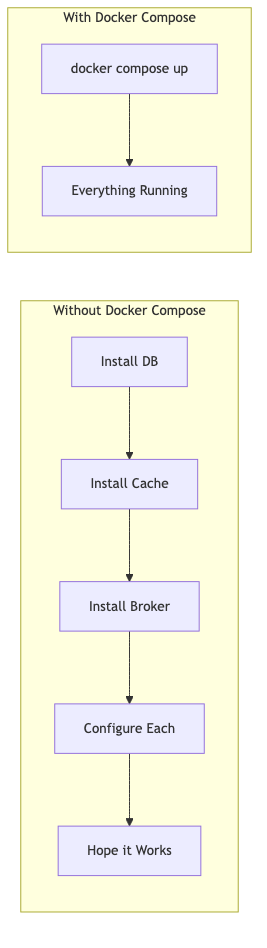
Every Spring Boot application depends on external services — databases, caches, message brokers, search engines. Without Docker Compose, onboarding a new developer looks like:
- Install PostgreSQL (hope the version matches)
- Install Redis (configure the port)
- Install Kafka + ZooKeeper (good luck)
- Create databases, run migrations
- Set environment variables
- Pray it all works together
With Docker Compose: docker compose up -d. Done.
flowchart LR
    subgraph "Without Docker Compose"
        A[Install DB] --> B[Install Cache]
        B --> C[Install Broker]
        C --> D[Configure Each]
        D --> E[Hope it Works]
    end

    subgraph "With Docker Compose"
        F[docker compose up] --> G[Everything Running]
    end
Anatomy of docker-compose.yml
1
2
3
4
5
6
7
8
9
10
11
12
13
14
15
16
17
18
19
20
21
| # docker-compose.yml
services:
postgres: # Service name (becomes hostname on the network)
image: postgres:16-alpine
container_name: myapp-postgres
environment:
POSTGRES_DB: myapp
POSTGRES_USER: postgres
POSTGRES_PASSWORD: postgres
ports:
- "5432:5432" # host:container
volumes:
- postgres_data:/var/lib/postgresql/data
healthcheck:
test: ["CMD-SHELL", "pg_isready -U postgres"]
interval: 5s
timeout: 3s
retries: 5
volumes:
postgres_data: # Named volume — persists across restarts
|
Key concepts:
- services — each service is a container
- image — the Docker image to use
- ports — map container ports to host ports
- volumes — persist data beyond container lifecycle
- healthcheck — verify the service is actually ready
- environment — configure the container
Service Patterns for Spring Devs
PostgreSQL
1
2
3
4
5
6
7
8
9
10
11
12
13
14
15
16
17
18
| services:
postgres:
image: postgres:16-alpine
container_name: app-postgres
environment:
POSTGRES_DB: ${DB_NAME:-myapp}
POSTGRES_USER: ${DB_USER:-postgres}
POSTGRES_PASSWORD: ${DB_PASS:-postgres}
ports:
- "5432:5432"
volumes:
- postgres_data:/var/lib/postgresql/data
- ./init-scripts:/docker-entrypoint-initdb.d # Auto-run SQL on first start
healthcheck:
test: ["CMD-SHELL", "pg_isready -U postgres -d myapp"]
interval: 5s
timeout: 3s
retries: 5
|
Spring Boot config:
1
2
3
4
5
| spring:
datasource:
url: jdbc:postgresql://localhost:5432/myapp
username: postgres
password: postgres
|
Redis
1
2
3
4
5
6
7
8
9
10
11
12
13
| redis:
image: redis:7-alpine
container_name: app-redis
ports:
- "6379:6379"
volumes:
- redis_data:/data
command: redis-server --appendonly yes --maxmemory 128mb --maxmemory-policy allkeys-lru
healthcheck:
test: ["CMD", "redis-cli", "ping"]
interval: 5s
timeout: 3s
retries: 5
|
Spring Boot config:
1
2
3
4
5
| spring:
data:
redis:
host: localhost
port: 6379
|
Kafka (with KRaft — no ZooKeeper)
1
2
3
4
5
6
7
8
9
10
11
12
13
14
15
16
17
18
19
20
21
| kafka:
image: confluentinc/cp-kafka:7.7.0
container_name: app-kafka
ports:
- "9092:9092"
environment:
KAFKA_NODE_ID: 1
KAFKA_PROCESS_ROLES: broker,controller
KAFKA_LISTENERS: PLAINTEXT://0.0.0.0:9092,CONTROLLER://0.0.0.0:9093
KAFKA_ADVERTISED_LISTENERS: PLAINTEXT://localhost:9092
KAFKA_CONTROLLER_LISTENER_NAMES: CONTROLLER
KAFKA_CONTROLLER_QUORUM_VOTERS: 1@kafka:9093
KAFKA_LISTENER_SECURITY_PROTOCOL_MAP: PLAINTEXT:PLAINTEXT,CONTROLLER:PLAINTEXT
KAFKA_OFFSETS_TOPIC_REPLICATION_FACTOR: 1
CLUSTER_ID: "MkU3OEVBNTcwNTJENDM2Qk"
healthcheck:
test: ["CMD", "kafka-broker-api-versions", "--bootstrap-server", "localhost:9092"]
interval: 10s
timeout: 5s
retries: 10
start_period: 30s
|
MongoDB
1
2
3
4
5
6
7
8
9
10
11
12
13
14
15
16
| mongodb:
image: mongo:7
container_name: app-mongodb
ports:
- "27017:27017"
environment:
MONGO_INITDB_ROOT_USERNAME: admin
MONGO_INITDB_ROOT_PASSWORD: admin
MONGO_INITDB_DATABASE: myapp
volumes:
- mongo_data:/data/db
healthcheck:
test: ["CMD", "mongosh", "--eval", "db.adminCommand('ping')"]
interval: 5s
timeout: 3s
retries: 5
|
Networking
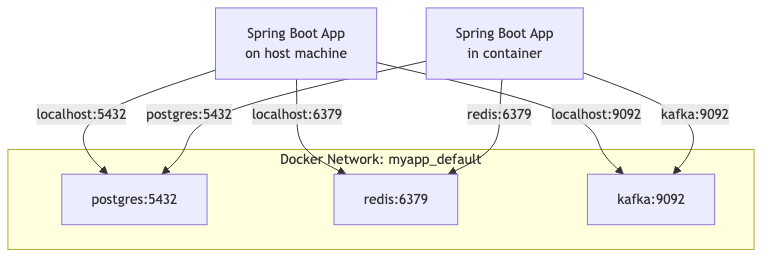
Docker Compose creates a default network. Services communicate using their service name as a hostname.
flowchart TD
    subgraph docker-network[Docker Network: myapp_default]
        A[postgres:5432]
        B[redis:6379]
        C[kafka:9092]
    end

    D[Spring Boot App<br>on host machine] -->|localhost:5432| A
    D -->|localhost:6379| B
    D -->|localhost:9092| C

    E[Spring Boot App<br>in container] -->|postgres:5432| A
    E -->|redis:6379| B
    E -->|kafka:9092| C
Key insight: When your Spring Boot app runs on the host (normal development), use localhost. When it runs in a container, use the service name.
1
2
3
4
5
6
7
8
9
| # application.yml for local development (app on host)
spring:
datasource:
url: jdbc:postgresql://localhost:5432/myapp
# application-docker.yml (app in container)
spring:
datasource:
url: jdbc:postgresql://postgres:5432/myapp
|
Volumes — Persisting Data vs Ephemeral
| Volume Type | Use Case | Survives docker compose down? |
|---|
| Named volume | Database data | Yes (unless -v flag) |
| Bind mount | Config files, init scripts | Always (it’s your filesystem) |
| No volume | Temporary data, test environments | No |
1
2
3
4
5
6
7
8
9
10
| volumes:
# Named volume — Docker manages location
postgres_data:
redis_data:
services:
postgres:
volumes:
- postgres_data:/var/lib/postgresql/data # Named volume
- ./init-scripts:/docker-entrypoint-initdb.d:ro # Bind mount (read-only)
|
Tip: Use docker compose down -v to destroy volumes when you want a fresh start.
Environment Variables and .env Files
.env File (git-ignored for secrets)
1
2
3
4
5
| # .env
DB_NAME=myapp
DB_USER=postgres
DB_PASS=localdev123
REDIS_PASSWORD=localdev123
|
Using in docker-compose.yml
1
2
3
4
5
6
| services:
postgres:
environment:
POSTGRES_DB: ${DB_NAME}
POSTGRES_USER: ${DB_USER}
POSTGRES_PASSWORD: ${DB_PASS}
|
.env.example (committed to git)
1
2
3
4
5
| # .env.example — copy to .env and fill in values
DB_NAME=myapp
DB_USER=postgres
DB_PASS=changeme
REDIS_PASSWORD=changeme
|
Health Checks — Why They Matter for depends_on
Without health checks, depends_on only waits for the container to start, not for the service inside to be ready.
1
2
3
4
5
6
7
8
9
10
11
12
13
14
15
16
| services:
postgres:
image: postgres:16-alpine
healthcheck:
test: ["CMD-SHELL", "pg_isready -U postgres"]
interval: 5s
timeout: 3s
retries: 5
app:
build: .
depends_on:
postgres:
condition: service_healthy # Wait for health check to pass
redis:
condition: service_healthy
|
Without condition: service_healthy, your app container might start before PostgreSQL is accepting connections — causing connection refused errors on startup.
Spring Boot 3.1+ Docker Compose Integration
Spring Boot 3.1 introduced automatic Docker Compose management. Add the dependency:
1
2
3
4
5
| <dependency>
<groupId>org.springframework.boot</groupId>
<artifactId>spring-boot-docker-compose</artifactId>
<scope>runtime</scope>
</dependency>
|
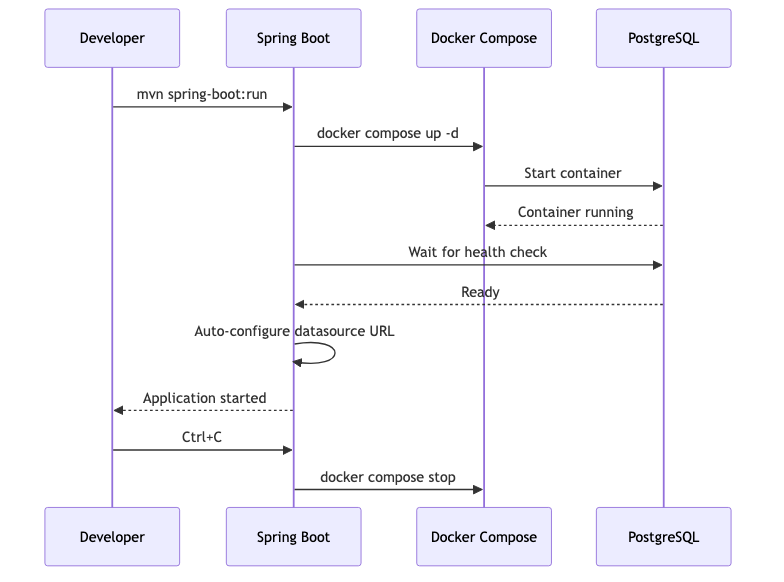
Now when you run mvn spring-boot:run, Spring Boot will:
- Detect
docker-compose.yml in your project - Run
docker compose up automatically - Wait for services to be healthy
- Configure connection properties automatically (port mapping)
- Run
docker compose stop when you stop your app
1
2
3
4
5
6
7
| # application.yml — minimal config needed
spring:
docker:
compose:
enabled: true
lifecycle-management: start-and-stop # or start-only
file: docker-compose.yml
|
sequenceDiagram
    participant Dev as Developer
    participant SB as Spring Boot
    participant DC as Docker Compose
    participant PG as PostgreSQL

    Dev->>SB: mvn spring-boot:run
    SB->>DC: docker compose up -d
    DC->>PG: Start container
    PG-->>DC: Container running
    SB->>PG: Wait for health check
    PG-->>SB: Ready
    SB->>SB: Auto-configure datasource URL
    SB-->>Dev: Application started

    Dev->>SB: Ctrl+C
    SB->>DC: docker compose stop
Limitations:
- Only works with
spring-boot:run (not when running the JAR directly) - Disabled when
spring.profiles.active=prod (safety) - The compose file must be in the project root or configured explicitly
Profiles — Dev vs Test
1
2
3
4
5
6
7
8
9
10
11
12
13
14
15
16
17
18
19
20
21
22
23
| services:
postgres:
image: postgres:16-alpine
profiles: ["dev", "test"] # Available in both
# ...
redis:
image: redis:7-alpine
profiles: ["dev", "test"]
# ...
kafka:
image: confluentinc/cp-kafka:7.7.0
profiles: ["dev"] # Only in dev, not test
# ...
mailhog:
image: mailhog/mailhog
profiles: ["dev"] # Only in dev
ports:
- "1025:1025" # SMTP
- "8025:8025" # Web UI
# ...
|
1
2
3
4
5
| # Start dev services
docker compose --profile dev up -d
# Start test services (lighter — no Kafka, no MailHog)
docker compose --profile test up -d
|
Common Patterns
| Pattern | What | Why | YAML Snippet |
|---|
| Init scripts | SQL files in /docker-entrypoint-initdb.d | Create schemas on first start | volumes: [./init.sql:/docker-entrypoint-initdb.d/init.sql] |
| Wait for healthy | depends_on: { db: { condition: service_healthy } } | App starts after DB is ready | See Health Checks section |
| Resource limits | deploy: { resources: { limits: { memory: 512M } } } | Prevent runaway containers | deploy.resources.limits.memory: 512M |
| Restart policy | restart: unless-stopped | Auto-recover from crashes | restart: unless-stopped |
| Read-only mounts | volumes: [./config:/app/config:ro] | Prevent container from modifying host files | :ro suffix |
| Tmpfs for speed | tmpfs: /tmp | Fast ephemeral storage (test DBs) | tmpfs: ["/var/lib/postgresql/data"] |
| Custom network | networks: { backend: {} } | Isolate service groups | Named networks |
Common Problems
| Problem | Cause | Solution |
|---|
| Port already in use | Host port conflict | Change host port: "5433:5432" |
| Data not persisting | No named volume | Add named volume in volumes: section |
| Container can’t reach another | Different networks or typo in service name | Check docker network ls, use service name exactly |
| Init script not running | DB already initialized (volume exists) | docker compose down -v then up |
| Permission denied on volume | UID mismatch (Linux) | Set user: "1000:1000" or fix permissions |
| OOM killed | Container exceeds memory | Add memory limits or increase Docker memory |
| Slow startup | No health check, app retries | Add health checks + depends_on with condition |
host.docker.internal not resolving | Older Docker on Linux | Add extra_hosts: ["host.docker.internal:host-gateway"] |
| Kafka not connecting | Advertised listener misconfigured | Set KAFKA_ADVERTISED_LISTENERS to localhost |
References