Spring Boot + Testcontainers — Integration Testing Done Right
A hands-on guide to integration testing Spring Boot applications with Testcontainers. Covers PostgreSQL, Kafka, Redis — real containers replacing mocks. Includes @ServiceConnection, dynamic properties, test slicing, and CI/CD setup with complete working examples.
The Problem
Your unit tests pass. Your mocks are green. You deploy to staging and the app explodes because:
- The SQL query uses a PostgreSQL-specific feature that H2 doesn’t support
- The Kafka serializer config works locally but not with the real broker
- The Redis TTL behaves differently in your mock than in actual Redis
Mocks lie. Real infrastructure doesn’t.
Testcontainers solves this by spinning up real Docker containers for your tests. PostgreSQL in a container. Kafka in a container. Redis in a container. Same engines as production — disposable, reproducible, fast.
What We Are Building
A test suite that:
- Tests against real PostgreSQL — JPA repositories, custom queries, migrations
- Tests against real Kafka — producer/consumer integration
- Tests against real Redis — caching behavior with actual TTLs
- Runs in CI/CD — GitHub Actions with Docker-in-Docker
flowchart LR
    subgraph "Test JVM"
        A[Spring Boot Test] --> B[Repository]
        A --> C[KafkaTemplate]
        A --> D[RedisTemplate]
    end

    subgraph "Docker Containers (managed by Testcontainers)"
        E[(PostgreSQL)]
        F[Kafka Broker]
        G[Redis]
    end

    B --> E
    C --> F
    D --> G

    style E fill:#48dbfb,color:#333
    style F fill:#feca57,color:#333
    style G fill:#2ed573,color:#fff
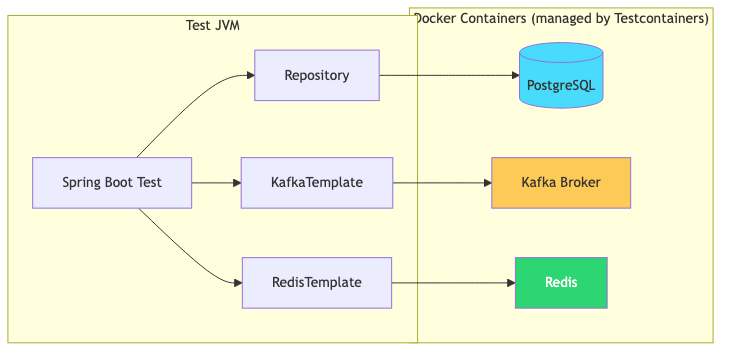
No mocks. No embedded databases. No “works on my machine.”
Prerequisites
| Component | Version |
|---|---|
| Java | 21+ |
| Spring Boot | 3.5+ |
| Docker | Running (Testcontainers needs it) |
| Maven | 3.9+ |
Setup
Dependencies (pom.xml)
1
2
3
4
5
6
7
8
9
10
11
12
13
14
15
16
17
18
19
20
21
22
23
24
25
26
27
28
29
30
31
32
33
34
35
36
37
38
39
<dependencies>
    <!-- Application dependencies -->
    <dependency>
        <groupId>org.springframework.boot</groupId>
        <artifactId>spring-boot-starter-data-jpa</artifactId>
    </dependency>
    <dependency>
        <groupId>org.postgresql</groupId>
        <artifactId>postgresql</artifactId>
        <scope>runtime</scope>
    </dependency>

    <!-- Test dependencies -->
    <dependency>
        <groupId>org.springframework.boot</groupId>
        <artifactId>spring-boot-starter-test</artifactId>
        <scope>test</scope>
    </dependency>
    <dependency>
        <groupId>org.springframework.boot</groupId>
        <artifactId>spring-boot-testcontainers</artifactId>
        <scope>test</scope>
    </dependency>
    <dependency>
        <groupId>org.testcontainers</groupId>
        <artifactId>postgresql</artifactId>
        <scope>test</scope>
    </dependency>
    <dependency>
        <groupId>org.testcontainers</groupId>
        <artifactId>kafka</artifactId>
        <scope>test</scope>
    </dependency>
    <dependency>
        <groupId>org.testcontainers</groupId>
        <artifactId>junit-jupiter</artifactId>
        <scope>test</scope>
    </dependency>
</dependencies>
| Dependency | Purpose |
|---|---|
spring-boot-testcontainers | @ServiceConnection auto-configuration |
org.testcontainers:postgresql | PostgreSQL container support |
org.testcontainers:kafka | Kafka container support |
org.testcontainers:junit-jupiter | JUnit 5 lifecycle integration |
Pattern 1: PostgreSQL with @ServiceConnection
The simplest approach — Spring Boot 3.1+ auto-configures the datasource from the container:
1
2
3
4
5
6
7
8
9
10
11
12
13
14
15
16
17
18
19
20
21
22
23
24
25
26
27
28
29
30
31
32
33
34
35
36
37
38
39
40
@SpringBootTest
@Testcontainers
class PaymentRepositoryIntegrationTest {

    @Container
    @ServiceConnection
    static PostgreSQLContainer<?> postgres = new PostgreSQLContainer<>("postgres:16-alpine");

    @Autowired
    private PaymentRepository paymentRepository;

    @Test
    void shouldSaveAndRetrievePayment() {
        Payment payment = new Payment();
        payment.setTransactionId("TXN-001");
        payment.setAmount(new BigDecimal("250.00"));
        payment.setStatus(PaymentStatus.COMPLETED);

        Payment saved = paymentRepository.save(payment);

        assertThat(saved.getId()).isNotNull();
        assertThat(paymentRepository.findByTransactionId("TXN-001"))
                .isPresent()
                .hasValueSatisfying(p -> {
                    assertThat(p.getAmount()).isEqualByComparingTo("250.00");
                    assertThat(p.getStatus()).isEqualTo(PaymentStatus.COMPLETED);
                });
    }

    @Test
    void shouldFindPaymentsByStatus() {
        paymentRepository.save(createPayment("TXN-001", PaymentStatus.COMPLETED));
        paymentRepository.save(createPayment("TXN-002", PaymentStatus.PENDING));
        paymentRepository.save(createPayment("TXN-003", PaymentStatus.COMPLETED));

        List<Payment> completed = paymentRepository.findByStatus(PaymentStatus.COMPLETED);

        assertThat(completed).hasSize(2);
    }
}
What @ServiceConnection does: Spring Boot detects the container type (PostgreSQL) and auto-configures spring.datasource.url, username, and password from the running container. Zero manual property wiring.
Pattern 2: Dynamic Properties (Pre-3.1 or Custom Config)
For cases where @ServiceConnection doesn’t cover your setup:
1
2
3
4
5
6
7
8
9
10
11
12
13
14
15
16
17
18
@SpringBootTest
@Testcontainers
class CustomConfigTest {

    @Container
    static PostgreSQLContainer<?> postgres = new PostgreSQLContainer<>("postgres:16-alpine")
            .withDatabaseName("testdb")
            .withInitScript("schema.sql");

    @DynamicPropertySource
    static void configureProperties(DynamicPropertyRegistry registry) {
        registry.add("spring.datasource.url", postgres::getJdbcUrl);
        registry.add("spring.datasource.username", postgres::getUsername);
        registry.add("spring.datasource.password", postgres::getPassword);
    }

    // tests...
}
Use @DynamicPropertySource when you need custom database names, init scripts, or non-standard property mappings.
Pattern 3: Kafka Integration Test
1
2
3
4
5
6
7
8
9
10
11
12
13
14
15
16
17
18
19
20
21
22
23
24
25
26
27
28
@SpringBootTest
@Testcontainers
class PaymentEventIntegrationTest {

    @Container
    @ServiceConnection
    static KafkaContainer kafka = new KafkaContainer(
            DockerImageName.parse("confluentinc/cp-kafka:7.6.0"));

    @Autowired
    private KafkaTemplate<String, PaymentEvent> kafkaTemplate;

    @Autowired
    private PaymentEventConsumer consumer;

    @Test
    void shouldPublishAndConsumePaymentEvent() throws Exception {
        PaymentEvent event = new PaymentEvent("TXN-100", "COMPLETED", BigDecimal.TEN);

        kafkaTemplate.send("payments", event.transactionId(), event).get();

        // Wait for consumer to process
        Awaitility.await()
                .atMost(Duration.ofSeconds(10))
                .untilAsserted(() ->
                        assertThat(consumer.getProcessedEvents()).contains(event));
    }
}
The Kafka container starts a real broker. Your producer serializes, the consumer deserializes — exactly like production.
Pattern 4: Shared Container (Faster Test Suites)
Starting a container per test class is slow. Share containers across the entire suite:
1
2
3
4
5
6
7
8
9
10
11
12
13
14
public abstract class BaseIntegrationTest {

    @Container
    @ServiceConnection
    protected static final PostgreSQLContainer<?> POSTGRES =
            new PostgreSQLContainer<>("postgres:16-alpine")
                    .withReuse(true);

    @Container
    @ServiceConnection
    protected static final KafkaContainer KAFKA =
            new KafkaContainer(DockerImageName.parse("confluentinc/cp-kafka:7.6.0"))
                    .withReuse(true);
}
1
2
3
4
5
6
7
8
9
@SpringBootTest
class PaymentServiceTest extends BaseIntegrationTest {
    // Uses shared POSTGRES and KAFKA containers
}

@SpringBootTest
class NotificationServiceTest extends BaseIntegrationTest {
    // Same containers, already running — fast startup
}
Enable reuse in ~/.testcontainers.properties:
1
testcontainers.reuse.enable=true
Pattern 5: Test Slicing with Testcontainers
You don’t always need a full @SpringBootTest. Use slices for faster, focused tests:
@DataJpaTest — Repository layer only
1
2
3
4
5
6
7
8
9
10
11
12
13
14
15
16
17
18
19
@DataJpaTest
@Testcontainers
@AutoConfigureTestDatabase(replace = AutoConfigureTestDatabase.Replace.NONE)
class PaymentRepositorySliceTest {

    @Container
    @ServiceConnection
    static PostgreSQLContainer<?> postgres = new PostgreSQLContainer<>("postgres:16-alpine");

    @Autowired
    private PaymentRepository paymentRepository;

    @Test
    void nativeQueryShouldWork() {
        // Tests PostgreSQL-specific features (JSON operators, window functions, etc.)
        List<Payment> results = paymentRepository.findHighValuePayments(BigDecimal.valueOf(1000));
        assertThat(results).isEmpty();
    }
}
@AutoConfigureTestDatabase(replace = NONE) tells Spring Boot NOT to replace your datasource with an embedded DB — use the real Testcontainers one.
Pattern 6: Redis Container
1
2
3
4
5
6
7
8
9
10
11
12
13
14
15
16
17
18
19
20
21
22
23
24
25
26
27
28
29
30
31
32
33
34
35
36
37
38
39
@SpringBootTest
@Testcontainers
class CacheIntegrationTest {

    @Container
    @ServiceConnection
    static GenericContainer<?> redis = new GenericContainer<>("redis:7-alpine")
            .withExposedPorts(6379);

    @Autowired
    private PaymentService paymentService;

    @Autowired
    private CacheManager cacheManager;

    @Test
    void shouldCachePaymentLookup() {
        // First call — cache miss, hits DB
        PaymentInfo first = paymentService.getPayment("TXN-001");

        // Second call — cache hit, returns from Redis
        PaymentInfo second = paymentService.getPayment("TXN-001");

        assertThat(first).isEqualTo(second);
        // Verify only one DB query was made (via spy or query count)
    }

    @Test
    void cacheShouldExpireAfterTtl() throws Exception {
        paymentService.getPayment("TXN-001");

        // Wait for TTL (e.g., 5 seconds in test config)
        Thread.sleep(6000);

        // Cache expired — next call hits DB again
        Cache cache = cacheManager.getCache("payments");
        assertThat(cache.get("TXN-001")).isNull();
    }
}
CI/CD: GitHub Actions
1
2
3
4
5
6
7
8
9
10
11
12
13
14
15
16
17
18
name: Integration Tests

on: [push, pull_request]

jobs:
  test:
    runs-on: ubuntu-latest

    steps:
      - uses: actions/checkout@v4

      - uses: actions/setup-java@v4
        with:
          java-version: '21'
          distribution: 'temurin'

      - name: Run integration tests
        run: ./mvnw verify -Pintegration-tests
That’s it. GitHub Actions runners have Docker pre-installed. Testcontainers works out of the box — no Docker Compose files, no service containers to configure.
Test Organization Strategy
1
2
3
4
5
6
7
8
9
10
11
src/test/java/
├── unit/                          # Fast, no containers
│   ├── PaymentServiceTest.java
│   └── ValidatorTest.java
├── integration/                   # Testcontainers
│   ├── BaseIntegrationTest.java   # Shared container config
│   ├── PaymentRepositoryIT.java
│   ├── KafkaProducerIT.java
│   └── CacheIT.java
└── e2e/                           # Full app tests
    └── PaymentFlowE2ETest.java
Maven profile to separate them:
1
2
3
4
5
6
7
8
9
10
11
12
13
14
15
16
17
18
<profiles>
    <profile>
        <id>integration-tests</id>
        <build>
            <plugins>
                <plugin>
                    <groupId>org.apache.maven.plugins</groupId>
                    <artifactId>maven-failsafe-plugin</artifactId>
                    <configuration>
                        <includes>
                            <include>**/*IT.java</include>
                        </includes>
                    </configuration>
                </plugin>
            </plugins>
        </build>
    </profile>
</profiles>
Testcontainers vs Alternatives
| Approach | Pros | Cons |
|---|---|---|
| H2 in-memory | Fast, no Docker | SQL dialect differences, missing features |
| Embedded Kafka | No Docker needed | Deprecated, config doesn’t match real broker |
| Docker Compose (manual) | Full control | Not lifecycle-managed, port conflicts |
| Testcontainers | Real engines, lifecycle-managed, portable | Requires Docker, slightly slower startup |
Testcontainers wins when correctness matters more than speed. For a 30-second test that catches a production bug, it’s worth it.
Performance Tips
| Tip | Impact |
|---|---|
Use withReuse(true) | Containers survive between test runs (~10x faster) |
| Share containers via base class | One container per suite, not per class |
| Use alpine images | postgres:16-alpine starts faster than full image |
Use @DataJpaTest over @SpringBootTest | Loads only JPA slice |
| Parallel test execution | Testcontainers is thread-safe |
Use ryuk cleanup | Automatic container cleanup (enabled by default) |
Common Problems
| Symptom | Cause | Fix |
|---|---|---|
Could not connect to Ryuk | Docker not running | Start Docker Desktop |
| Container starts but tests fail to connect | Wrong port mapping | Use container.getMappedPort() or @ServiceConnection |
| Tests pass locally, fail in CI | CI runner lacks Docker | Use ubuntu-latest (has Docker) |
| Slow test suite (> 2 min) | Container per class | Switch to shared containers with withReuse(true) |
Connection refused after container starts | App connects before container is ready | Testcontainers has built-in wait strategies — check logs |
| Flyway/Liquibase conflicts | Schema already exists on reused container | Use withReuse(false) for migration tests |
Full Working Example
The complete test suite with PostgreSQL, Kafka, and Redis examples is at github.com/AnupamSinha/spring-boot-examples/tree/main/08-testcontainers.
1
2
3
git clone https://github.com/AnupamSinha/spring-boot-examples/tree/main/08-testcontainers
cd spring-boot-testcontainers
./mvnw verify