Spring Boot + WebSocket — Real-Time Notifications and Chat
Build real-time features with Spring Boot WebSocket and STOMP. Covers bidirectional communication, message broker, pub/sub topics, server-push notifications, and a working chat application.
The Problem
Traditional HTTP is request-response. The client asks, the server answers. But what about:
- Chat messages that appear instantly
- Notifications pushed from the server
- Live dashboards with real-time data
- Collaborative editing
You have three options:
| Approach | Direction | Latency | Connection | Use Case |
|---|---|---|---|---|
| Polling | Client → Server | High (interval) | New connection each time | Simple, low-frequency updates |
| SSE (Server-Sent Events) | Server → Client | Low | Persistent, one-way | Notifications, feeds |
| WebSocket | Bidirectional | Very low | Persistent, full-duplex | Chat, gaming, collaboration |
WebSocket wins when you need bidirectional, low-latency, persistent communication.
What is WebSocket + STOMP?
WebSocket provides a persistent TCP connection with full-duplex communication. But raw WebSocket is just bytes — no routing, no pub/sub, no message format.
STOMP (Simple Text Oriented Messaging Protocol) adds structure on top of WebSocket:
- Message routing (destinations like
/topic/messages) - Pub/sub semantics (subscribe to topics)
- Headers and body format
- Works with message brokers (RabbitMQ, ActiveMQ)
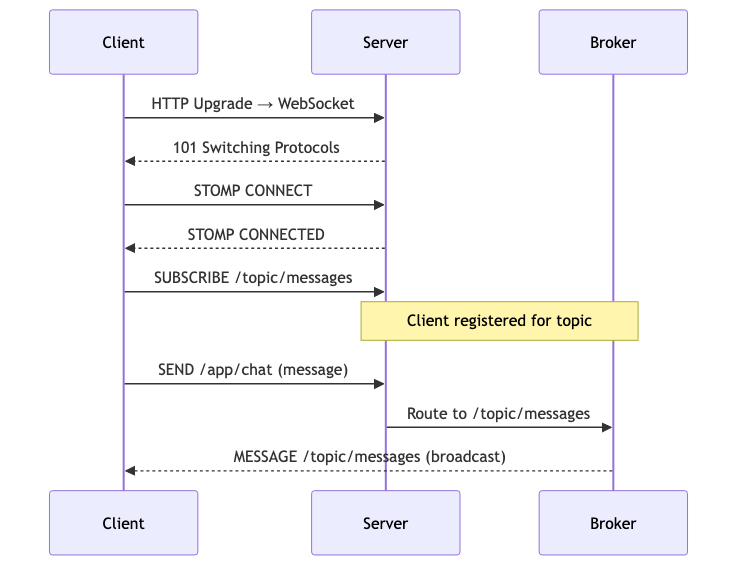
sequenceDiagram
    participant Client
    participant Server
    participant Broker

    Client->>Server: HTTP Upgrade → WebSocket
    Server-->>Client: 101 Switching Protocols
    Client->>Server: STOMP CONNECT
    Server-->>Client: STOMP CONNECTED

    Client->>Server: SUBSCRIBE /topic/messages
    Note over Server,Broker: Client registered for topic

    Client->>Server: SEND /app/chat (message)
    Server->>Broker: Route to /topic/messages
    Broker-->>Client: MESSAGE /topic/messages (broadcast)
Setup
Add the WebSocket starter to your pom.xml:
1
2
3
4
5
6
7
8
<dependency>
    <groupId>org.springframework.boot</groupId>
    <artifactId>spring-boot-starter-websocket</artifactId>
</dependency>
<dependency>
    <groupId>org.springframework.boot</groupId>
    <artifactId>spring-boot-starter-web</artifactId>
</dependency>
WebSocket Configuration
1
2
3
4
5
6
7
8
9
10
11
12
13
14
15
16
17
18
19
20
@Configuration
@EnableWebSocketMessageBroker
public class WebSocketConfig implements WebSocketMessageBrokerConfigurer {

    @Override
    public void configureMessageBroker(MessageBrokerRegistry config) {
        // Messages FROM server TO client go to /topic/*
        config.enableSimpleBroker("/topic");
        // Messages FROM client TO server are prefixed with /app
        config.setApplicationDestinationPrefixes("/app");
    }

    @Override
    public void registerStompEndpoints(StompEndpointRegistry registry) {
        // The WebSocket handshake endpoint
        registry.addEndpoint("/ws")
                .setAllowedOriginPatterns("*")
                .withSockJS(); // fallback for older browsers
    }
}
Key decisions:
/topic— prefix for broadcast destinations (pub/sub)/app— prefix for messages routed to@MessageMappingcontrollers/ws— the initial HTTP endpoint that upgrades to WebSocketwithSockJS()— enables fallback transports (XHR streaming, long-polling) for browsers without WebSocket support
You can also add /queue for point-to-point messaging:
1
2
config.enableSimpleBroker("/topic", "/queue");
config.setUserDestinationPrefix("/user"); // for user-specific messages
Chat Controller — @MessageMapping
@MessageMapping is the WebSocket equivalent of @RequestMapping:
1
2
3
4
5
6
7
8
9
10
11
12
13
14
15
16
17
18
19
20
21
22
23
24
25
26
@Controller
public class ChatController {

    @MessageMapping("/chat")
    @SendTo("/topic/messages")
    public ChatMessage sendMessage(ChatMessage message) {
        return new ChatMessage(
                message.sender(),
                message.content(),
                Instant.now(),
                message.type()
        );
    }

    @MessageMapping("/chat.join")
    @SendTo("/topic/messages")
    public ChatMessage join(ChatMessage message) {
        return ChatMessage.join(message.sender());
    }

    @MessageMapping("/chat.leave")
    @SendTo("/topic/messages")
    public ChatMessage leave(ChatMessage message) {
        return ChatMessage.leave(message.sender());
    }
}
The message model:
1
2
3
4
5
6
7
8
9
10
11
12
13
14
15
16
public record ChatMessage(
        String sender,
        String content,
        Instant timestamp,
        MessageType type
) {
    public enum MessageType { CHAT, JOIN, LEAVE }

    public static ChatMessage join(String sender) {
        return new ChatMessage(sender, sender + " joined the chat", Instant.now(), MessageType.JOIN);
    }

    public static ChatMessage leave(String sender) {
        return new ChatMessage(sender, sender + " left the chat", Instant.now(), MessageType.LEAVE);
    }
}
Flow:
- Client sends to
/app/chat(app prefix + mapping) - Spring routes to
sendMessage()method - Return value is sent to
/topic/messages(via@SendTo) - All subscribers of
/topic/messagesreceive the message
Server-Push Notifications — SimpMessagingTemplate
Not all messages originate from WebSocket clients. Sometimes you need to push from a REST endpoint, a scheduled task, or an event listener:
1
2
3
4
5
6
7
8
9
10
11
12
13
14
15
16
17
18
19
20
21
22
23
24
25
26
@RestController
@RequestMapping("/api/notifications")
public class NotificationController {

    private final SimpMessagingTemplate messagingTemplate;

    public NotificationController(SimpMessagingTemplate messagingTemplate) {
        this.messagingTemplate = messagingTemplate;
    }

    @PostMapping
    public Map<String, String> sendNotification(@RequestBody Map<String, String> payload) {
        String message = payload.getOrDefault("message", "No message");

        Map<String, Object> notification = Map.of(
                "message", message,
                "timestamp", Instant.now().toString(),
                "type", "SERVER_NOTIFICATION"
        );

        // Push to all subscribers of /topic/notifications
        messagingTemplate.convertAndSend("/topic/notifications", notification);

        return Map.of("status", "sent", "message", message);
    }
}
Use SimpMessagingTemplate anywhere you need to push messages:
convertAndSend("/topic/...")— broadcast to all subscribersconvertAndSendToUser(username, "/queue/...", payload)— send to a specific user
Test it:
1
2
3
curl -X POST http://localhost:8080/api/notifications \
  -H "Content-Type: application/json" \
  -d '{"message": "Deployment complete!"}'
Frontend — Minimal HTML/JS
A working chat client using SockJS and STOMP.js:
1
2
3
4
5
6
7
8
9
10
11
12
13
14
15
16
17
18
19
20
21
22
23
24
25
26
27
28
29
30
31
32
33
34
35
36
37
38
39
40
41
42
43
44
45
46
<script src="https://cdn.jsdelivr.net/npm/sockjs-client@1/dist/sockjs.min.js"></script>
<script src="https://cdn.jsdelivr.net/npm/stompjs@2.3.3/lib/stomp.min.js"></script>
<script>
    let stompClient = null;

    function connect(username) {
        const socket = new SockJS('/ws');
        stompClient = Stomp.over(socket);

        stompClient.connect({}, function () {
            // Subscribe to chat messages
            stompClient.subscribe('/topic/messages', function (msg) {
                const message = JSON.parse(msg.body);
                displayMessage(message);
            });

            // Subscribe to notifications
            stompClient.subscribe('/topic/notifications', function (msg) {
                const notification = JSON.parse(msg.body);
                displayNotification(notification);
            });

            // Announce joining
            stompClient.send('/app/chat.join', {}, JSON.stringify({
                sender: username,
                type: 'JOIN'
            }));
        });
    }

    function sendMessage(sender, content) {
        stompClient.send('/app/chat', {}, JSON.stringify({
            sender: sender,
            content: content,
            type: 'CHAT'
        }));
    }

    function disconnect(username) {
        stompClient.send('/app/chat.leave', {}, JSON.stringify({
            sender: username,
            type: 'LEAVE'
        }));
        stompClient.disconnect();
    }
</script>
The full HTML with styling is in the project’s src/main/resources/static/index.html.
Authentication with WebSocket
In production, you need to authenticate WebSocket connections. Spring Security integrates naturally:
1
2
3
4
5
6
7
8
9
10
11
12
13
14
15
16
17
18
19
20
21
22
@Configuration
@EnableWebSocketMessageBroker
public class WebSocketSecurityConfig implements WebSocketMessageBrokerConfigurer {

    @Override
    public void configureClientInboundChannel(ChannelRegistration registration) {
        registration.interceptors(new ChannelInterceptor() {
            @Override
            public Message<?> preSend(Message<?> message, MessageChannel channel) {
                StompHeaderAccessor accessor = StompHeaderAccessor.wrap(message);

                if (StompCommand.CONNECT.equals(accessor.getCommand())) {
                    String token = accessor.getFirstNativeHeader("Authorization");
                    // Validate token and set authentication
                    Authentication auth = validateToken(token);
                    accessor.setUser(auth);
                }
                return message;
            }
        });
    }
}
For user-specific messages:
1
2
3
4
5
6
// Send to a specific user
messagingTemplate.convertAndSendToUser(
        "john",                    // username
        "/queue/notifications",    // destination
        notification               // payload
);
The client subscribes to /user/queue/notifications — Spring resolves the user prefix automatically.
Scaling WebSocket — External Broker
The in-memory SimpleBroker works for single instances. For multiple server instances behind a load balancer, use an external broker:
1
2
3
4
5
6
7
8
9
@Override
public void configureMessageBroker(MessageBrokerRegistry config) {
    config.enableStompBrokerRelay("/topic", "/queue")
            .setRelayHost("rabbitmq-host")
            .setRelayPort(61613)
            .setClientLogin("guest")
            .setClientPasscode("guest");
    config.setApplicationDestinationPrefixes("/app");
}
This routes messages through RabbitMQ/ActiveMQ, so all server instances share the same message bus.
Common Problems
| Problem | Cause | Solution |
|---|---|---|
| Connection refused | SockJS endpoint not registered | Verify registerStompEndpoints matches client URL |
| CORS error | Origin not allowed | Add .setAllowedOriginPatterns("*") or specific origins |
| Messages not received | Wrong topic prefix | Client subscribes to /topic/..., not /app/... |
| 404 on /ws | Missing withSockJS() or wrong URL | Client must use new SockJS('/ws'), not raw WebSocket |
| Lost messages on reconnect | No message persistence | Use external broker with durable subscriptions |
| Memory leak | Connections never closed | Implement heartbeat and session cleanup |
@SendTo not working | Method returns void | Return the message object to broadcast |
| User messages not delivered | Missing user destination prefix | Configure setUserDestinationPrefix("/user") |
Full Working Example
The complete project with chat UI, server notifications, and all configuration is on GitHub:
To run:
1
2
./mvnw spring-boot:run
# Open http://localhost:8080 in multiple browser tabs