React + Spring Boot — Full-Stack App with JWT Authentication
Build a complete full-stack application with React frontend and Spring Boot backend. Covers JWT authentication, CORS configuration, Axios interceptors, protected routes, and the development workflow for serving both from one project.
The Problem — Backend Devs Need to Ship UIs
You’ve built a REST API with Spring Boot. Now someone needs a UI for it. The options:
- Hire a frontend developer (budget says no)
- Build it yourself with React (but you’re a Java developer)
- Ship a full-stack app from one project
Option 3 is what we’re doing today. A Spring Boot backend with JWT authentication and a React frontend that talks to it. Both run from the same repository, deploy together, and work seamlessly.
Architecture
graph LR
    A[React Frontend<br/>Port 5173] -->|REST API calls<br/>with JWT| B[Spring Boot Backend<br/>Port 8080]
    B --> C[H2 Database]
    B --> D[JWT Token Validation]
    A --> E[LocalStorage<br/>JWT Token]
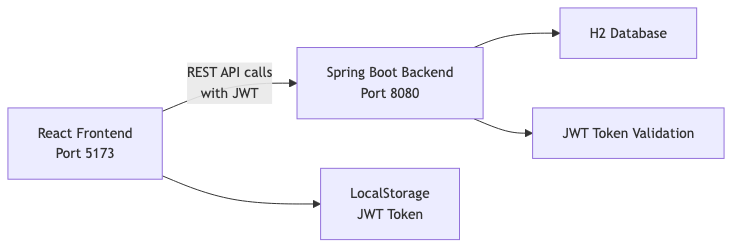
The React app calls the Spring Boot API over HTTP. Authentication happens via JWT tokens stored in localStorage. In production, you’d serve the React build as static files from Spring Boot itself.
Backend Setup
Dependencies
1
2
3
4
5
6
7
8
9
10
11
12
13
<dependency>
    <groupId>org.springframework.boot</groupId>
    <artifactId>spring-boot-starter-web</artifactId>
</dependency>
<dependency>
    <groupId>org.springframework.boot</groupId>
    <artifactId>spring-boot-starter-security</artifactId>
</dependency>
<dependency>
    <groupId>io.jsonwebtoken</groupId>
    <artifactId>jjwt-api</artifactId>
    <version>0.12.6</version>
</dependency>
JWT Utility
The JwtUtil class handles token generation and validation:
1
2
3
4
5
6
7
8
9
10
11
12
13
14
15
16
17
18
19
20
21
22
23
24
25
26
27
28
29
30
31
@Component
public class JwtUtil {

    private final SecretKey key;
    private final long expirationHours;

    public JwtUtil(@Value("${app.jwt.secret}") String secret,
                   @Value("${app.jwt.expiration-hours:24}") long expirationHours) {
        this.key = Keys.hmacShaKeyFor(secret.getBytes(StandardCharsets.UTF_8));
        this.expirationHours = expirationHours;
    }

    public String generateToken(String username) {
        Instant now = Instant.now();
        return Jwts.builder()
                .subject(username)
                .issuedAt(Date.from(now))
                .expiration(Date.from(now.plus(expirationHours, ChronoUnit.HOURS)))
                .signWith(key)
                .compact();
    }

    public boolean isTokenValid(String token) {
        try {
            Claims claims = extractClaims(token);
            return claims.getExpiration().after(Date.from(Instant.now()));
        } catch (Exception e) {
            return false;
        }
    }
}
Security Configuration — Stateless
The key: no sessions. Every request must carry its JWT:
1
2
3
4
5
6
7
8
9
10
11
12
13
14
15
@Bean
public SecurityFilterChain securityFilterChain(HttpSecurity http) throws Exception {
    return http
            .cors(cors -> cors.configurationSource(corsConfigurationSource()))
            .csrf(csrf -> csrf.disable())
            .sessionManagement(session ->
                session.sessionCreationPolicy(SessionCreationPolicy.STATELESS))
            .authorizeHttpRequests(auth -> auth
                    .requestMatchers("/api/auth/**").permitAll()
                    .anyRequest().authenticated()
            )
            .addFilterBefore(jwtAuthenticationFilter(),
                UsernamePasswordAuthenticationFilter.class)
            .build();
}
The JWT filter extracts the token from the Authorization header and sets the Spring Security context:
1
2
3
4
5
6
7
8
9
10
String authHeader = request.getHeader("Authorization");
if (authHeader != null && authHeader.startsWith("Bearer ")) {
    String token = authHeader.substring(7);
    if (jwtUtil.isTokenValid(token)) {
        String username = jwtUtil.extractUsername(token);
        UsernamePasswordAuthenticationToken auth =
            new UsernamePasswordAuthenticationToken(username, null, Collections.emptyList());
        SecurityContextHolder.getContext().setAuthentication(auth);
    }
}
Frontend Setup
We use React 18 with Vite (faster than Create React App):
1
2
3
4
5
6
7
8
{
  "dependencies": {
    "axios": "^1.7.2",
    "react": "^18.3.1",
    "react-dom": "^18.3.1",
    "react-router-dom": "^6.23.1"
  }
}
Axios Instance with Interceptors
The core pattern: a configured Axios instance that automatically attaches the JWT to every request:
1
2
3
4
5
6
7
8
9
10
11
12
13
14
15
16
17
18
19
20
21
22
23
24
25
26
27
28
29
import axios from 'axios';

const api = axios.create({
  baseURL: 'http://localhost:8080',
  headers: { 'Content-Type': 'application/json' },
});

// Attach token to every request
api.interceptors.request.use((config) => {
  const token = localStorage.getItem('token');
  if (token) {
    config.headers.Authorization = `Bearer ${token}`;
  }
  return config;
});

// Redirect to login on 401
api.interceptors.response.use(
  (response) => response,
  (error) => {
    if (error.response?.status === 401) {
      localStorage.removeItem('token');
      window.location.href = '/login';
    }
    return Promise.reject(error);
  }
);

export default api;
Login Flow
sequenceDiagram
    participant User
    participant React
    participant API as Spring Boot API
    participant JWT as JWT Utility

    User->>React: Enter credentials
    React->>API: POST /api/auth/login {username, password}
    API->>JWT: Authenticate & generate token
    JWT-->>API: eyJhbGciOiJIUzI1NiJ9...
    API-->>React: {token, username, type: "Bearer"}
    React->>React: Store token in localStorage
    React->>React: Redirect to /products
    React->>API: GET /api/products (Authorization: Bearer ...)
    API->>JWT: Validate token
    JWT-->>API: Valid, user = "admin"
    API-->>React: [products...]
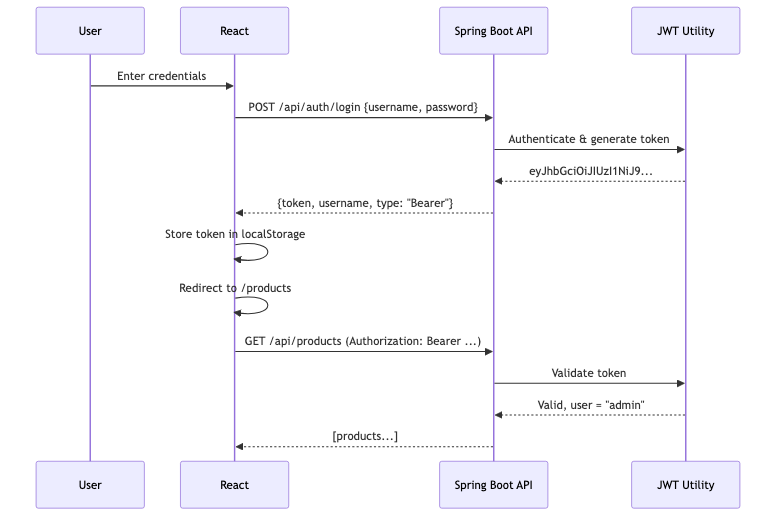
The login component:
1
2
3
4
5
6
7
8
9
10
11
const handleSubmit = async (e) => {
  e.preventDefault();
  try {
    const response = await api.post('/api/auth/login', { username, password });
    localStorage.setItem('token', response.data.token);
    localStorage.setItem('username', response.data.username);
    navigate('/products');
  } catch (err) {
    setError(err.response?.data?.error || 'Login failed');
  }
};
Protected Routes
React Router handles client-side route protection:
1
2
3
4
5
6
7
8
9
10
11
12
13
14
15
16
17
18
19
20
21
22
function PrivateRoute({ children }) {
  const token = localStorage.getItem('token');
  return token ? children : <Navigate to="/login" />;
}

function App() {
  return (
    <BrowserRouter>
      <Routes>
        <Route path="/login" element={<Login />} />
        <Route
          path="/products"
          element={
            <PrivateRoute>
              <ProductList />
            </PrivateRoute>
          }
        />
      </Routes>
    </BrowserRouter>
  );
}
This is client-side only. The real security is on the backend — a missing or invalid JWT returns 401.
CORS Configuration
The most common pain point. React runs on port 5173, Spring Boot on 8080. Without CORS configuration, the browser blocks cross-origin requests.
1
2
3
4
5
6
7
8
9
10
11
12
13
14
15
16
@Bean
public CorsConfigurationSource corsConfigurationSource() {
    CorsConfiguration config = new CorsConfiguration();
    config.setAllowedOrigins(List.of(
        "http://localhost:3000",
        "http://localhost:5173"
    ));
    config.setAllowedMethods(List.of("GET", "POST", "PUT", "DELETE", "OPTIONS"));
    config.setAllowedHeaders(List.of("*"));
    config.setAllowCredentials(true);
    config.setMaxAge(3600L);

    UrlBasedCorsConfigurationSource source = new UrlBasedCorsConfigurationSource();
    source.registerCorsConfiguration("/**", config);
    return source;
}
Key points:
allowedOriginsmust include your React dev server URLallowedHeaders: *permits theAuthorizationheaderallowCredentials: trueallows cookies (if you use them later)maxAgecaches the preflight OPTIONS response for 1 hour
Development Workflow
During Development (Two Servers)
1
2
3
4
5
# Terminal 1 — Backend
cd backend && mvn spring-boot:run   # Port 8080

# Terminal 2 — Frontend
cd frontend && npm run dev          # Port 5173 with proxy to 8080
Vite proxies /api calls to http://localhost:8080, so during development you avoid CORS issues entirely:
1
2
3
4
5
6
// vite.config.js
server: {
  proxy: {
    '/api': { target: 'http://localhost:8080', changeOrigin: true }
  }
}
In Production (One Server)
Build React, copy to Spring Boot’s static directory:
1
2
cd frontend && npm run build
cp -r dist/* ../backend/src/main/resources/static/
Spring Boot serves the React SPA and the API from the same origin — no CORS needed.
Common Problems
| Problem | Cause | Solution |
|---|---|---|
| CORS “No Access-Control-Allow-Origin” | Missing CORS config | Add CorsConfigurationSource bean |
| 403 on POST/PUT/DELETE | CSRF enabled (default) | Disable CSRF for stateless API: .csrf(csrf -> csrf.disable()) |
| 401 on login endpoint | Login path not permitted | Add .requestMatchers("/api/auth/**").permitAll() |
| Token not sent after login | Axios instance not used | Import the configured api instance, not raw axios |
| React routes return 404 on refresh | Server doesn’t know about client routes | Serve index.html for unknown paths (SPA fallback) |
| JWT expired | Token TTL too short | Increase expiration-hours or implement refresh tokens |
| H2 console 403 | Frame options blocked | Add .headers(h -> h.frameOptions(f -> f.disable())) |
Full Working Example
The complete project with both backend and frontend:
https://github.com/AnupamSinha/spring-boot-examples/tree/main/30-react-fullstack
1
2
3
4
5
6
7
8
# Run backend
cd 30-react-fullstack/backend
mvn spring-boot:run

# Run frontend (separate terminal)
cd 30-react-fullstack/frontend
npm install
npm run dev
Login with admin / admin123 and you’ll see the products page with data from the Spring Boot API.