The Problem
Your “Beat the Basics” knowledge covers form login and basic auth. But production applications need:
- Single Sign-On (SSO) across multiple services
- Token-based auth for APIs (no sessions)
- Role-based access from a centralized identity provider
- Standard protocols that work with any OAuth2/OIDC provider (Keycloak, Auth0, Okta, Azure AD)
Spring Security 6 makes this straightforward — but the terminology (authorization code flow, resource server, ID token vs access token) trips up most developers on first encounter.
What We Are Building
Two Spring Boot applications:
| Component | Role |
|---|
| Resource Server | REST API secured with JWT tokens |
| Keycloak | Identity Provider (issues tokens, manages users/roles) |
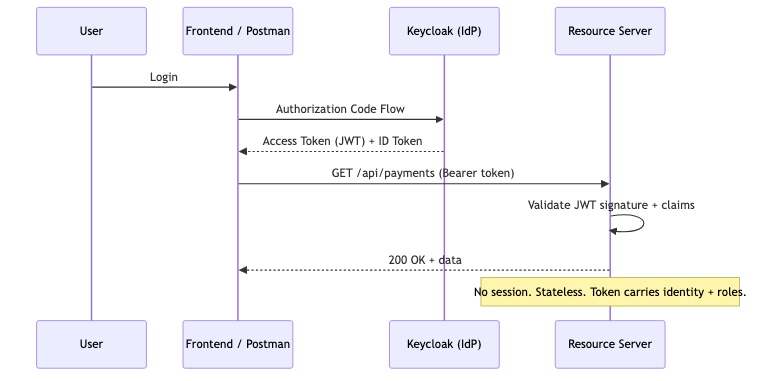
sequenceDiagram
    participant User
    participant Client as Frontend / Postman
    participant KC as Keycloak (IdP)
    participant API as Resource Server

    User->>Client: Login
    Client->>KC: Authorization Code Flow
    KC-->>Client: Access Token (JWT) + ID Token
    Client->>API: GET /api/payments (Bearer token)
    API->>API: Validate JWT signature + claims
    API-->>Client: 200 OK + data

    Note over API: No session. Stateless. Token carries identity + roles.
Prerequisites
| Component | Version |
|---|
| Java | 21+ |
| Spring Boot | 3.5+ |
| Docker | Latest (for Keycloak) |
| Maven | 3.9+ |
Step 1: Start Keycloak
1
2
3
4
5
6
7
8
9
10
11
| # docker-compose.yml
services:
keycloak:
image: quay.io/keycloak/keycloak:25.0
container_name: keycloak
environment:
KEYCLOAK_ADMIN: admin
KEYCLOAK_ADMIN_PASSWORD: admin
ports:
- "8180:8080"
command: start-dev
|
Access the admin console at http://localhost:8180 (admin/admin).
- Create a realm:
payment-realm - Create a client:
payment-api- Client authentication: ON
- Authorization: ON
- Valid redirect URIs:
http://localhost:8080/* - Web origins:
*
- Create roles:
ADMIN, USER - Create users:
alice → role ADMINbob → role USER
Step 2: Resource Server Dependencies
1
2
3
4
5
6
7
8
9
10
11
12
13
14
| <dependencies>
<dependency>
<groupId>org.springframework.boot</groupId>
<artifactId>spring-boot-starter-web</artifactId>
</dependency>
<dependency>
<groupId>org.springframework.boot</groupId>
<artifactId>spring-boot-starter-oauth2-resource-server</artifactId>
</dependency>
<dependency>
<groupId>org.springframework.boot</groupId>
<artifactId>spring-boot-starter-security</artifactId>
</dependency>
</dependencies>
|
Step 3: Application Configuration
1
2
3
4
5
6
7
8
9
| spring:
security:
oauth2:
resourceserver:
jwt:
issuer-uri: http://localhost:8180/realms/payment-realm
server:
port: 8080
|
Spring Security fetches the OIDC discovery document from issuer-uri/.well-known/openid-configuration at startup. It gets the JWKS endpoint, downloads public keys, and validates tokens automatically.
Step 4: Security Configuration
1
2
3
4
5
6
7
8
9
10
11
12
13
14
15
16
17
18
19
20
21
22
23
24
25
26
27
28
29
30
31
32
33
34
35
36
37
38
39
40
41
42
43
44
45
46
| @Configuration
@EnableWebSecurity
public class SecurityConfig {
@Bean
public SecurityFilterChain securityFilterChain(HttpSecurity http) throws Exception {
http
.authorizeHttpRequests(auth -> auth
.requestMatchers("/api/public/**").permitAll()
.requestMatchers("/api/admin/**").hasRole("ADMIN")
.requestMatchers("/api/payments/**").hasAnyRole("USER", "ADMIN")
.anyRequest().authenticated()
)
.oauth2ResourceServer(oauth2 -> oauth2
.jwt(jwt -> jwt
.jwtAuthenticationConverter(jwtAuthenticationConverter())
)
);
return http.build();
}
@Bean
public JwtAuthenticationConverter jwtAuthenticationConverter() {
JwtGrantedAuthoritiesConverter grantedAuthorities = new JwtGrantedAuthoritiesConverter();
grantedAuthorities.setAuthoritiesClaimName("realm_access.roles");
grantedAuthorities.setAuthorityPrefix("ROLE_");
JwtAuthenticationConverter converter = new JwtAuthenticationConverter();
converter.setJwtGrantedAuthoritiesConverter(jwt -> {
// Extract roles from Keycloak's token structure
Map<String, Object> realmAccess = jwt.getClaimAsMap("realm_access");
if (realmAccess == null) return List.of();
@SuppressWarnings("unchecked")
List<String> roles = (List<String>) realmAccess.get("roles");
if (roles == null) return List.of();
return roles.stream()
.map(role -> new SimpleGrantedAuthority("ROLE_" + role))
.collect(Collectors.toList());
});
return converter;
}
}
|
Key points:
.oauth2ResourceServer(jwt(...)) tells Spring Security this is a stateless API that validates JWT tokens- The
JwtAuthenticationConverter maps Keycloak’s realm_access.roles claim to Spring Security authorities - No sessions, no CSRF (API is stateless)
Step 5: Secured Controller
1
2
3
4
5
6
7
8
9
10
11
12
13
14
15
16
17
18
19
20
21
22
23
24
25
26
27
28
29
30
31
32
| @RestController
@RequestMapping("/api")
public class PaymentController {
@GetMapping("/public/health")
public Map<String, String> health() {
return Map.of("status", "UP");
}
@GetMapping("/payments")
public List<Payment> getPayments(@AuthenticationPrincipal Jwt jwt) {
String username = jwt.getClaimAsString("preferred_username");
String email = jwt.getClaimAsString("email");
// Use token claims for business logic
return paymentService.getPaymentsForUser(username);
}
@GetMapping("/admin/users")
@PreAuthorize("hasRole('ADMIN')")
public List<UserInfo> getAllUsers() {
return userService.getAllUsers();
}
@GetMapping("/me")
public Map<String, Object> currentUser(@AuthenticationPrincipal Jwt jwt) {
return Map.of(
"username", jwt.getClaimAsString("preferred_username"),
"email", jwt.getClaimAsString("email"),
"roles", jwt.getClaimAsMap("realm_access")
);
}
}
|
@AuthenticationPrincipal Jwt jwt gives you direct access to all token claims — username, email, roles, custom attributes.
Step 6: Testing
Get a token from Keycloak
1
2
3
4
5
6
| TOKEN=$(curl -s -X POST http://localhost:8180/realms/payment-realm/protocol/openid-connect/token \
-d "client_id=payment-api" \
-d "client_secret=YOUR_CLIENT_SECRET" \
-d "username=alice" \
-d "password=alice123" \
-d "grant_type=password" | jq -r '.access_token')
|
Call the secured API
1
2
3
4
5
6
7
8
9
10
11
| # Authenticated request (works)
curl -H "Authorization: Bearer $TOKEN" http://localhost:8080/api/payments
# Admin endpoint (works for alice, fails for bob)
curl -H "Authorization: Bearer $TOKEN" http://localhost:8080/api/admin/users
# No token (401 Unauthorized)
curl http://localhost:8080/api/payments
# Public endpoint (always works)
curl http://localhost:8080/api/public/health
|
Understanding the Token
A decoded Keycloak JWT looks like:
1
2
3
4
5
6
7
8
9
10
11
12
13
14
15
16
| {
"sub": "a1b2c3d4-...",
"preferred_username": "alice",
"email": "alice@example.com",
"realm_access": {
"roles": ["ADMIN", "USER"]
},
"resource_access": {
"payment-api": {
"roles": ["manage-payments"]
}
},
"iss": "http://localhost:8180/realms/payment-realm",
"exp": 1724400000,
"iat": 1724396400
}
|
| Claim | Purpose |
|---|
sub | Unique user identifier |
preferred_username | Human-readable username |
realm_access.roles | Global roles (ADMIN, USER) |
resource_access | Client-specific roles |
iss | Token issuer (validates against config) |
exp | Expiration timestamp |
Testing Secured Endpoints in JUnit
1
2
3
4
5
6
7
8
9
10
11
12
13
14
15
16
17
18
19
20
21
22
23
24
25
26
27
28
29
30
31
32
33
| @SpringBootTest
@AutoConfigureMockMvc
class PaymentControllerSecurityTest {
@Autowired
private MockMvc mockMvc;
@Test
void shouldRejectUnauthenticatedRequest() throws Exception {
mockMvc.perform(get("/api/payments"))
.andExpect(status().isUnauthorized());
}
@Test
@WithMockUser(roles = "USER")
void shouldAllowUserToAccessPayments() throws Exception {
mockMvc.perform(get("/api/payments"))
.andExpect(status().isOk());
}
@Test
@WithMockUser(roles = "USER")
void shouldDenyUserFromAdminEndpoint() throws Exception {
mockMvc.perform(get("/api/admin/users"))
.andExpect(status().isForbidden());
}
@Test
void shouldAllowPublicEndpointWithoutAuth() throws Exception {
mockMvc.perform(get("/api/public/health"))
.andExpect(status().isOk());
}
}
|
For JWT-specific testing with custom claims:
1
2
3
4
5
6
7
8
9
10
11
12
13
| @Test
void shouldExtractUsernameFromJwt() throws Exception {
Jwt jwt = Jwt.withTokenValue("mock-token")
.header("alg", "RS256")
.claim("preferred_username", "alice")
.claim("realm_access", Map.of("roles", List.of("USER")))
.build();
mockMvc.perform(get("/api/me")
.with(SecurityMockMvcRequestPostProcessors.jwt().jwt(jwt)))
.andExpect(status().isOk())
.andExpect(jsonPath("$.username").value("alice"));
}
|
Switching Providers
The beauty of OAuth2/OIDC is portability. To switch from Keycloak to Auth0:
1
2
3
4
5
6
7
| # Just change the issuer URI
spring:
security:
oauth2:
resourceserver:
jwt:
issuer-uri: https://your-tenant.auth0.com/
|
Adjust the role-extraction logic in JwtAuthenticationConverter (Auth0 uses a different claim structure), and you’re done. Zero application logic changes.
Common Problems
| Symptom | Cause | Fix |
|---|
| 401 on every request | Wrong issuer-uri or Keycloak not reachable | Verify URL, check Docker is running |
| Roles not mapped | Keycloak nests roles in realm_access.roles | Use custom JwtAuthenticationConverter |
| Token expired instantly | Clock skew between app and Keycloak | Add spring.security.oauth2.resourceserver.jwt.clock-skew=30s |
| 403 even with correct role | Missing ROLE_ prefix | Ensure converter adds ROLE_ prefix |
| CORS errors from frontend | No CORS config | Add CorsConfigurationSource bean |
JwtDecoder bean not found | Missing oauth2-resource-server dependency | Add spring-boot-starter-oauth2-resource-server |
Full Working Example
The complete project with Keycloak docker-compose, resource server, and test suite is at github.com/AnupamSinha/spring-boot-examples/tree/main/09-security-oauth2.
1
2
3
4
| git clone https://github.com/AnupamSinha/spring-boot-examples/tree/main/09-security-oauth2
cd spring-security-oauth2-demo
docker compose up -d # Starts Keycloak
./mvnw spring-boot:run
|
References