Spring Data JPA — Beyond the Basics (Projections, Specifications, Auditing)
Go beyond basic CRUD with Spring Data JPA. Master Specifications for dynamic queries, Projections for performance, and Auditing for automatic timestamps — with real PostgreSQL examples and Testcontainers tests.
The Problem
Every Spring Data JPA tutorial starts the same way: define an entity, extend JpaRepository, and call findById(). That’s fine for a weekend project — but production code hits three walls fast:
1. Dynamic queries become messy
Your product search endpoint accepts optional filters: category, price range, name keyword. Suddenly you’re writing 8 different repository methods or string-concatenating JPQL — both are fragile and hard to test.
2. Returning full entities wastes bandwidth
Your listing page only needs id, name, and price — but you’re fetching 15 columns including large text fields and audit metadata. That’s wasted I/O at the database, network, and serialization layers.
3. No audit trail
“Who created this record? When was it last updated?” Without auditing, you’re manually setting timestamps in every service method — inconsistent and easy to forget.
flowchart LR
    A[Client Request] --> B{Dynamic Filters?}
    B -->|Yes| C[Specifications]
    B -->|No| D[Simple findAll]
    C --> E{Need all columns?}
    D --> E
    E -->|No| F[Projections]
    E -->|Yes| G[Full Entity]
    F --> H[Response]
    G --> H

This post tackles all three problems with Specifications, Projections, and Auditing — using a real PostgreSQL-backed Spring Boot 3.5 application.
Setup
We’ll work with a Product entity stored in PostgreSQL 16. The full project uses:
| Layer | Technology |
|---|---|
| Language | Java 21 |
| Framework | Spring Boot 3.5.0 |
| Persistence | Spring Data JPA |
| Database | PostgreSQL 16 |
| Testing | Testcontainers + JUnit 5 |
Entity
1
2
3
4
5
6
7
8
9
10
11
12
13
14
15
16
17
18
19
20
21
22
23
24
25
26
27
28
@Entity
@Table(name = "products")
@EntityListeners(AuditingEntityListener.class)
public class Product {

    @Id
    @GeneratedValue(strategy = GenerationType.IDENTITY)
    private Long id;

    @Column(nullable = false)
    private String name;

    @Column(nullable = false)
    private String category;

    @Column(nullable = false, precision = 10, scale = 2)
    private BigDecimal price;

    @CreatedDate
    @Column(nullable = false, updatable = false)
    private Instant createdAt;

    @LastModifiedDate
    @Column(nullable = false)
    private Instant updatedAt;

    // constructors, getters, setters
}
Repository
1
2
3
4
5
6
7
8
public interface ProductRepository
        extends JpaRepository<Product, Long>, JpaSpecificationExecutor<Product> {

    List<Product> findByCategory(String category);

    @Query("SELECT p FROM Product p WHERE p.price > :threshold ORDER BY p.price DESC")
    List<Product> findHighValueProducts(@Param("threshold") BigDecimal threshold);
}
Note that we extend both JpaRepository (standard CRUD + paging) and JpaSpecificationExecutor (dynamic queries via the Criteria API).
Specifications: Dynamic Type-Safe Queries
The Problem with Derived Queries
Derived query methods are great for simple lookups:
1
List<Product> findByCategoryAndPriceBetween(String category, BigDecimal min, BigDecimal max);
But what happens when every parameter is optional? You’d need:
findByCategoryfindByPriceBetweenfindByCategoryAndPriceBetweenfindByNameContainingfindByCategoryAndNameContaining- … and every permutation
This combinatorial explosion is unsustainable.
Building Composable Specifications
A Specification<T> is a single predicate that can be composed with and(), or(), and not():
1
2
3
4
5
6
7
8
9
10
11
12
13
14
15
16
17
public final class ProductSpecifications {

    private ProductSpecifications() {}

    public static Specification<Product> hasCategory(String category) {
        return (root, query, cb) -> cb.equal(root.get("category"), category);
    }

    public static Specification<Product> priceBetween(BigDecimal min, BigDecimal max) {
        return (root, query, cb) -> cb.between(root.get("price"), min, max);
    }

    public static Specification<Product> nameContains(String keyword) {
        return (root, query, cb) ->
                cb.like(cb.lower(root.get("name")), "%" + keyword.toLowerCase() + "%");
    }
}
Composing at Runtime
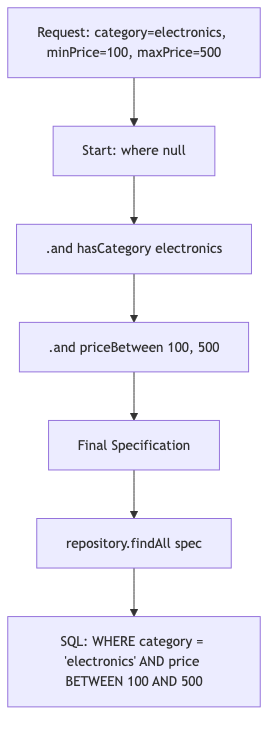
In the service layer, we build the query dynamically — only non-null parameters contribute a predicate:
1
2
3
4
5
6
7
8
9
10
11
12
13
14
15
16
17
18
19
20
21
22
23
24
25
26
@Service
public class ProductService {

    private final ProductRepository productRepository;

    public ProductService(ProductRepository productRepository) {
        this.productRepository = productRepository;
    }

    public List<Product> findProducts(String category, BigDecimal minPrice,
                                       BigDecimal maxPrice, String name) {
        Specification<Product> spec = Specification.where(null);

        if (category != null && !category.isBlank()) {
            spec = spec.and(ProductSpecifications.hasCategory(category));
        }
        if (minPrice != null && maxPrice != null) {
            spec = spec.and(ProductSpecifications.priceBetween(minPrice, maxPrice));
        }
        if (name != null && !name.isBlank()) {
            spec = spec.and(ProductSpecifications.nameContains(name));
        }

        return productRepository.findAll(spec);
    }
}
flowchart TD
    A[Request: category=electronics, minPrice=100, maxPrice=500] --> B[Start: where null]
    B --> C[.and hasCategory electronics]
    C --> D[.and priceBetween 100, 500]
    D --> E[Final Specification]
    E --> F[repository.findAll spec]
    F --> G[SQL: WHERE category = 'electronics' AND price BETWEEN 100 AND 500]
Advantages Over JPQL Concatenation
| Approach | Type-safe | Composable | Testable | Readable |
|---|---|---|---|---|
| Derived queries | Yes | No | Yes | Yes (simple) |
| JPQL strings | No | Manual | Hard | Degrades |
| Criteria API raw | Yes | Yes | Yes | Poor |
| Specifications | Yes | Yes | Yes | Good |
Projections: Return Only What You Need
The Performance Cost of Full Entities
When a listing endpoint only needs three columns but your entity has fifteen, you’re paying for:
- Database I/O — reading unnecessary columns from disk
- Network transfer — shipping extra bytes from DB to app
- Heap allocation — hydrating unused fields into objects
- Serialization — converting unused fields to JSON
Interface-Based Projections
The simplest approach — define an interface with getter methods for the columns you want:
1
2
3
4
5
public interface ProductProjection {
    Long getId();
    String getName();
    BigDecimal getPrice();
}
Then declare a query method that returns this projection:
1
2
3
public interface ProductRepository extends JpaRepository<Product, Long> {
    List<ProductProjection> findAllProjectedBy();
}
Spring Data generates a SELECT id, name, price FROM products — only the columns matching your getters.
Class-Based Projections (DTOs)
For more control (computed fields, custom constructors), use a record:
1
public record ProductSummary(Long id, String name, BigDecimal price) {}
With a JPQL constructor expression:
1
2
@Query("SELECT new com.anupam.jpa.dto.ProductSummary(p.id, p.name, p.price) FROM Product p")
List<ProductSummary> findAllSummaries();
Dynamic Projections
Return different shapes from the same query method:
1
<T> List<T> findByCategory(String category, Class<T> type);
Call with different projection types:
1
2
3
4
5
// Full entity
List<Product> full = repo.findByCategory("electronics", Product.class);

// Lightweight projection
List<ProductProjection> light = repo.findByCategory("electronics", ProductProjection.class);
When to Use Each
| Type | Use Case | SQL Impact |
|---|---|---|
| Interface-based | Read-only listings, API responses | Only declared columns |
| Class-based (DTO) | Computed fields, immutable transport | Only constructor params |
| Dynamic | Same query, multiple consumers | Varies by projection type |
Auditing: Automatic Timestamps and User Tracking
Enable JPA Auditing
1
2
3
4
@Configuration
@EnableJpaAuditing
public class JpaAuditConfig {
}
Annotate Your Entity
1
2
3
4
5
6
7
8
9
10
11
@EntityListeners(AuditingEntityListener.class)
public class Product {

    @CreatedDate
    @Column(nullable = false, updatable = false)
    private Instant createdAt;

    @LastModifiedDate
    @Column(nullable = false)
    private Instant updatedAt;
}
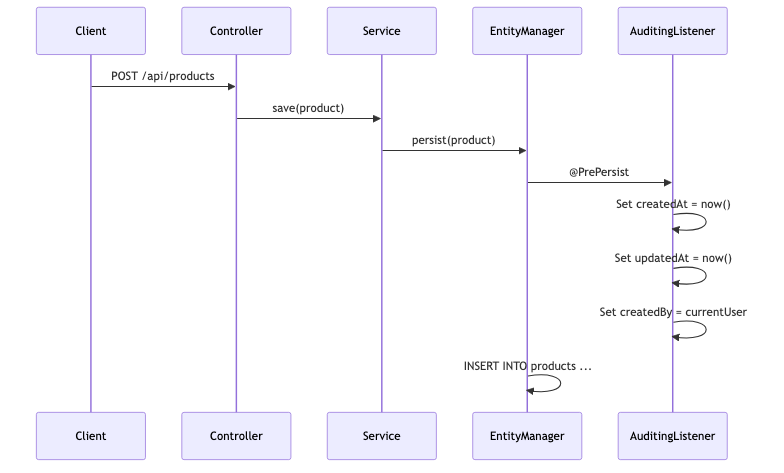
Now createdAt is set automatically on persist() and updatedAt on every merge() — no manual code needed.
Adding User Tracking with @CreatedBy
For multi-user systems, implement AuditorAware:
1
2
3
4
5
6
7
8
9
10
@Component
public class SpringSecurityAuditorAware implements AuditorAware<String> {

    @Override
    public Optional<String> getCurrentAuditor() {
        return Optional.ofNullable(SecurityContextHolder.getContext().getAuthentication())
                .filter(Authentication::isAuthenticated)
                .map(Authentication::getName);
    }
}
Then annotate:
1
2
3
4
5
6
@CreatedBy
@Column(updatable = false)
private String createdBy;

@LastModifiedBy
private String updatedBy;
Update the config to reference the auditor:
1
2
3
4
@Configuration
@EnableJpaAuditing(auditorAwareRef = "springSecurityAuditorAware")
public class JpaAuditConfig {
}
sequenceDiagram
    participant Client
    participant Controller
    participant Service
    participant EntityManager
    participant AuditingListener

    Client->>Controller: POST /api/products
    Controller->>Service: save(product)
    Service->>EntityManager: persist(product)
    EntityManager->>AuditingListener: @PrePersist
    AuditingListener->>AuditingListener: Set createdAt = now()
    AuditingListener->>AuditingListener: Set updatedAt = now()
    AuditingListener->>AuditingListener: Set createdBy = currentUser
    EntityManager->>EntityManager: INSERT INTO products ...
Pagination and Sorting
Pageable
Spring Data makes pagination trivial. Your repository already supports it via JpaRepository:
1
Page<Product> findAll(Specification<Product> spec, Pageable pageable);
Call from the controller:
1
2
3
4
5
6
7
8
9
10
11
@GetMapping
public Page<Product> getProducts(
        @RequestParam(defaultValue = "0") int page,
        @RequestParam(defaultValue = "20") int size,
        @RequestParam(defaultValue = "createdAt") String sortBy,
        @RequestParam(defaultValue = "desc") String direction) {

    Sort sort = Sort.by(Sort.Direction.fromString(direction), sortBy);
    Pageable pageable = PageRequest.of(page, size, sort);
    return productService.findProducts(category, minPrice, maxPrice, name, pageable);
}
Page vs Slice
| Feature | Page<T> | Slice<T> |
|---|---|---|
| Total count | Yes (SELECT COUNT(*)) | No |
| Performance | Extra query for total | Faster (no count) |
| Use case | UI with “Page 3 of 12” | Infinite scroll, “Load more” |
Use Slice when you don’t need the total element count — it saves one database round-trip.
Sort with Multiple Properties
1
2
3
4
Sort sort = Sort.by(
    Sort.Order.desc("price"),
    Sort.Order.asc("name")
);
Common Problems
| Problem | Cause | Fix |
|---|---|---|
InvalidDataAccessApiUsageException when using Specification | Repository doesn’t extend JpaSpecificationExecutor | Add JpaSpecificationExecutor<Product> to your interface |
Projection returns null for all fields | Getter names don’t match entity property names | Ensure getId() matches private Long id |
@CreatedDate is always null | Missing @EnableJpaAuditing or @EntityListeners | Add both: config annotation + entity listener |
| N+1 queries with projections | Using open projections with @Value SpEL | Switch to closed projections or use @EntityGraph |
LazyInitializationException | Accessing lazy associations outside transaction | Use @EntityGraph, JOIN FETCH, or a DTO projection |
| Specification ignores null check | Building spec with nullable params without guarding | Always check if (param != null) before .and() |
| Pagination count query is slow | Complex joins in the count query | Provide a custom countQuery in @Query |
| Audit fields not populated in tests | Test doesn’t bootstrap Spring context with auditing | Use @DataJpaTest which auto-enables auditing config |
Full Working Example
The complete source code is available on GitHub:
github.com/AnupamSinha/spring-boot-examples/tree/main/13-jpa-advanced
Running Locally
1
2
3
4
5
6
7
8
9
10
11
12
13
14
# Start PostgreSQL via Docker
docker compose up -d

# Run the application
./mvnw spring-boot:run

# Test dynamic filtering
curl "http://localhost:8080/api/products?category=electronics&minPrice=100&maxPrice=500"

# All products (no filters)
curl "http://localhost:8080/api/products"

# Filter by name keyword
curl "http://localhost:8080/api/products?name=laptop"
Running Tests with Testcontainers
1
./mvnw test
Tests spin up a real PostgreSQL container via Testcontainers — no mocks, no H2 compatibility issues.
Key Takeaways
- Specifications eliminate query method explosion — compose predicates at runtime based on which parameters are present.
- Projections reduce I/O and memory — fetch only the columns your consumer actually needs.
- Auditing removes boilerplate — let the framework handle
createdAt,updatedAt,createdByvia entity listeners. - Pagination is built in — use
Pageableand choose betweenPage(with count) andSlice(without).
These features work together. You can combine Specifications with Projections with Pagination in a single query:
1
2
3
4
Page<ProductProjection> results = productRepository.findBy(
    spec,
    q -> q.as(ProductProjection.class).page(pageable)
);