Spring Boot Multi-Tenancy — One App, Multiple Customers
Build a multi-tenant Spring Boot application. Covers schema-per-tenant with AbstractRoutingDataSource, row-level filtering with Hibernate filters, tenant resolution from JWT/headers, and isolation strategies.
The Problem
You’re building a SaaS product. Ten customers sign up. Then a hundred. Each one expects their data to be completely isolated from everyone else’s — but you don’t want to deploy a separate application instance for each customer.
This is the multi-tenancy problem: one application, multiple customers (tenants), complete data isolation.
Get it wrong and you leak data between customers. Get it right and you have a scalable architecture that handles thousands of tenants with a single deployment.
Multi-Tenancy Strategies
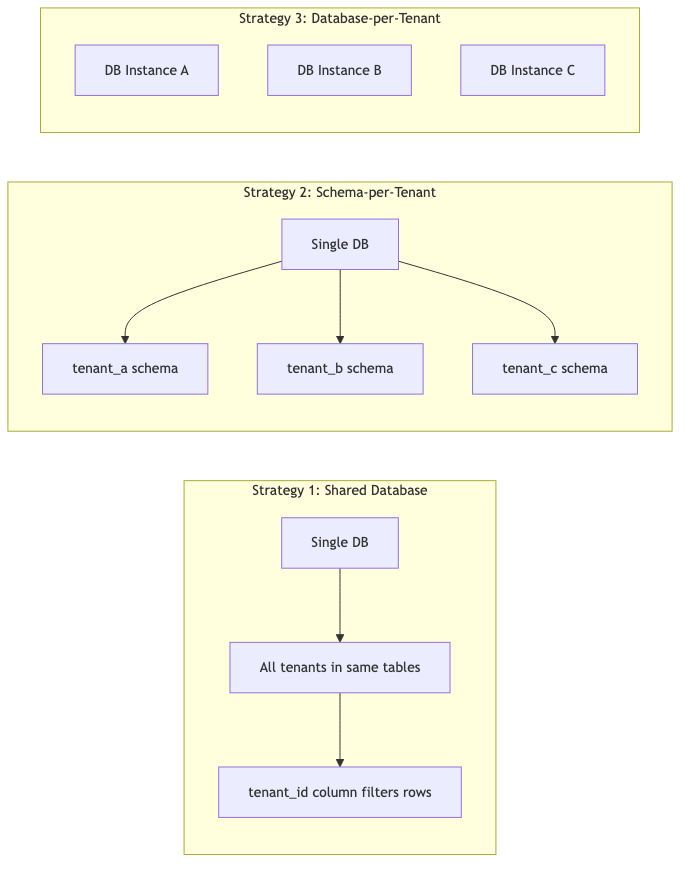
There are three main approaches to multi-tenancy, each with different tradeoffs:
graph LR
    subgraph "Strategy 1: Shared Database"
        A[Single DB] --> B[All tenants in same tables]
        B --> C[tenant_id column filters rows]
    end

    subgraph "Strategy 2: Schema-per-Tenant"
        D[Single DB] --> E[tenant_a schema]
        D --> F[tenant_b schema]
        D --> G[tenant_c schema]
    end

    subgraph "Strategy 3: Database-per-Tenant"
        H[DB Instance A]
        I[DB Instance B]
        J[DB Instance C]
    end
| Strategy | Isolation | Cost | Complexity | Best For |
|---|---|---|---|---|
| Shared DB (row-level) | Low | Low | Low | Many small tenants |
| Schema-per-tenant | Medium | Medium | Medium | Moderate isolation needs |
| Database-per-tenant | High | High | High | Regulated industries, large tenants |
What We’re Building
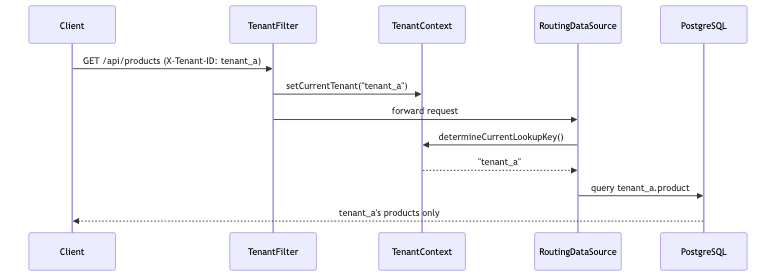
We’ll implement Strategy 2: Schema-per-Tenant as the primary approach, then show how to add row-level filtering as an alternative. The architecture:
sequenceDiagram
    participant Client
    participant Filter as TenantFilter
    participant Context as TenantContext
    participant Router as RoutingDataSource
    participant DB as PostgreSQL

    Client->>Filter: GET /api/products (X-Tenant-ID: tenant_a)
    Filter->>Context: setCurrentTenant("tenant_a")
    Filter->>Router: forward request
    Router->>Context: determineCurrentLookupKey()
    Context-->>Router: "tenant_a"
    Router->>DB: query tenant_a.product
    DB-->>Client: tenant_a's products only
Strategy 1: Schema-per-Tenant
TenantContext — ThreadLocal Holder
The simplest piece — a ThreadLocal that holds the current tenant ID for the duration of a request:
1
2
3
4
5
6
7
8
9
10
11
12
13
14
15
16
public final class TenantContext {

    private static final ThreadLocal<String> CURRENT_TENANT = new ThreadLocal<>();

    public static String getCurrentTenant() {
        return CURRENT_TENANT.get();
    }

    public static void setCurrentTenant(String tenantId) {
        CURRENT_TENANT.set(tenantId);
    }

    public static void clear() {
        CURRENT_TENANT.remove();
    }
}
Important: Always call
clear()in afinallyblock. If you don’t, the tenant ID can leak to the next request on the same thread (thread pool reuse).
TenantFilter — Extracting the Tenant
A servlet filter reads the X-Tenant-ID header and populates the context:
1
2
3
4
5
6
7
8
9
10
11
12
13
14
15
16
17
18
19
20
21
22
23
24
25
26
27
28
@Component
@Order(1)
public class TenantFilter implements Filter {

    private static final String TENANT_HEADER = "X-Tenant-ID";

    @Override
    public void doFilter(ServletRequest request, ServletResponse response,
                         FilterChain chain) throws IOException, ServletException {

        HttpServletRequest httpRequest = (HttpServletRequest) request;
        String tenantId = httpRequest.getHeader(TENANT_HEADER);

        if (tenantId == null || tenantId.isBlank()) {
            HttpServletResponse httpResponse = (HttpServletResponse) response;
            httpResponse.setStatus(HttpServletResponse.SC_BAD_REQUEST);
            httpResponse.getWriter().write("Missing required header: " + TENANT_HEADER);
            return;
        }

        try {
            TenantContext.setCurrentTenant(tenantId);
            chain.doFilter(request, response);
        } finally {
            TenantContext.clear();
        }
    }
}
TenantRoutingDataSource — Routing Connections
Spring’s AbstractRoutingDataSource selects the target DataSource based on a lookup key. We override one method:
1
2
3
4
5
6
7
public class TenantRoutingDataSource extends AbstractRoutingDataSource {

    @Override
    protected Object determineCurrentLookupKey() {
        return TenantContext.getCurrentTenant();
    }
}
DataSourceConfig — Wiring Multiple DataSources
Each tenant schema gets its own DataSource. The routing DataSource wraps them all:
1
2
3
4
5
6
7
8
9
10
11
12
13
14
15
16
17
18
19
20
21
22
23
24
25
26
27
28
29
30
31
32
33
34
35
36
37
@Configuration
public class DataSourceConfig {

    @Value("${spring.datasource.url}")
    private String baseUrl;

    @Value("${spring.datasource.username}")
    private String username;

    @Value("${spring.datasource.password}")
    private String password;

    @Bean
    public DataSource dataSource() {
        TenantRoutingDataSource routingDataSource = new TenantRoutingDataSource();

        Map<Object, Object> targetDataSources = new HashMap<>();
        targetDataSources.put("tenant_a", buildDataSource("tenant_a"));
        targetDataSources.put("tenant_b", buildDataSource("tenant_b"));

        routingDataSource.setTargetDataSources(targetDataSources);
        routingDataSource.setDefaultTargetDataSource(buildDataSource("tenant_a"));
        routingDataSource.afterPropertiesSet();

        return routingDataSource;
    }

    private DataSource buildDataSource(String schema) {
        String url = baseUrl + "?currentSchema=" + schema;
        return DataSourceBuilder.create()
                .url(url)
                .username(username)
                .password(password)
                .driverClassName("org.postgresql.Driver")
                .build();
    }
}
For production, you’d load tenant configurations from a database or configuration service rather than hardcoding them.
Strategy 2: Row-Level with Hibernate Filters
If you prefer a single schema with a tenant_id discriminator column, Hibernate’s @Filter annotation does the heavy lifting:
1
2
3
4
5
6
7
8
9
10
11
12
13
14
15
16
@Entity
@Table(name = "product")
@FilterDef(name = "tenantFilter", parameters = @ParamDef(name = "tenantId", type = String.class))
@Filter(name = "tenantFilter", condition = "tenant_id = :tenantId")
public class Product {

    @Id
    @GeneratedValue(strategy = GenerationType.IDENTITY)
    private Long id;

    @Column(name = "tenant_id", nullable = false)
    private String tenantId;

    private String name;
    private BigDecimal price;
}
Enable the filter at the start of each request:
1
2
3
4
5
6
7
8
9
10
11
12
13
14
15
@Component
public class TenantHibernateFilter {

    private final EntityManager entityManager;

    public TenantHibernateFilter(EntityManager entityManager) {
        this.entityManager = entityManager;
    }

    public void enableFilter(String tenantId) {
        Session session = entityManager.unwrap(Session.class);
        session.enableFilter("tenantFilter")
               .setParameter("tenantId", tenantId);
    }
}
This approach is simpler to set up but offers less isolation — a bug in your filter logic could expose another tenant’s data.
Tenant Resolution
The X-Tenant-ID header works for development, but production systems typically resolve tenants from:
JWT Claims
1
2
3
4
5
6
7
8
9
public class JwtTenantResolver {

    public String resolve(HttpServletRequest request) {
        String token = request.getHeader("Authorization");
        // Decode JWT and extract tenant claim
        DecodedJWT jwt = JWT.decode(token.replace("Bearer ", ""));
        return jwt.getClaim("tenant_id").asString();
    }
}
Subdomain
1
2
3
4
5
6
7
public class SubdomainTenantResolver {

    public String resolve(HttpServletRequest request) {
        String host = request.getServerName(); // acme.myapp.com
        return host.split("\\.")[0];           // "acme"
    }
}
Path Prefix
1
GET /api/tenants/acme/products → tenant = "acme"
In practice, JWT claims are the most common choice for APIs — the tenant is baked into the authentication token and can’t be forged by the client.
Security Considerations
Multi-tenancy introduces a class of vulnerabilities that don’t exist in single-tenant apps:
Cross-tenant data leakage — Always validate that the resolved tenant matches the authenticated user’s tenant. Never trust a header alone in production.
ThreadLocal leaks — If
TenantContext.clear()isn’t called, stale tenant IDs persist on pooled threads. Usetry/finallyreligiously.Connection pool isolation — With schema-per-tenant, ensure connection pools are properly sized. One slow tenant shouldn’t exhaust connections for everyone.
DDL operations — Schema migrations must run against all tenant schemas. Use Flyway with a loop over tenants, or a tool like
Flyway Teamswith multi-schema support.Caching — If you use Spring’s
@Cacheable, cache keys must include the tenant ID. Otherwise, Tenant A’s cached product list might be served to Tenant B.
Common Problems
| Problem | Cause | Fix |
|---|---|---|
| Wrong tenant’s data returned | ThreadLocal not cleared | Always clear in finally block |
Could not determine target DataSource | Unknown tenant ID in header | Validate tenant exists before routing |
| Connection pool exhaustion | Too many tenants, too few connections | Use HikariCP per-tenant with max-pool-size limits |
| Hibernate cache returns stale data | Cache key doesn’t include tenant | Include tenant in cache region or key |
| Schema migrations miss a tenant | Manual schema management | Automate with Flyway + tenant registry |
NullPointerException in determineCurrentLookupKey | Filter not applied (e.g., health endpoints) | Exclude actuator/health paths from filter |
Full Working Example
The complete implementation is available on GitHub:
- spring-boot-multi-tenancy — Schema-per-tenant with
AbstractRoutingDataSource, PostgreSQL 16, Docker Compose setup
Clone it, run docker-compose up -d, and hit the API with different X-Tenant-ID headers to see tenant isolation in action.