Spring Boot + MongoDB — When Documents Beat Tables
Build Spring Boot applications with MongoDB. Covers document modeling, MongoRepository, custom queries with @Query, aggregation pipelines with MongoTemplate, indexing, embedded vs referenced documents, and when to choose MongoDB over relational databases.
The Problem — Schema Rigidity
Relational databases demand a schema before you write a single row. For many domains — product catalogs, content management, IoT telemetry — the shape of your data varies from record to record. You end up with nullable columns everywhere, EAV tables, or JSON columns that defeat the purpose of a relational schema.
MongoDB stores documents as flexible BSON objects. Each document in a collection can have a different structure, making it natural for domains where:
- Products have category-specific attributes (a laptop has RAM, a shirt has size)
- Nested data belongs together (an order with its line items)
- Rapid iteration matters more than strict schema enforcement
When Documents Beat Tables
| Criteria | Choose MongoDB | Choose PostgreSQL |
|---|---|---|
| Schema changes frequently | Yes — schemaless flexibility | No — migrations required |
| Deeply nested / hierarchical | Yes — embedded documents are natural | Joins become complex |
| Need strong transactions | Possible (4.0+) but not the sweet spot | Yes — ACID by default |
| Aggregation across collections | $lookup works, but not as powerful as JOIN | JOINs are first-class |
| Horizontal scaling | Yes — built-in sharding | Requires Citus or manual partitioning |
| Reporting / analytics | Aggregation framework works, but limited | SQL is king for analytics |
| Read-heavy, write-heavy | Both — tunable consistency | Read-heavy is fine, writes contend |
Setup
Docker Compose
1
2
3
4
5
6
7
8
9
10
11
12
13
14
15
services:
  mongodb:
    image: mongo:7
    container_name: mongodb
    ports:
      - "27017:27017"
    environment:
      MONGO_INITDB_ROOT_USERNAME: root
      MONGO_INITDB_ROOT_PASSWORD: secret
      MONGO_INITDB_DATABASE: productdb
    volumes:
      - mongo-data:/data/db

volumes:
  mongo-data:
Dependencies (pom.xml)
1
2
3
4
5
6
7
8
<dependency>
    <groupId>org.springframework.boot</groupId>
    <artifactId>spring-boot-starter-data-mongodb</artifactId>
</dependency>
<dependency>
    <groupId>org.springframework.boot</groupId>
    <artifactId>spring-boot-starter-web</artifactId>
</dependency>
application.yml
1
2
3
4
spring:
  data:
    mongodb:
      uri: mongodb://root:secret@localhost:27017/productdb?authSource=admin
Document Modeling — Embedded vs Referenced
The most important decision in MongoDB is whether to embed related data or reference it.
graph LR
    subgraph "Embedded (Denormalized)"
        A[Product Document] --> B[specification: brand, model, weight]
        A --> C["tags: [electronics, sale]"]
    end

    subgraph "Referenced (Normalized)"
        D[Product Document] --> E[categoryId: ObjectId]
        F[Category Collection] --> G[id, name, description]
    end
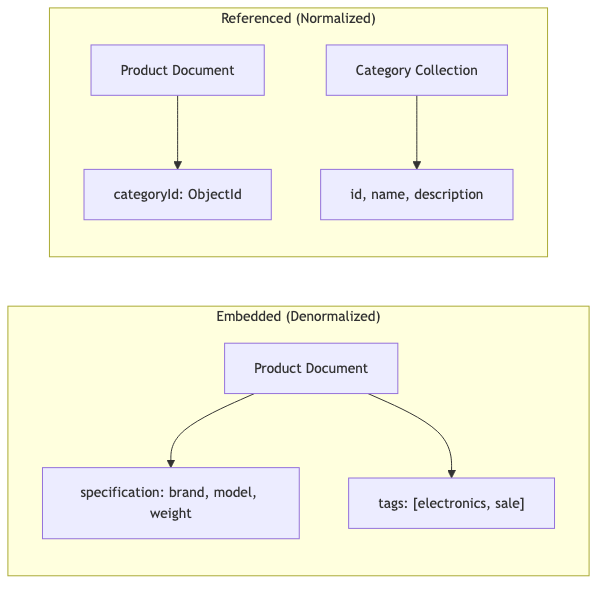
Embed when:
- Data is read together (product + its specs)
- The relationship is 1:1 or 1:few
- Child data doesn’t need independent access
Reference when:
- Data is shared across documents (a category used by many products)
- The relationship is 1:many with unbounded growth
- You need to update the referenced data independently
Our Product Model — Embedded Approach
1
2
3
4
5
6
7
8
9
10
11
12
13
14
15
16
17
18
19
20
21
22
23
24
25
26
27
28
29
@Document(collection = "products")
public class Product {

    @Id
    private String id;

    @Indexed
    private String name;

    @Indexed
    private String category;

    private BigDecimal price;

    private Specification specification;

    private List<String> tags;

    private Instant createdAt;
    private Instant updatedAt;

    public record Specification(
            String brand,
            String model,
            double weight,
            String dimensions,
            String color
    ) {}
}
The Specification record is embedded directly in the product document. Tags are a simple list. Both are stored in the same BSON document — no joins needed.
The resulting MongoDB document looks like:
1
2
3
4
5
6
7
8
9
10
11
12
13
14
15
16
{
  "_id": "664f2a...",
  "name": "MacBook Pro 16",
  "category": "laptops",
  "price": 2499.99,
  "specification": {
    "brand": "Apple",
    "model": "M3 Max",
    "weight": 2.14,
    "dimensions": "35.6 x 25.4 x 1.7 cm",
    "color": "Space Black"
  },
  "tags": ["electronics", "premium", "apple"],
  "createdAt": "2026-08-22T10:00:00Z",
  "updatedAt": "2026-08-22T10:00:00Z"
}
MongoRepository — Derived Queries and @Query
Spring Data MongoDB generates query implementations from method names, just like Spring Data JPA.
1
2
3
4
5
6
7
8
9
10
11
12
13
14
15
16
17
18
19
20
21
22
23
24
@Repository
public interface ProductRepository extends MongoRepository<Product, String> {

    // Derived query — Spring generates the MongoDB query
    List<Product> findByCategory(String category);

    List<Product> findByTagsContaining(String tag);

    // Custom query with regex for case-insensitive search
    @Query("{ 'name': { $regex: ?0, $options: 'i' } }")
    List<Product> searchByName(String nameRegex);

    // Range query on price
    @Query("{ 'price': { $gte: ?0, $lte: ?1 } }")
    List<Product> findByPriceRange(BigDecimal minPrice, BigDecimal maxPrice);

    // Compound query — category + price ceiling
    @Query("{ 'category': ?0, 'price': { $lte: ?1 } }")
    List<Product> findByCategoryAndMaxPrice(String category, BigDecimal maxPrice);

    // Projection — only return name and price for a brand
    @Query(value = "{ 'specification.brand': ?0 }", fields = "{ 'name': 1, 'price': 1 }")
    List<Product> findNameAndPriceByBrand(String brand);
}
Query Method Mapping
| Method Name | MongoDB Query |
|---|---|
findByCategory("laptops") | { category: "laptops" } |
findByTagsContaining("premium") | { tags: "premium" } |
findByPriceBetween(100, 500) | { price: { $gte: 100, $lte: 500 } } |
findByNameStartingWith("Mac") | { name: { $regex: "^Mac" } } |
MongoTemplate + Aggregation Pipeline
For complex analytics, MongoTemplate gives you full access to MongoDB’s aggregation framework.
graph LR
    A[Collection] --> B["$match (filter)"]
    B --> C["$group (aggregate)"]
    C --> D["$project (reshape)"]
    D --> E[Results]

Category Summary — Group, Sum, Count, Average
1
2
3
4
5
6
7
8
9
10
11
12
13
14
15
16
17
18
19
20
21
22
23
24
25
@Service
public class ProductService {

    private final MongoTemplate mongoTemplate;

    public List<Map> aggregateByCategorySummary() {
        GroupOperation groupByCategory = Aggregation.group("category")
                .sum("price").as("totalPrice")
                .count().as("productCount")
                .avg("price").as("averagePrice");

        ProjectionOperation project = Aggregation.project()
                .andExpression("_id").as("category")
                .andInclude("totalPrice", "productCount", "averagePrice")
                .andExclude("_id");

        Aggregation aggregation = Aggregation.newAggregation(
                groupByCategory, project);

        AggregationResults<Map> results = mongoTemplate.aggregate(
                aggregation, "products", Map.class);

        return results.getMappedResults();
    }
}
This produces:
1
2
3
4
[
  { "category": "laptops", "totalPrice": 7499.97, "productCount": 3, "averagePrice": 2499.99 },
  { "category": "phones", "totalPrice": 3299.98, "productCount": 2, "averagePrice": 1649.99 }
]
Filter + Group Pipeline
1
2
3
4
5
6
7
8
9
10
11
12
public List<Map> aggregateExpensiveByCategory(BigDecimal minPrice) {
    MatchOperation match = Aggregation.match(
            Criteria.where("price").gte(minPrice));

    GroupOperation group = Aggregation.group("category")
            .count().as("count")
            .sum("price").as("totalValue");

    Aggregation aggregation = Aggregation.newAggregation(match, group, project);
    return mongoTemplate.aggregate(aggregation, "products", Map.class)
            .getMappedResults();
}
Indexing Strategies
Without indexes, MongoDB performs a collection scan for every query. Create indexes for your most common query patterns.
1
2
3
4
5
6
7
8
9
10
11
// Annotation-based indexes on the model
@Document(collection = "products")
@CompoundIndex(name = "category_price_idx", def = "{'category': 1, 'price': -1}")
public class Product {

    @Indexed
    private String name;

    @Indexed
    private String category;
}
Index Types
| Index Type | Use Case | Example |
|---|---|---|
| Single field | Filter/sort on one field | @Indexed on category |
| Compound | Multi-field queries | { category: 1, price: -1 } |
| Text | Full-text search | @TextIndexed on name |
| TTL | Auto-expire documents | @Indexed(expireAfterSeconds=3600) |
| Wildcard | Schema-flexible nested fields | { "specification.$**": 1 } |
Transactions in MongoDB
Since MongoDB 4.0, multi-document transactions are supported. Spring Data MongoDB integrates with @Transactional.
1
2
3
4
5
6
7
8
@Configuration
public class MongoConfig {

    @Bean
    MongoTransactionManager transactionManager(MongoDatabaseFactory dbFactory) {
        return new MongoTransactionManager(dbFactory);
    }
}
1
2
3
4
5
6
7
8
9
10
11
@Transactional
public void transferStock(String fromProductId, String toProductId, int quantity) {
    Product from = productRepository.findById(fromProductId).orElseThrow();
    Product to = productRepository.findById(toProductId).orElseThrow();

    from.setStock(from.getStock() - quantity);
    to.setStock(to.getStock() + quantity);

    productRepository.save(from);
    productRepository.save(to);
}
Note: Transactions require a replica set. In development, use
mongod --replSet rs0or configure your Docker Compose with replica set initialization.
MongoDB vs PostgreSQL — Comparison
| Feature | MongoDB | PostgreSQL |
|---|---|---|
| Data model | Documents (BSON) | Tables (rows/columns) |
| Schema | Flexible / schema-on-read | Rigid / schema-on-write |
| Query language | MQL (JSON-based) | SQL |
| Joins | $lookup (limited) | Full JOIN support |
| Transactions | Multi-document (since 4.0) | Full ACID |
| Scaling | Horizontal (sharding) | Vertical (or Citus for horizontal) |
| Aggregation | Aggregation Framework | SQL GROUP BY, window functions |
| Change streams | Built-in | LISTEN/NOTIFY, logical replication |
| Full-text search | Built-in (basic) | Built-in (powerful with tsvector) |
| Geospatial | Native support | PostGIS extension |
Common Problems
| Problem | Cause | Solution |
|---|---|---|
| Slow queries on large collections | Missing index | Use explain() and add appropriate indexes |
WriteConcernException | Replica set not configured | Use w: "majority" or configure replica set |
| Document exceeds 16 MB | Embedding too much data | Switch to referenced approach or GridFS |
$lookup performance issues | Cross-collection joins are expensive | Denormalize or embed data |
Duplicate key error on _id | Providing explicit IDs that conflict | Let MongoDB generate ObjectId or ensure uniqueness |
| Connection pool exhaustion | Too many concurrent connections | Configure maxPoolSize in connection URI |
| Transactions fail in standalone mode | Transactions need a replica set | Run MongoDB as a single-node replica set |
Full Working Example
The complete working project is available on GitHub:
Run it locally:
1
2
3
4
git clone https://github.com/anupamsinha/spring-boot-mongodb.git
cd spring-boot-mongodb
docker compose up -d
./mvnw spring-boot:run
Test with curl:
1
2
3
4
5
6
7
8
9
10
11
12
13
14
15
16
17
18
19
# Create a product
curl -X POST http://localhost:8080/api/products \
  -H "Content-Type: application/json" \
  -d '{
    "name": "MacBook Pro 16",
    "category": "laptops",
    "price": 2499.99,
    "specification": {
      "brand": "Apple",
      "model": "M3 Max",
      "weight": 2.14,
      "dimensions": "35.6 x 25.4 x 1.7 cm",
      "color": "Space Black"
    },
    "tags": ["electronics", "premium", "apple"]
  }'

# Category aggregation
curl http://localhost:8080/api/products/aggregation