Spring Boot + GraphQL — Flexible APIs for Frontend Teams
Build flexible APIs with Spring Boot and GraphQL. Covers schema-first design, @QueryMapping, @MutationMapping, N+1 prevention with DataLoader, error handling, and when GraphQL beats REST.
The Problem — Over-Fetching, Under-Fetching, and Round Trips
REST APIs return fixed response shapes. When a mobile client needs only product name and price, it still receives the full 20-field payload. When a dashboard needs products with reviews, ratings, and inventory — that’s three API calls and a client-side join.
sequenceDiagram
    participant Client
    participant REST API
    Client->>REST API: GET /products
    REST API-->>Client: 20 fields per product (over-fetching)
    Client->>REST API: GET /products/1/reviews
    REST API-->>Client: Reviews array
    Client->>REST API: GET /products/1/inventory
    REST API-->>Client: Inventory data
    Note over Client: 3 round trips, client-side joining
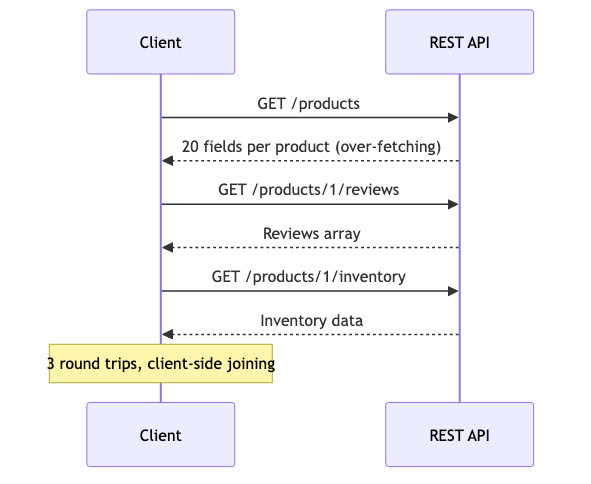
GraphQL solves this: the client specifies exactly what it needs in a single request, and the server returns precisely that shape.
What is GraphQL
GraphQL is a query language for APIs — not a database query language. The client describes the data shape, and the server resolves it.
graph LR
    A[Client] -->|"{ products { name, price } }"| B[GraphQL Server]
    B --> C[Product Resolver]
    B --> D[Review Resolver]
    B --> E[Inventory Resolver]
    C --> F[Database]
    D --> F
    E --> F
    B -->|"{ products: [{name, price}] }"| A
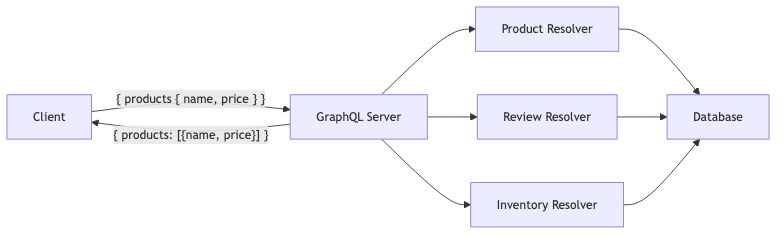
Key concepts:
- Schema — defines types, queries, and mutations (the contract)
- Queries — read operations (like GET)
- Mutations — write operations (like POST/PUT/DELETE)
- Resolvers — functions that fetch data for each field
- Schema-first — you write the schema, then implement resolvers
Setup
Dependencies (pom.xml)
1
2
3
4
5
6
7
8
9
10
11
12
13
14
15
16
17
<dependency>
    <groupId>org.springframework.boot</groupId>
    <artifactId>spring-boot-starter-graphql</artifactId>
</dependency>
<dependency>
    <groupId>org.springframework.boot</groupId>
    <artifactId>spring-boot-starter-web</artifactId>
</dependency>
<dependency>
    <groupId>org.springframework.boot</groupId>
    <artifactId>spring-boot-starter-data-jpa</artifactId>
</dependency>
<dependency>
    <groupId>com.h2database</groupId>
    <artifactId>h2</artifactId>
    <scope>runtime</scope>
</dependency>
application.yml
1
2
3
4
5
6
7
8
9
10
11
12
13
14
15
spring:
  graphql:
    graphiql:
      enabled: true
    schema:
      printer:
        enabled: true
  datasource:
    url: jdbc:h2:mem:graphqldb
    driver-class-name: org.h2.Driver
    username: sa
    password:
  jpa:
    hibernate:
      ddl-auto: create-drop
Schema Definition
Place your schema at src/main/resources/graphql/schema.graphqls. Spring Boot auto-detects it.
1
2
3
4
5
6
7
8
9
10
11
12
13
14
15
16
17
18
19
20
21
22
23
24
25
26
27
28
29
30
31
32
33
34
35
36
37
38
39
40
41
42
type Product {
    id: ID!
    name: String!
    description: String
    category: String!
    price: Float!
    reviews: [Review!]!
}

type Review {
    id: ID!
    author: String!
    comment: String!
    rating: Int!
    createdAt: String!
}

type Query {
    products: [Product!]!
    productById(id: ID!): Product
    productsByCategory(category: String!): [Product!]!
}

input ProductInput {
    name: String!
    description: String
    category: String!
    price: Float!
}

input ReviewInput {
    author: String!
    comment: String!
    rating: Int!
}

type Mutation {
    createProduct(input: ProductInput!): Product!
    updateProduct(id: ID!, input: ProductInput!): Product!
    deleteProduct(id: ID!): Boolean!
    addReview(productId: ID!, input: ReviewInput!): Review!
}
Schema Design Rules
| Rule | Example |
|---|---|
Use ! for non-nullable fields | name: String! |
Use input types for mutations | input ProductInput { ... } |
| Prefix with action for mutations | createProduct, deleteProduct |
Use ID! for identifiers | id: ID! |
| Plural for lists | products: [Product!]! |
Implementing Resolvers
@QueryMapping — Read Operations
1
2
3
4
5
6
7
8
9
10
11
12
13
14
15
16
17
18
19
20
@Controller
public class ProductGraphqlController {

    private final ProductRepository productRepository;

    @QueryMapping
    public List<Product> products() {
        return productRepository.findAll();
    }

    @QueryMapping
    public Product productById(@Argument Long id) {
        return productRepository.findById(id).orElse(null);
    }

    @QueryMapping
    public List<Product> productsByCategory(@Argument String category) {
        return productRepository.findByCategory(category);
    }
}
The method name must match the field name in the schema. @Argument maps GraphQL arguments to method parameters.
@MutationMapping — Write Operations
1
2
3
4
5
6
7
8
9
10
11
12
13
14
15
16
17
18
19
20
21
22
@MutationMapping
public Product createProduct(@Argument ProductInput input) {
    Product product = new Product(
            input.name(), input.description(),
            input.category(), input.price()
    );
    return productRepository.save(product);
}

@MutationMapping
public Review addReview(@Argument Long productId, @Argument ReviewInput input) {
    Product product = productRepository.findById(productId)
            .orElseThrow(() -> new RuntimeException("Product not found"));

    Review review = new Review(input.author(), input.comment(),
                               input.rating(), product);
    return reviewRepository.save(review);
}

record ProductInput(String name, String description,
                    String category, BigDecimal price) {}
record ReviewInput(String author, String comment, int rating) {}
@SchemaMapping — Nested Types
For resolving nested fields (like Product.reviews), use @SchemaMapping:
1
2
3
4
@SchemaMapping(typeName = "Product", field = "reviews")
public List<Review> reviews(Product product) {
    return reviewRepository.findByProductId(product.getId());
}
This is called for each product in the result — which leads to the N+1 problem.
N+1 Problem + @BatchMapping
If you query 10 products with reviews, @SchemaMapping fires 10 separate SQL queries for reviews. That’s the N+1 problem.
graph TD
    A[Query: products] --> B[1 query: SELECT * FROM products]
    B --> C[Product 1]
    B --> D[Product 2]
    B --> E[Product N]
    C --> F[Query: SELECT * FROM reviews WHERE product_id = 1]
    D --> G[Query: SELECT * FROM reviews WHERE product_id = 2]
    E --> H[Query: SELECT * FROM reviews WHERE product_id = N]
    style F fill:#f96,stroke:#333
    style G fill:#f96,stroke:#333
    style H fill:#f96,stroke:#333
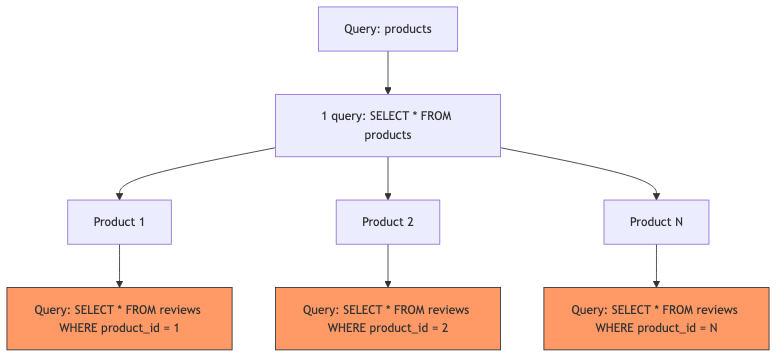
Solution: @BatchMapping
@BatchMapping receives all parent objects at once and returns a map:
1
2
3
4
5
6
7
8
9
10
11
12
13
14
15
16
17
18
19
@BatchMapping
public Map<Product, List<Review>> reviews(List<Product> products) {
    List<Long> productIds = products.stream()
            .map(Product::getId)
            .toList();

    // Single query for ALL reviews
    List<Review> allReviews = reviewRepository.findByProductIdIn(productIds);

    Map<Long, List<Review>> reviewsByProductId = allReviews.stream()
            .collect(Collectors.groupingBy(r -> r.getProduct().getId()));

    return products.stream()
            .collect(Collectors.toMap(
                    product -> product,
                    product -> reviewsByProductId.getOrDefault(
                            product.getId(), List.of())
            ));
}
Now instead of N+1 queries, we execute exactly 2: one for products, one for all their reviews.
Error Handling
Spring GraphQL integrates with DataFetcherExceptionResolver for consistent error responses:
1
2
3
4
5
6
7
8
9
10
11
12
13
14
15
16
17
18
19
20
21
22
23
24
@Component
public class GraphqlExceptionHandler implements DataFetcherExceptionResolver {

    @Override
    public Mono<List<GraphQLError>> resolveException(
            Throwable ex, DataFetchingEnvironment env) {

        if (ex instanceof EntityNotFoundException) {
            return Mono.just(List.of(
                    GraphqlErrorBuilder.newError(env)
                            .message(ex.getMessage())
                            .errorType(ErrorType.NOT_FOUND)
                            .build()
            ));
        }

        return Mono.just(List.of(
                GraphqlErrorBuilder.newError(env)
                        .message("Internal error")
                        .errorType(ErrorType.INTERNAL_ERROR)
                        .build()
        ));
    }
}
GraphQL errors follow a standard format:
1
2
3
4
5
6
7
8
9
10
11
{
  "errors": [
    {
      "message": "Product not found: 99",
      "locations": [{"line": 2, "column": 3}],
      "path": ["productById"],
      "extensions": { "classification": "NOT_FOUND" }
    }
  ],
  "data": { "productById": null }
}
GraphiQL for Testing
With spring.graphql.graphiql.enabled=true, navigate to http://localhost:8080/graphiql to get an interactive IDE with:
- Schema explorer (left sidebar)
- Auto-completion
- Query history
- Variable support
Example query to test:
1
2
3
4
5
6
7
8
9
10
11
12
{
  products {
    id
    name
    price
    reviews {
      author
      rating
      comment
    }
  }
}
GraphQL vs REST — Comparison
| Aspect | GraphQL | REST |
|---|---|---|
| Data fetching | Client specifies exact fields | Server decides response shape |
| Endpoints | Single endpoint (/graphql) | Multiple endpoints per resource |
| Over-fetching | Not possible — client picks fields | Common — full resource returned |
| Under-fetching | Not possible — nested queries | Requires multiple calls |
| Versioning | No versioning — deprecate fields | URL versioning (/v1/, /v2/) |
| Caching | Complex (POST-based) | Simple (HTTP caching, ETags) |
| File uploads | Not built-in | Native multipart support |
| Real-time | Subscriptions (WebSocket) | SSE, WebSocket, polling |
| Tooling | GraphiQL, schema introspection | Swagger/OpenAPI |
| Learning curve | Higher | Lower |
When to Use Which
Choose GraphQL when:
- Multiple frontend clients need different data shapes
- Deeply nested related data
- Rapid frontend iteration (no backend changes for new views)
- Mobile clients where bandwidth matters
Choose REST when:
- Simple CRUD with predictable access patterns
- File upload/download is primary
- HTTP caching is critical
- Team is experienced with REST, new to GraphQL
Common Problems
| Problem | Cause | Solution |
|---|---|---|
| N+1 queries | @SchemaMapping runs per parent | Use @BatchMapping or DataLoader |
| Schema not found | File not in src/main/resources/graphql/ | Move to correct location, use .graphqls extension |
@Argument returns null | Name mismatch with schema | Ensure parameter name matches schema argument name |
| Circular references in JSON | Bidirectional JPA relationships | Use DTOs or @JsonIgnore on one side |
| Mutation input not binding | Missing input keyword in schema | Use input ProductInput not type ProductInput |
| Large query depth causes timeouts | No depth limiting | Configure spring.graphql.schema.inspection.enabled=true |
| GraphiQL not loading | graphiql.enabled not set | Add to application.yml |
Full Working Example
The complete project is available on GitHub:
1
2
3
4
git clone https://github.com/anupamsinha/spring-boot-graphql.git
cd spring-boot-graphql
./mvnw spring-boot:run
# Open http://localhost:8080/graphiql