The Problem
Your distributed tracing post covers trace propagation between services. But observability is three pillars — not one:
- Metrics — is the system healthy? (latency, error rate, throughput)
- Logs — what happened? (structured events with context)
- Traces — where did it go? (request path across services)
In production you need all three, correlated. When a 500 error fires, you should jump from the metric alert → to the log entry → to the full trace — in one click.
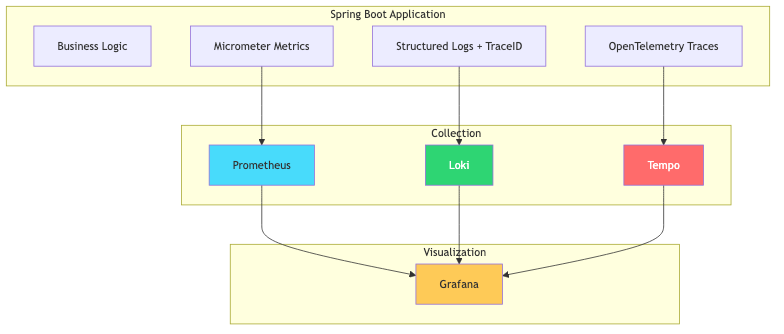
This post builds that complete stack with the LGTM stack (Loki, Grafana, Tempo, Mimir/Prometheus).
What We Are Building
flowchart TD
    subgraph "Spring Boot Application"
        A[Business Logic]
        B[Micrometer Metrics]
        C[Structured Logs + TraceID]
        D[OpenTelemetry Traces]
    end

    subgraph "Collection"
        B --> E[Prometheus]
        C --> F[Loki]
        D --> G[Tempo]
    end

    subgraph "Visualization"
        E --> H[Grafana]
        F --> H
        G --> H
    end

    style H fill:#feca57,color:#333
    style E fill:#48dbfb,color:#333
    style F fill:#2ed573,color:#fff
    style G fill:#ff6b6b,color:#fff
One Grafana dashboard where you can:
- See request rate and error rate (metrics from Prometheus)
- Click an error → see the log line (from Loki)
- Click the trace ID in the log → see the full distributed trace (from Tempo)
Prerequisites
| Component | Version |
|---|
| Java | 21+ |
| Spring Boot | 3.5+ |
| Docker Compose | Latest |
| Maven | 3.9+ |
Step 1: Infrastructure (docker-compose.yml)
1
2
3
4
5
6
7
8
9
10
11
12
13
14
15
16
17
18
19
20
21
22
23
24
25
26
27
28
29
30
31
32
33
34
35
| services:
prometheus:
image: prom/prometheus:v2.53.0
container_name: prometheus
ports:
- "9090:9090"
volumes:
- ./observability/prometheus.yml:/etc/prometheus/prometheus.yml
loki:
image: grafana/loki:3.1.0
container_name: loki
ports:
- "3100:3100"
tempo:
image: grafana/tempo:2.5.0
container_name: tempo
ports:
- "3200:3200" # Tempo API
- "4317:4317" # OTLP gRPC
- "4318:4318" # OTLP HTTP
volumes:
- ./observability/tempo.yml:/etc/tempo/config.yml
command: ["-config.file=/etc/tempo/config.yml"]
grafana:
image: grafana/grafana:11.1.0
container_name: grafana
ports:
- "3000:3000"
environment:
GF_SECURITY_ADMIN_PASSWORD: admin
volumes:
- ./observability/grafana-datasources.yml:/etc/grafana/provisioning/datasources/datasources.yml
|
Prometheus config (observability/prometheus.yml)
1
2
3
4
5
6
7
8
| global:
scrape_interval: 15s
scrape_configs:
- job_name: 'spring-boot-app'
metrics_path: '/actuator/prometheus'
static_configs:
- targets: ['host.docker.internal:8080']
|
Tempo config (observability/tempo.yml)
1
2
3
4
5
6
7
8
9
10
11
12
13
14
15
16
17
| server:
http_listen_port: 3200
distributor:
receivers:
otlp:
protocols:
grpc:
endpoint: "0.0.0.0:4317"
http:
endpoint: "0.0.0.0:4318"
storage:
trace:
backend: local
local:
path: /var/tempo/traces
|
Grafana datasources (observability/grafana-datasources.yml)
1
2
3
4
5
6
7
8
9
10
11
12
| apiVersion: 1
datasources:
- name: Prometheus
type: prometheus
url: http://prometheus:9090
isDefault: true
- name: Loki
type: loki
url: http://loki:3100
- name: Tempo
type: tempo
url: http://tempo:3200
|
Step 2: Spring Boot Dependencies
1
2
3
4
5
6
7
8
9
10
11
12
13
14
15
16
17
18
19
20
21
22
23
24
25
26
27
28
29
30
31
32
33
| <dependencies>
<dependency>
<groupId>org.springframework.boot</groupId>
<artifactId>spring-boot-starter-web</artifactId>
</dependency>
<dependency>
<groupId>org.springframework.boot</groupId>
<artifactId>spring-boot-starter-actuator</artifactId>
</dependency>
<!-- Metrics → Prometheus -->
<dependency>
<groupId>io.micrometer</groupId>
<artifactId>micrometer-registry-prometheus</artifactId>
</dependency>
<!-- Tracing → OpenTelemetry → Tempo -->
<dependency>
<groupId>io.micrometer</groupId>
<artifactId>micrometer-tracing-bridge-otel</artifactId>
</dependency>
<dependency>
<groupId>io.opentelemetry</groupId>
<artifactId>opentelemetry-exporter-otlp</artifactId>
</dependency>
<!-- Structured Logging → Loki -->
<dependency>
<groupId>com.github.loki4j</groupId>
<artifactId>loki-logback-appender</artifactId>
<version>1.5.1</version>
</dependency>
</dependencies>
|
| Dependency | Purpose |
|---|
micrometer-registry-prometheus | Exposes metrics at /actuator/prometheus |
micrometer-tracing-bridge-otel | Bridges Micrometer tracing to OpenTelemetry |
opentelemetry-exporter-otlp | Exports traces to Tempo via OTLP |
loki-logback-appender | Ships logs directly to Loki |
Step 3: Application Configuration
1
2
3
4
5
6
7
8
9
10
11
12
13
14
15
16
17
18
19
| spring:
application:
name: payment-service
management:
endpoints:
web:
exposure:
include: health,info,prometheus,metrics
tracing:
sampling:
probability: 1.0 # Sample 100% in dev. Use 0.1 (10%) in production.
otlp:
tracing:
endpoint: http://localhost:4318/v1/traces
logging:
pattern:
correlation: "[${spring.application.name:},%X{traceId:-},%X{spanId:-}] "
|
The correlation pattern injects traceId and spanId into every log line. This is the glue between logs and traces.
Step 4: Logback Configuration for Loki
1
2
3
4
5
6
7
8
9
10
11
12
13
14
15
16
17
18
19
20
21
22
23
24
25
26
27
28
29
30
31
| <!-- src/main/resources/logback-spring.xml -->
<configuration>
<include resource="org/springframework/boot/logging/logback/defaults.xml"/>
<!-- Console with trace correlation -->
<appender name="CONSOLE" class="ch.qos.logback.core.ConsoleAppender">
<encoder>
<pattern>%d{HH:mm:ss.SSS} [%thread] %-5level [%X{traceId:-},%X{spanId:-}] %logger{36} - %msg%n</pattern>
</encoder>
</appender>
<!-- Ship to Loki with labels -->
<appender name="LOKI" class="com.github.loki4j.logback.Loki4jAppender">
<http>
<url>http://localhost:3100/loki/api/v1/push</url>
</http>
<format>
<label>
<pattern>app=${spring.application.name},level=%level</pattern>
</label>
<message>
<pattern>%d{HH:mm:ss.SSS} [%thread] %-5level [%X{traceId:-},%X{spanId:-}] %logger{36} - %msg%n</pattern>
</message>
</format>
</appender>
<root level="INFO">
<appender-ref ref="CONSOLE"/>
<appender-ref ref="LOKI"/>
</root>
</configuration>
|
Every log line in Loki includes the traceId. Click it in Grafana → jump to the full trace in Tempo.
Step 5: Custom Metrics
1
2
3
4
5
6
7
8
9
10
11
12
13
14
15
16
17
18
19
20
21
22
23
24
25
26
27
28
29
30
31
32
| @Service
public class PaymentService {
private final Counter paymentCounter;
private final Timer paymentTimer;
public PaymentService(MeterRegistry meterRegistry) {
this.paymentCounter = Counter.builder("payments.processed")
.description("Total payments processed")
.tag("type", "all")
.register(meterRegistry);
this.paymentTimer = Timer.builder("payments.duration")
.description("Payment processing duration")
.register(meterRegistry);
}
public PaymentResult processPayment(PaymentRequest request) {
return paymentTimer.record(() -> {
// Business logic
PaymentResult result = doProcess(request);
paymentCounter.increment();
Counter.builder("payments.processed")
.tag("status", result.status())
.register(meterRegistry)
.increment();
return result;
});
}
}
|
These custom metrics appear in Prometheus alongside the auto-configured ones (HTTP request duration, JVM memory, thread pools, etc.).
Step 6: Custom Spans for Fine-Grained Tracing
1
2
3
4
5
6
7
8
9
10
11
12
13
14
15
16
17
18
19
20
21
22
23
24
25
26
27
28
29
| @Service
public class PaymentService {
private final ObservationRegistry observationRegistry;
public PaymentService(ObservationRegistry observationRegistry) {
this.observationRegistry = observationRegistry;
}
public PaymentResult processPayment(PaymentRequest request) {
Observation observation = Observation.createNotStarted("payment.process", observationRegistry)
.lowCardinalityKeyValue("payment.method", request.method())
.highCardinalityKeyValue("payment.id", request.paymentId());
return observation.observe(() -> {
validatePayment(request);
PaymentResult result = chargeProvider(request);
saveResult(result);
return result;
});
}
private void validatePayment(PaymentRequest request) {
Observation.createNotStarted("payment.validate", observationRegistry)
.observe(() -> {
// Validation logic — appears as a child span
});
}
}
|
This creates nested spans: payment.process → payment.validate → payment.charge visible in Tempo.
Step 7: Correlation in Action
When a request flows through the system:
1
2
3
| 2026-08-22 10:30:01 [http-nio-8080-exec-1] INFO [abc123def456,span789] PaymentController - Received payment request
2026-08-22 10:30:01 [http-nio-8080-exec-1] INFO [abc123def456,span790] PaymentService - Processing payment PAY-001
2026-08-22 10:30:02 [http-nio-8080-exec-1] INFO [abc123def456,span791] PaymentService - Payment PAY-001 completed
|
The abc123def456 trace ID is the same across all log lines for this request. In Grafana:
- Prometheus shows a spike in
payments.duration → you click to investigate - Loki shows the log lines with that trace ID → you see the error message
- Tempo shows the full trace → you see which span was slow (the external provider call)
Grafana Dashboard Queries
Request rate (Prometheus)
rate(http_server_requests_seconds_count{application="payment-service"}[5m])
Error rate (Prometheus)
rate(http_server_requests_seconds_count{application="payment-service", status=~"5.."}[5m])
/ rate(http_server_requests_seconds_count{application="payment-service"}[5m])
P99 latency (Prometheus)
histogram_quantile(0.99, rate(http_server_requests_seconds_bucket{application="payment-service"}[5m]))
Find error logs (Loki)
{app="payment-service"} |= "ERROR"
Find logs for a specific trace (Loki)
{app="payment-service"} |= "abc123def456"
Spring Boot + Micrometer gives you these with zero code:
| Metric | What It Measures |
|---|
http_server_requests_seconds | Request duration, status codes, endpoints |
jvm_memory_used_bytes | Heap and non-heap memory |
jvm_threads_states | Thread pool utilization |
system_cpu_usage | CPU utilization |
hikaricp_connections_active | Database connection pool |
spring_kafka_listener_seconds | Kafka consumer processing time |
Production Sampling
Don’t trace 100% in production — it’s expensive:
1
2
3
4
| management:
tracing:
sampling:
probability: 0.1 # 10% of requests
|
For errors, always capture:
1
2
3
4
| @Bean
public SpanExportingPredicate alwaysExportErrors() {
return span -> span.getStatus() == StatusData.error() || Math.random() < 0.1;
}
|
Common Problems
| Symptom | Cause | Fix |
|---|
| No traces in Tempo | OTLP endpoint wrong | Verify management.otlp.tracing.endpoint |
| No metrics in Prometheus | Actuator not exposed | Add management.endpoints.web.exposure.include=prometheus |
| Logs missing traceId | No tracing bridge | Add micrometer-tracing-bridge-otel dependency |
| Grafana shows no data | Datasource misconfigured | Check URLs in grafana-datasources.yml |
| High cardinality metrics | Using user IDs as tags | Use highCardinalityKeyValue for high-cardinality, not tags |
| Trace not connecting across services | Missing propagation header | Ensure traceparent header is forwarded |
Full Working Example
The complete project with Docker Compose, Grafana dashboards, and instrumented app is at github.com/AnupamSinha/spring-boot-examples/tree/main/11-observability.
1
2
3
4
5
| git clone https://github.com/AnupamSinha/spring-boot-examples/tree/main/11-observability
cd spring-boot-observability
docker compose up -d # Starts Prometheus, Loki, Tempo, Grafana
./mvnw spring-boot:run
# Open Grafana at http://localhost:3000 (admin/admin)
|
References