Feature Flags with Spring Boot — Togglz for Safe Deployments
Decouple deployment from release with feature flags in Spring Boot. Covers Togglz setup, activation strategies (gradual rollout, user-based, time-based), runtime toggling, A/B testing, and production safety patterns.
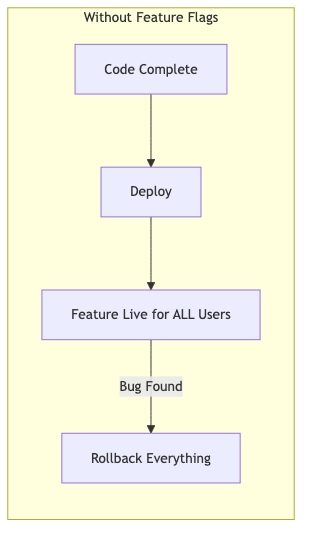
The Problem — Deploy ≠ Release
In traditional deployment workflows, deploying code means releasing features. This creates pressure:
- Teams batch features into large releases (risky)
- Broken features require rollback of everything
- No way to test in production with a subset of users
- Friday deploys are terrifying
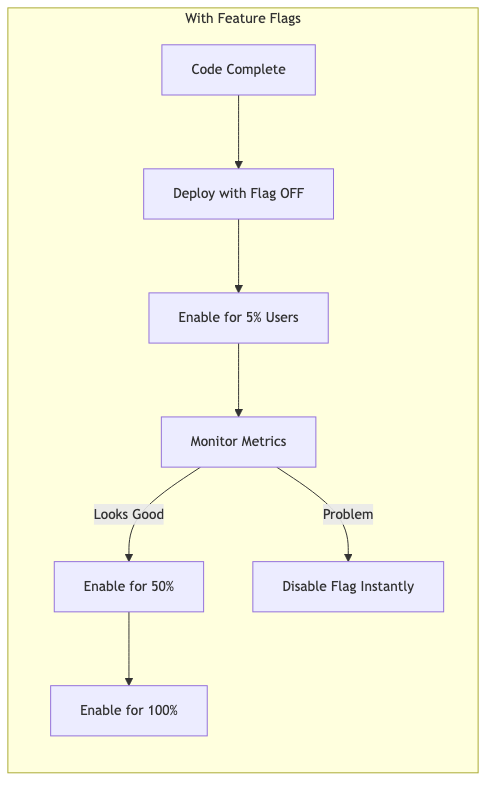
What if you could deploy code with features turned off, then enable them gradually at runtime — without redeploying?
graph LR
    subgraph "Without Feature Flags"
        A[Code Complete] --> B[Deploy]
        B --> C[Feature Live for ALL Users]
        C -->|Bug Found| D[Rollback Everything]
    end
graph LR
    subgraph "With Feature Flags"
        E[Code Complete] --> F[Deploy with Flag OFF]
        F --> G[Enable for 5% Users]
        G --> H[Monitor Metrics]
        H -->|Looks Good| I[Enable for 50%]
        I --> J[Enable for 100%]
        H -->|Problem| K[Disable Flag Instantly]
    end
What Are Feature Flags?
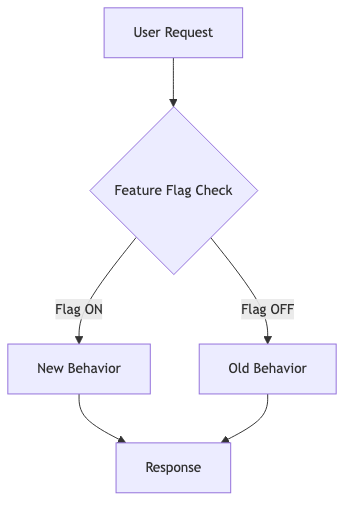
Feature flags (also called feature toggles) are conditional statements that control which code paths execute. They decouple deployment (pushing code) from release (enabling behavior).
graph TD
    A[User Request] --> B{Feature Flag Check}
    B -->|Flag ON| C[New Behavior]
    B -->|Flag OFF| D[Old Behavior]
    C --> E[Response]
    D --> E
Types of feature flags:
| Type | Purpose | Lifespan | Example |
|---|---|---|---|
| Release toggle | Decouple deploy from release | Days to weeks | New checkout flow |
| Experiment toggle | A/B testing | Weeks to months | Recommendation algorithm |
| Ops toggle | Kill switch for unstable features | Permanent | Circuit breaker |
| Permission toggle | Gatekeep premium features | Permanent | Premium search |
Setup with Togglz
Togglz is a mature feature flag library for Java with first-class Spring Boot integration.
Maven Dependencies
1
2
3
4
5
6
7
8
9
10
11
12
<dependencies>
    <dependency>
        <groupId>org.togglz</groupId>
        <artifactId>togglz-spring-boot-starter</artifactId>
        <version>4.4.0</version>
    </dependency>
    <dependency>
        <groupId>org.togglz</groupId>
        <artifactId>togglz-console</artifactId>
        <version>4.4.0</version>
    </dependency>
</dependencies>
Application Configuration
1
2
3
4
5
6
7
8
9
togglz:
  enabled: true
  feature-enums: com.anupam.flags.feature.AppFeatures
  console:
    enabled: true
    path: /togglz-console
    secured: false  # Set true in production
  state-repository:
    type: IN_MEMORY  # Use JDBC or Redis in production
Defining Features
Features are defined as an enum implementing Feature:
1
2
3
4
5
6
7
8
9
10
11
12
public enum AppFeatures implements Feature {

    @Label("New Checkout Flow")
    NEW_CHECKOUT,

    @Label("Dark Mode")
    @EnabledByDefault
    DARK_MODE,

    @Label("Premium Search")
    PREMIUM_SEARCH
}
Register the enum with a FeatureProvider bean:
1
2
3
4
5
6
7
8
@Configuration
public class FeatureConfig {

    @Bean
    public FeatureProvider featureProvider() {
        return new EnumBasedFeatureProvider(AppFeatures.class);
    }
}
Activation Strategies
Togglz supports multiple strategies for controlling when a flag is active:
Percentage-Based (Gradual Rollout)
1
2
3
4
5
6
// Activate for 10% of users
FeatureState state = new FeatureState(AppFeatures.NEW_CHECKOUT)
    .setEnabled(true)
    .setStrategyId("gradual")
    .setParameter("percentage", "10");
featureManager.setFeatureState(state);
User-Based
1
2
3
4
5
6
// Only enable for specific users
FeatureState state = new FeatureState(AppFeatures.PREMIUM_SEARCH)
    .setEnabled(true)
    .setStrategyId("username")
    .setParameter("users", "admin,beta-tester-1,beta-tester-2");
featureManager.setFeatureState(state);
Time-Based (Scheduled Release)
1
2
3
4
5
6
7
// Enable after a specific date
FeatureState state = new FeatureState(AppFeatures.NEW_CHECKOUT)
    .setEnabled(true)
    .setStrategyId("release-date")
    .setParameter("date", "2026-09-01")
    .setParameter("time", "09:00:00");
featureManager.setFeatureState(state);
Server IP (Canary Deployment)
1
2
3
4
5
6
// Enable on specific server instances
FeatureState state = new FeatureState(AppFeatures.NEW_CHECKOUT)
    .setEnabled(true)
    .setStrategyId("server-ip")
    .setParameter("ips", "10.0.1.5,10.0.1.6");
featureManager.setFeatureState(state);
Using in Code
Basic Check with FeatureManager
1
2
3
4
5
6
7
8
9
10
11
12
13
14
15
16
17
18
19
20
21
22
23
24
@RestController
@RequestMapping("/api/products")
public class ProductController {

    private final FeatureManager featureManager;

    @GetMapping
    public ResponseEntity<Map<String, Object>> searchProducts(@RequestParam String query) {
        if (featureManager.isActive(AppFeatures.PREMIUM_SEARCH)) {
            // Enhanced: full-text, faceted, weighted scoring
            return ResponseEntity.ok(Map.of(
                "searchMode", "premium",
                "results", premiumSearch(query),
                "facets", List.of("category", "brand", "price-range")
            ));
        } else {
            // Basic: simple LIKE query
            return ResponseEntity.ok(Map.of(
                "searchMode", "basic",
                "results", basicSearch(query)
            ));
        }
    }
}
Service Layer Pattern
1
2
3
4
5
6
7
8
9
10
11
12
13
14
@Service
public class CheckoutService {

    private final FeatureManager featureManager;
    private final LegacyCheckout legacyCheckout;
    private final NewCheckout newCheckout;

    public CheckoutResult processCheckout(Cart cart) {
        if (featureManager.isActive(AppFeatures.NEW_CHECKOUT)) {
            return newCheckout.process(cart);
        }
        return legacyCheckout.process(cart);
    }
}
REST Toggle Endpoint
For runtime control without restarting the application:
1
2
3
4
5
6
7
8
9
10
11
12
13
14
15
16
17
18
19
20
21
22
23
24
25
26
27
28
29
30
31
@RestController
@RequestMapping("/api/features")
public class FeatureToggleController {

    private final FeatureManager featureManager;

    @GetMapping
    public ResponseEntity<List<Map<String, Object>>> getAllFeatures() {
        var features = Arrays.stream(AppFeatures.values())
            .map(feature -> Map.<String, Object>of(
                "name", feature.name(),
                "enabled", featureManager.isActive(feature)
            ))
            .toList();
        return ResponseEntity.ok(features);
    }

    @PutMapping("/{featureName}/enable")
    public ResponseEntity<?> enable(@PathVariable String featureName) {
        AppFeatures feature = AppFeatures.valueOf(featureName.toUpperCase());
        featureManager.setFeatureState(new FeatureState(feature, true));
        return ResponseEntity.ok(Map.of("feature", feature.name(), "enabled", true));
    }

    @PutMapping("/{featureName}/disable")
    public ResponseEntity<?> disable(@PathVariable String featureName) {
        AppFeatures feature = AppFeatures.valueOf(featureName.toUpperCase());
        featureManager.setFeatureState(new FeatureState(feature, false));
        return ResponseEntity.ok(Map.of("feature", feature.name(), "enabled", false));
    }
}
Usage:
1
2
3
4
5
6
7
8
# Check all flags
curl http://localhost:8080/api/features

# Enable new checkout
curl -X PUT http://localhost:8080/api/features/NEW_CHECKOUT/enable

# Disable if problems detected
curl -X PUT http://localhost:8080/api/features/NEW_CHECKOUT/disable
Togglz Admin Console
Togglz ships with a web-based admin console at /togglz-console. It provides:
- View all features and their current state
- Toggle features on/off
- Configure activation strategies
- Set strategy parameters (percentage, user list, etc.)
In production, secure it with Spring Security:
1
2
3
4
5
6
7
8
9
@Bean
public SecurityFilterChain securityFilterChain(HttpSecurity http) throws Exception {
    return http
        .authorizeHttpRequests(auth -> auth
            .requestMatchers("/togglz-console/**").hasRole("ADMIN")
            .anyRequest().permitAll()
        )
        .build();
}
Feature Flag Lifecycle
Every flag should follow a defined lifecycle:
graph LR
    A[Create Flag] --> B[Develop Behind Flag]
    B --> C[Test in Staging]
    C --> D[Gradual Rollout — 5%]
    D --> E[Expand — 25%]
    E --> F[Full Rollout — 100%]
    F --> G[Remove Flag from Code]
    G --> H[Delete Flag Definition]

Critical rule: flags are temporary. A flag that lives forever becomes technical debt.
| Phase | Duration | Action |
|---|---|---|
| Development | 1-2 sprints | Code behind flag, flag is OFF |
| Testing | Days | Enable in staging, internal users |
| Gradual rollout | 1-2 weeks | 5% → 25% → 50% → 100% |
| Permanent release | 1 sprint | Flag always ON, test removal |
| Cleanup | Next sprint | Remove flag checks, delete enum entry |
Anti-Patterns — Flag Debt
Feature flags can become technical debt if not managed:
| Anti-Pattern | Symptom | Solution |
|---|---|---|
| Permanent release toggles | Flag enabled for 6+ months | Remove flag; make feature permanent |
| Nested flags | if (flagA && flagB && !flagC) | Flatten logic; one flag per decision |
| Flag in shared library | Flag check in utility code | Keep flags in application layer |
| No flag ownership | Nobody knows who owns OLD_FEATURE_V2 | Assign owner per flag; add expiry date |
| Testing only happy path | Only test with flag ON | Test both paths; test flag transitions |
Common Problems
| Problem | Cause | Solution |
|---|---|---|
| Flag state lost on restart | Using IN_MEMORY state repository | Use JDBC, Redis, or MongoDB state repo |
| Inconsistent state across instances | Each instance has own state | Use centralized state store (database/Redis) |
| Cannot roll back flag change | No history of who changed what | Enable audit log in Togglz |
| Performance impact | Flag check hits database per request | Cache flag state with TTL |
| Flag not picked up in tests | Test doesn’t configure Togglz | Use @TestFeature annotation or mock FeatureManager |
| Too many flags | No cleanup process | Set expiry dates; alert when flag > 30 days old |
Full Working Example
The complete source code is available on GitHub:
1
2
3
4
5
6
7
8
9
10
11
12
13
14
15
16
# Run the application
./mvnw spring-boot:run

# Test search with PREMIUM_SEARCH off (default)
curl "http://localhost:8080/api/products?query=laptop"
# → {"searchMode": "basic", ...}

# Enable premium search
curl -X PUT http://localhost:8080/api/features/PREMIUM_SEARCH/enable

# Test search again
curl "http://localhost:8080/api/products?query=laptop"
# → {"searchMode": "premium", "facets": [...], ...}

# Togglz Admin Console
open http://localhost:8080/togglz-console