Spring Boot + Flyway — Database Migrations That Don't Break Production
Master database schema migrations with Spring Boot and Flyway. Covers versioned migrations, repeatable migrations, migration naming, rollback strategies, multi-environment setup, team workflows, and Flyway vs Liquibase comparison.
The Problem
Your application is live. Hundreds of users. The database has a users table, and now you need to add a phone_number column. You open pgAdmin, run ALTER TABLE, and… someone on your team does the same thing on staging but with a different column name. QA runs migrations and gets a different schema than production.
Schema changes in production are terrifying because:
- There’s no version history for DDL
- You can’t review a schema change in a pull request
- Rolling back a column drop is impossible without a backup
- Multiple developers stepping on each other’s changes
- Environments drift out of sync silently
Why Not ddl-auto=update
Hibernate’s ddl-auto=update is tempting:
1
2
3
4
spring:
  jpa:
    hibernate:
      ddl-auto: update
But it will never:
- Remove a column (data loss risk)
- Rename a column (creates a new one instead)
- Change a column type correctly
- Add indexes with specific configurations
- Run data migrations
It’s fine for prototyping. It’s dangerous for anything with real users.
What is Flyway
Flyway is a database migration tool that versions your schema like you version your code. It maintains a history table (flyway_schema_history) that tracks which migrations have been applied:
graph TD
    A[Application Starts] --> B{Check flyway_schema_history}
    B -->|V1 applied, V2 applied| C[V3 pending]
    C --> D[Execute V3__Add_phone_number.sql]
    D --> E[Record V3 in history table]
    E --> F[Application Ready]

    B -->|No history table| G[Create history table]
    G --> H[Execute V1, V2, V3 in order]
    H --> F
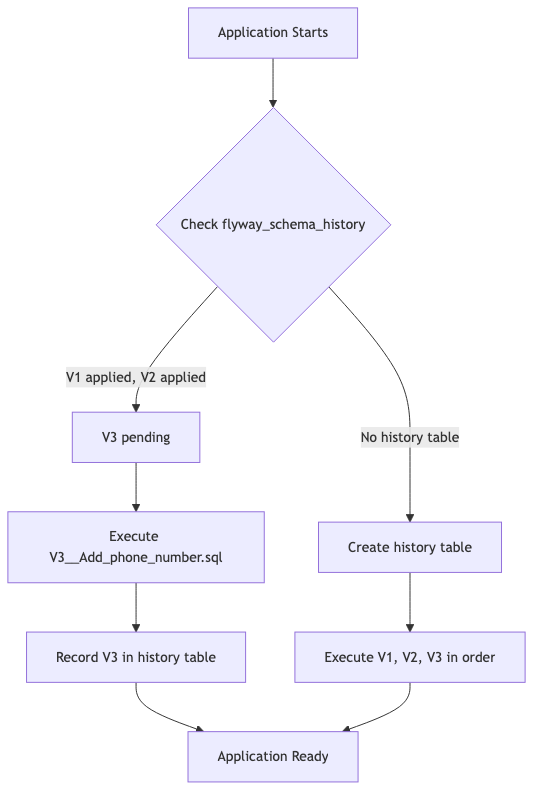
The flyway_schema_history table looks like this:
| installed_rank | version | description | type | script | checksum | installed_on | execution_time | success |
|---|---|---|---|---|---|---|---|---|
| 1 | 1 | Create tables | SQL | V1__Create_tables.sql | -12345 | 2026-01-15 | 245 | true |
| 2 | 2 | Add indexes | SQL | V2__Add_indexes.sql | 67890 | 2026-02-01 | 89 | true |
Setup with Spring Boot
Add Flyway to your pom.xml:
1
2
3
4
5
6
7
8
<dependency>
    <groupId>org.flywaydb</groupId>
    <artifactId>flyway-core</artifactId>
</dependency>
<dependency>
    <groupId>org.flywaydb</groupId>
    <artifactId>flyway-database-postgresql</artifactId>
</dependency>
Configure in application.yml:
1
2
3
4
5
6
7
8
9
10
11
12
spring:
  datasource:
    url: jdbc:postgresql://localhost:5432/myapp
    username: admin
    password: admin
  flyway:
    enabled: true
    locations: classpath:db/migration
    baseline-on-migrate: true
  jpa:
    hibernate:
      ddl-auto: validate  # Flyway manages schema, Hibernate only validates
Key insight: Set
ddl-auto=validate. Let Flyway own the schema. Hibernate validates that entities match the schema at startup.
Writing Migrations
Place SQL files in src/main/resources/db/migration/:
V1__Create_tables.sql
1
2
3
4
5
6
7
8
9
10
11
12
13
14
CREATE TABLE users (
    id         BIGSERIAL PRIMARY KEY,
    username   VARCHAR(100) NOT NULL UNIQUE,
    email      VARCHAR(255) NOT NULL UNIQUE,
    created_at TIMESTAMP DEFAULT CURRENT_TIMESTAMP
);

CREATE TABLE orders (
    id         BIGSERIAL PRIMARY KEY,
    user_id    BIGINT NOT NULL REFERENCES users(id),
    total      NUMERIC(12, 2) NOT NULL,
    status     VARCHAR(20) DEFAULT 'PENDING',
    created_at TIMESTAMP DEFAULT CURRENT_TIMESTAMP
);
V2__Add_indexes.sql
1
2
3
CREATE INDEX idx_orders_user_id ON orders(user_id);
CREATE INDEX idx_orders_status ON orders(status);
CREATE INDEX idx_users_email ON users(email);
V3__Add_phone_number.sql
1
ALTER TABLE users ADD COLUMN phone_number VARCHAR(20);
Each migration runs exactly once, in version order, and is never modified after it’s been applied.
Naming Convention
| Pattern | Example | Purpose |
|---|---|---|
V{version}__{description}.sql | V1__Create_tables.sql | Versioned migration (runs once) |
V{version}.{sub}__{description}.sql | V1.1__Add_column.sql | Sub-versioned migration |
R__{description}.sql | R__Create_views.sql | Repeatable migration (runs on change) |
U{version}__{description}.sql | U3__Undo_phone_number.sql | Undo migration (Flyway Teams only) |
Rules:
- The
__(double underscore) separates version from description - Descriptions use underscores for spaces
- Versions are compared numerically:
V10comes afterV9, not afterV1 - Never modify a migration after it’s been applied — Flyway checksums will fail
Repeatable Migrations
Repeatable migrations re-run whenever their content changes. Perfect for:
- Database views
- Stored procedures
- Reference data that evolves
R__Create_order_summary_view.sql
1
2
3
4
5
6
7
8
9
CREATE OR REPLACE VIEW order_summary AS
SELECT
    u.username,
    COUNT(o.id) AS total_orders,
    SUM(o.total) AS lifetime_value,
    MAX(o.created_at) AS last_order_date
FROM users u
LEFT JOIN orders o ON o.user_id = u.id
GROUP BY u.username;
Repeatable migrations always run after all versioned migrations, and they re-execute whenever you change their checksum.
Environment-Specific Migrations
Use Spring profiles to load different migration locations:
1
2
3
4
5
6
7
8
9
10
11
12
13
14
15
16
17
18
# application.yml (shared)
spring:
  flyway:
    locations: classpath:db/migration

---
# application-dev.yml
spring:
  flyway:
    locations: classpath:db/migration,classpath:db/dev
    # db/dev/ contains test data inserts

---
# application-prod.yml
spring:
  flyway:
    locations: classpath:db/migration,classpath:db/prod
    # db/prod/ contains production-only config
Keep environment-specific SQL (seed data, test fixtures) separate from schema migrations.
Rollback Strategies
Flyway is forward-only by design. There’s no built-in rollback for the open-source version. Here are the strategies:
Strategy 1: Forward-Fix (Recommended)
If V5__Add_column.sql was wrong, don’t delete it. Write V6__Fix_column.sql:
1
2
-- V6__Fix_column_type.sql
ALTER TABLE users ALTER COLUMN phone_number TYPE VARCHAR(30);
This preserves history and is safe for all environments.
Strategy 2: Undo Migrations (Flyway Teams)
With a paid license, you can write undo scripts:
1
2
-- U5__Add_column.sql (undo for V5)
ALTER TABLE users DROP COLUMN phone_number;
Then run: flyway undo
Strategy 3: Clean + Migrate (Dev Only)
For development, you can nuke everything and start fresh:
1
2
flyway clean
flyway migrate
Never run
flyway cleanagainst production. Configureflyway.cleanDisabled=truefor production profiles.
Team Workflow
Branching and Merge Conflicts
When two developers both create V5__*.sql on different branches:
gitGraph
    commit id: "V4 applied"
    branch feature-a
    commit id: "V5__Add_phone.sql"
    checkout main
    branch feature-b
    commit id: "V5__Add_address.sql"
    checkout main
    merge feature-a
    merge feature-b id: "CONFLICT"
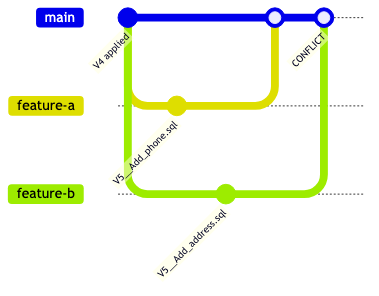
Solution: Use timestamps or ticket numbers in versions:
1
2
V20260822_001__Add_phone_number.sql
V20260822_002__Add_address.sql
Or use a sequential numbering convention with merge coordination (team agrees who gets the next number).
Code Review Checklist for Migrations
- Migration is backwards-compatible (old code still works)
- Large tables: uses
CONCURRENTLYfor index creation - No
DROP COLUMNwithout confirming data loss is acceptable - Matching JPA entity changes in the same PR
- Migration tested locally with
flyway validate
Flyway vs Liquibase
| Feature | Flyway | Liquibase |
|---|---|---|
| Migration format | Plain SQL (preferred), Java | XML, YAML, JSON, SQL |
| Learning curve | Low — it’s just SQL | Medium — XML changeset syntax |
| Rollback (OSS) | No | Yes (with rollback tags) |
| Diff generation | No | Yes (liquibase diff) |
| Database support | 20+ databases | 50+ databases |
| Spring Boot integration | First-class (spring.flyway.*) | First-class (spring.liquibase.*) |
| Checksum validation | SHA-1 per file | SHA-1 per changeset |
| Repeatable migrations | Yes | Yes (via runAlways) |
| Conditional execution | No (use Java migrations) | Yes (preconditions) |
| Community size | Large | Large |
| Best for | Teams that prefer SQL | Teams that need database-agnostic XML |
My recommendation: Use Flyway if your team writes SQL naturally and you’re on a single database. Use Liquibase if you need database-agnostic migrations or rollback support in the open-source version.
Production Tips
Baseline an Existing Database
If you’re adding Flyway to an existing database:
1
2
3
4
spring:
  flyway:
    baseline-on-migrate: true
    baseline-version: 0
This creates a baseline entry in the history table without running any migrations for existing schemas.
Validate Before Deploy
Add validation to your CI pipeline:
1
flyway validate -url=jdbc:postgresql://... -user=admin -password=***
This catches checksum mismatches and missing migrations before you deploy.
Repair
If a migration fails halfway (non-transactional DDL on MySQL), the history table gets corrupted. Fix it:
1
flyway repair
This removes failed entries and realigns checksums.
Locking
Flyway uses database-level locking (SELECT FOR UPDATE on the history table) to prevent concurrent migrations. You don’t need to coordinate deploys in a cluster — only one instance runs migrations.
Common Problems
| Problem | Cause | Fix |
|---|---|---|
Migration checksum mismatch | Modified an already-applied migration | Never edit applied migrations; write a new one |
Found non-empty schema without history table | Adding Flyway to existing DB | Set baseline-on-migrate=true |
Migration V5 failed | SQL error in migration file | Fix SQL, run flyway repair, then flyway migrate |
| Schema out of sync with entities | Missing migration for new entity field | Write migration, set ddl-auto=validate to catch early |
| Duplicate version numbers | Two developers used same version | Use timestamp-based versions |
| Slow migrations on large tables | ALTER TABLE locks entire table | Use CONCURRENTLY for indexes, batch data migrations |
FlywayException: Validate failed in CI | Pending migrations not applied | Run flyway migrate before validate, or use flyway info |