HTMX + Spring Boot — Modern Server-Rendered UIs Without JavaScript Frameworks
Build modern, interactive UIs with Spring Boot and HTMX — no React, no Angular, no build step. Covers hx-get, hx-post, hx-swap, fragment rendering with Thymeleaf, and why this approach is gaining traction for internal tools and CRUD apps.
The Problem — SPA Fatigue for CRUD Apps
Every internal tool starts the same way. Someone says “we need a dashboard” and suddenly you’re configuring Webpack, setting up a React project, managing state with Redux, and writing 2000 lines of JavaScript to render a table with pagination.
For most CRUD apps — admin panels, internal tools, dashboards — a full SPA is overkill. You don’t need client-side routing. You don’t need a virtual DOM. You don’t need a 200MB node_modules folder just to display a form.
What you actually need: the ability to update parts of a page without a full reload. That’s it.
Enter HTMX.
What is HTMX
HTMX is a 14KB JavaScript library that extends HTML with attributes for making HTTP requests and swapping content. Instead of building a JSON API and rendering on the client, you return HTML fragments from the server and let HTMX swap them into the page.
The philosophy: hypermedia as the engine of application state (HATEOAS) — the way the web was designed to work.
sequenceDiagram
    participant Browser
    participant HTMX
    participant Server

    Browser->>HTMX: User clicks button (hx-get="/products/list")
    HTMX->>Server: GET /products/list
    Server-->>HTMX: HTML fragment (<tbody>...</tbody>)
    HTMX->>Browser: Swap fragment into #product-table-body
    Note over Browser: No full page reload, no JSON parsing
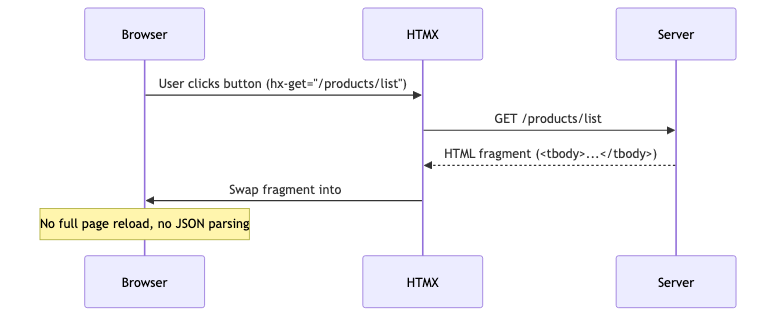
Key insight: the server owns the rendering. No duplication of templates between frontend and backend.
Setup
We need three dependencies:
1
2
3
4
5
6
7
8
9
10
11
12
13
<dependency>
    <groupId>org.springframework.boot</groupId>
    <artifactId>spring-boot-starter-web</artifactId>
</dependency>
<dependency>
    <groupId>org.springframework.boot</groupId>
    <artifactId>spring-boot-starter-thymeleaf</artifactId>
</dependency>
<dependency>
    <groupId>org.webjars.npm</groupId>
    <artifactId>htmx.org</artifactId>
    <version>2.0.0</version>
</dependency>
Include HTMX in your template:
1
<script src="/webjars/htmx.org/dist/htmx.min.js"></script>
No npm install. No build step. One script tag.
HTMX Attributes
HTMX works through HTML attributes. Here are the ones we’ll use:
| Attribute | Purpose | Example |
|---|---|---|
hx-get | Make a GET request | hx-get="/products/list" |
hx-post | Make a POST request | hx-post="/products" |
hx-delete | Make a DELETE request | hx-delete="/products/1" |
hx-swap | How to swap the response | hx-swap="innerHTML" / "outerHTML" / "beforeend" |
hx-target | Which element to update | hx-target="#product-table-body" |
hx-trigger | When to fire the request | hx-trigger="click" / "input changed delay:500ms" |
hx-confirm | Show confirmation before request | hx-confirm="Are you sure?" |
hx-indicator | Show loading indicator | hx-indicator="#spinner" |
The mental model: any element can make any HTTP request and put the response anywhere on the page.
Thymeleaf Fragments — Partial Page Updates
The power of HTMX with Spring Boot comes from returning fragments — partial HTML that gets swapped into the existing page.
A full page template (products.html) renders the initial load. Subsequent interactions return only the parts that changed.
Product row fragment (fragments/product-row.html):
1
2
3
4
5
6
7
8
9
10
11
12
13
14
<tr th:id="'product-' + ${product.id()}">
    <td th:text="${product.id()}"></td>
    <td th:text="${product.name()}"></td>
    <td th:text="'$' + ${product.price()}"></td>
    <td>
        <button class="delete-btn"
                th:attr="hx-delete='/products/' + ${product.id()}"
                hx-confirm="Are you sure?"
                th:attr="hx-target='#product-' + ${product.id()}"
                hx-swap="outerHTML">
            Delete
        </button>
    </td>
</tr>
Product list fragment (fragments/product-list.html):
1
2
3
<th:block th:each="product : ${products}">
    <!-- renders each product row -->
</th:block>
The controller returns fragment view names:
1
2
3
4
5
@GetMapping("/list")
public String productList(Model model) {
    model.addAttribute("products", productService.findAll());
    return "fragments/product-list";
}
Building a Product CRUD — No JavaScript Needed
Here’s the complete controller:
1
2
3
4
5
6
7
8
9
10
11
12
13
14
15
16
17
18
19
20
21
22
23
24
25
26
27
28
29
30
31
32
33
34
35
36
37
38
@Controller
@RequestMapping("/products")
public class ProductController {

    private final ProductService productService;

    public ProductController(ProductService productService) {
        this.productService = productService;
    }

    @GetMapping
    public String productsPage(Model model) {
        model.addAttribute("products", productService.findAll());
        return "products";
    }

    @GetMapping("/list")
    public String productList(Model model) {
        model.addAttribute("products", productService.findAll());
        return "fragments/product-list";
    }

    @PostMapping
    public String createProduct(@RequestParam String name,
                                @RequestParam BigDecimal price,
                                Model model) {
        Product product = productService.create(name, price);
        model.addAttribute("product", product);
        return "fragments/product-row";
    }

    @DeleteMapping("/{id}")
    @ResponseBody
    public String deleteProduct(@PathVariable Long id) {
        productService.delete(id);
        return "";
    }
}
Create — hx-post="/products" sends form data, server returns a new <tr>, HTMX appends it to the table body (hx-swap="beforeend").
Delete — hx-delete="/products/1" fires the request, server returns empty string, HTMX removes the row (hx-swap="outerHTML" replaces the row with nothing).
List — hx-get="/products/list" fetches the full table body fragment and replaces the current content.
Zero JavaScript written. The browser handles everything.
Active Search
One of HTMX’s killer features: real-time search with a single attribute.
1
2
3
4
5
6
7
<input type="search"
       name="query"
       placeholder="Search products..."
       hx-get="/products/search"
       hx-trigger="input changed delay:500ms, search"
       hx-target="#product-table-body"
       hx-swap="innerHTML"/>
The hx-trigger="input changed delay:500ms" means: fire the request 500ms after the user stops typing, but only if the value actually changed. Built-in debouncing with no JavaScript.
The controller:
1
2
3
4
5
@GetMapping("/search")
public String searchProducts(@RequestParam(defaultValue = "") String query, Model model) {
    model.addAttribute("products", productService.search(query));
    return "fragments/product-list";
}
Infinite Scroll
HTMX supports infinite scroll out of the box:
1
2
3
4
5
<tr hx-get="/products/page?page=2"
    hx-trigger="revealed"
    hx-swap="afterend">
    <td colspan="4">Loading more...</td>
</tr>
The hx-trigger="revealed" fires when the element scrolls into view. The response includes the next page of rows plus another trigger row for the following page. Pagination without a single line of JavaScript.
HTMX vs React/Angular
| Criteria | HTMX | React/Angular |
|---|---|---|
| Bundle size | 14KB | 100KB+ (gzipped) |
| Build step | None | Webpack/Vite required |
| State management | Server owns state | Client state (Redux, Zustand) |
| SEO | Built-in (server-rendered) | Requires SSR/SSG |
| Learning curve | HTML attributes | JSX, hooks, lifecycle |
| Real-time updates | WebSocket + hx-swap-oob | WebSocket + state update |
| Offline support | Limited | Service workers |
| Complex UI interactions | Gets awkward | Natural fit |
| Team skills needed | Backend devs can ship UI | Frontend specialization |
| Time to first feature | Minutes | Hours (setup alone) |
When to Use HTMX
HTMX shines when:
- Internal tools and admin panels — nobody cares if it’s React, they care if it works
- CRUD applications — forms, tables, basic interactions
- Backend teams shipping UI — no frontend hire needed
- Prototyping — get something working in minutes
- Content-heavy sites — blogs, docs, e-commerce
Stick with React/Angular when:
- Complex client-side state (drag-and-drop, real-time collaboration)
- Offline-first requirements
- Heavy animations and transitions
- Mobile apps via React Native
Common Problems
| Problem | Cause | Solution |
|---|---|---|
| HTMX not firing requests | Script not loaded | Check WebJars path: /webjars/htmx.org/dist/htmx.min.js |
| Fragment renders full page | Wrong view name returned | Return "fragments/product-row" not "products" |
| Delete doesn’t remove row | Wrong hx-target | Use th:attr="hx-target='#product-' + ${product.id()}" with hx-swap="outerHTML" |
| Form doesn’t reset after submit | Missing reset handler | Add hx-on::after-request="this.reset()" |
| CORS errors | HTMX sends different origin | Not an issue with same-origin (monolithic app) |
| Thymeleaf caching in dev | Default caching enabled | Set spring.thymeleaf.cache=false |
| 406 Not Acceptable | Content negotiation issue | Ensure controller returns view name, not @ResponseBody |
Full Working Example
The complete project with all source code is available at:
https://github.com/AnupamSinha/spring-boot-examples/tree/main/29-htmx
Run it:
1
2
3
cd 29-htmx
mvn spring-boot:run
# Open http://localhost:8080/products
You’ll see a product table with:
- Real-time search (type in the search box)
- Add products (fill the form, click Add)
- Delete products (click Delete, confirm)
- No page reloads at any point